
Calderdale Industrial Museum

Calderdale Industrial Museum

A few weeks ago Christine and I went to the Calderdale Industrial Museum in Halifax. The museum opened in 1985, but sadly closed only a few years later and has been mothballed ever since. A group of volunteers called CIMA are working to get the museum open again, and the 10th August was one of their regular open days where visitors could have a look around. I’ve uploaded the photos of my visit to Flickr.

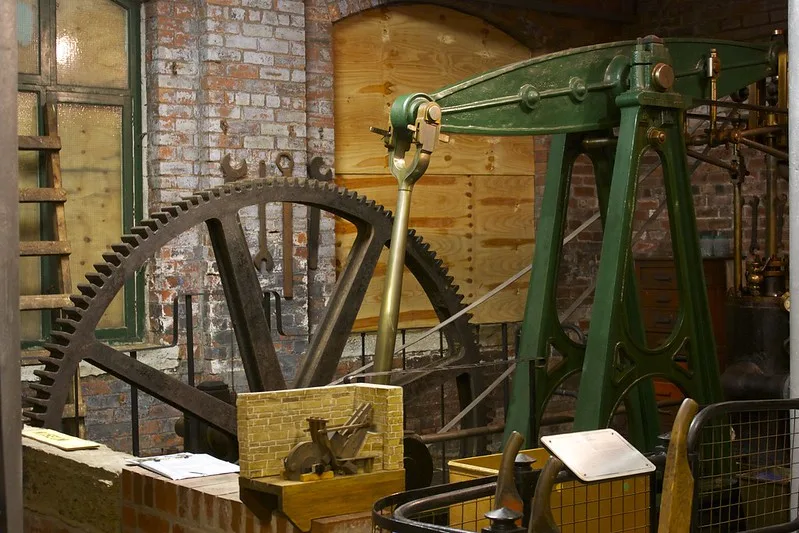
Not all of the museum is accessible; the volunteers have been working for a couple of years but some parts are still out of bounds. However, there are three floors of exhibits, which include stationary engines like the one pictured, weaving machines and histories of some of the major companies that were founded in Halifax. These include Percy Shaw’s catseyes company, Mackintosh – maker of Quality Street and now a part of Nestlé, and the Halifax Bank.

A lot of the windows are still boarded up and not all of the light bulbs had been replaced, so the museum is quite dark. The paintwork on the walls needs some attention as well, as shown in some of my photos.

It was my first visit, but Christine had been as a child, back when the museum was open properly in the 1980s. I think she was disappointed at how the museum had been left to rot for so long. The volunteers have done well but will have their work cut out to get the museum back to where it was when it was closed, never mind taking it forward. I also got the feeling that the local council, which still owns the museum, isn’t being 100% co-operative.

There are also question marks hanging over the museum’s future. It backs on to The Piece Hall, which in January will under-go a 15-month modernisation, and it is next to the proposed site for Halifax’s new central library. The plans may see the museum building being cut down somewhat, although the artists’ impressions do at least show it so hopefully it’ll still be around in future.

There are two more open days planned for 2013, on the 14th and 15th September as part of the national Heritage Open Days events. If you’re in the area I would definitely recommend a visit – it’s easy to get to as it’s just around the corner from Halifax station. Entry is free, but I’m sure CIMA would be delighted if you were able to donate some money to help them get the museum open again more often.

What I’ve done with my Raspberry Pi so far

Screenshot of Raspberry Pi running Raspbian through Screen Sharing and VNC

I’ve had my little Raspberry Pi for a couple of months now. To be honest, I haven’t used it for a great many things, other than as a BBC iPlayer client using XBian, but I have been spending a little more time in Raspbian recently to get to grips with it.

Running in headless mode

When I set up the Rasbperry Pi initially, I had it plugged into a computer monitor – my monitor thankfully has an HDMI input, and can switch between HDMI, VGA and DVI sources so I didn’t need to unplug my Mac. I also used a spare mouse, but at present I only own one keyboard which I had to keep unplugging and reconnecting with my Mac as I switched between them, which is hardly ideal.

So one of the first things I did was follow these instructions to enable VNC so that I could work with the Raspberry Pi using the Screen Sharing app on my Mac. I also used these instructions to ensure that my Mac could see it on the network, and share files. That guide also tells you how to set up VNC but I couldn’t get it to run on bootup, hence why I linked the other set of instructions as these worked for me.

Running the BOINC client

Since the Raspberry Pi is very energy efficient, I’ve decided to keep it on all the time and run SETI@Home on it, using BOINC. There are quite a few guides to this and on the whole this is the best one, although you will need to replace the URL in the wget command with the newer one for version 7 of the SETI@Home client. Although you can safely use the BOINC client that installs using Raspbian’s package manager (sudo apt-get install boinc-manager), you’ll need to download the SETI@Home client as instructed. The client that Raspbian offers through apt-get is out of date and so you won’t get any tasks to complete. I found this out the hard way.

If you use other BOINC projects, then you’ll probably find that most won’t work with the Raspberry Pi as they need to be compiled for the ARMv6 processor architecture. Rosetta@Home is one such example that I’m part of. The other big caveat is that tasks will take a very long time to complete. What a modern desktop PC could do in hours, may take up to a week of continuous computation for the Raspberry Pi to complete. But, it’ll do so using less electricity.

Getting used to Unix

This isn’t such a tangible thing, but I’ve been able to learn a lot more about Unix by having a Raspberry Pi to play with – especially when it comes to the command line. This is important as this blog runs on a Debian Linux server, and I do need to log in from time to time to do things. In particular, I’ve learned that nano is the easiest command line text editor to use and, in my opinion, is far superior to vi or vim.

I still have a lot more to learn, as and when I have free time to do so. It’s certainly been interesting, and better than working with a Linux virtual machine in VirtualBox.