Debating whether to ditch Dropbox Pro

A screenshot of Dropbox settings showing how much storage I am using

I’m a Dropbox Pro user. This means that I’m paying around £60 per year (or £5 per month if you will) for an extra 100 gigabytes of storage, over and above what free users get. This is mainly because I use it to keep photos in sync between my devices – and as I have a SLR camera, those images can be quite large – but also because I believe in paying for services that I rely on.

But lately, two things have happened.

One, I signed up for Office 365, which gave me an additional 20 gigabytes of storage in Microsoft’s rival cloud storage service OneDrive. Coupled with the 28 gigabytes that I have free, that means I have almost 50 gigabytes available that I’m also partly paying for anyway. As I was able to purchase the Office 365 University package, that means that I paid less than £60 for four years, and also get access to Microsoft Office and some Skype minutes thrown in. So, using OneDrive would still give me plenty of space, at a significantly reduced cost.

The other thing that happened was a recent appointment to Dropbox’s board, in the form of Dr Condoleeza Rice, the former US secretary of state under George W Bush’s presidency. During her time in office, she authorised widespread wiretapping, which is a bit of an issue when it comes to privacy and cloud storage. Plus there are all of the uncomfortable things that surround the War on Terror that happened during that time. Whilst I’m pleased that Dropbox has a woman – and a woman of colour at that – on its board, this appointment makes me feel a little uneasy, in the same way as Brendan Eich’s brief presidency of the Mozilla Corporation.

With these two factors in mind, I decided to explore OneDrive a little more, and see if I could really replace Dropbox with Microsoft’s cheaper alternative. Last year, this would have been a non-starter, as I was still using Windows XP at work which SkyDrive (as OneDrive was called at the time) would not run on. But whilst OneDrive supports fewer platforms than Dropbox, it does support the ones I use – Windows 7, Windows 8, Mac OS X and iOS.

However, its Mac client isn’t as good as Dropbox’s client, and this is the first reason why (spoiler alert!) I’m not going to ditch Dropbox. Sure, it does the same basic job of synchronising the content of a folder to the cloud, but without any status icons on each file informing you of its state. So whereas Dropbox shows you which files have been successfully uploaded, and which are still pending, with OneDrive you’re in the dark.

Dropbox’s other useful feature is photo importing. Now OneDrive is happy to import the contents of my phone automatically – as is Dropbox, and indeed Google+ and most recently Flickr in its version 3.0 update released yesterday. But on the desktop? Not so much. With Dropbox, I can put the SD card from my SLR camera into my Mac, and have it automatically import the new photos, which saves me the effort of doing it manually.

There’s also the issue of third-party app integration. OneDrive does have an open API and integration with sites like IFTTT, but not to the same extent as Dropbox. For example, I use Dropbox to keep my 1Password keychain in sync between my devices. If I didn’t use Dropbox, then I’d either have to use iCloud (which wouldn’t work on Windows) or over a local Wifi connection (no use at work). I suppose I could switch to using another service like LastPass instead, but I’ve already paid for the individual 1Password apps and like using them.

I also use Dropbox for collaboration – Christine and I had a shared wedding folder for planning our wedding, which was really helpful. OneDrive does this as well but I’d also have to convert Christine over as well.

So really, I can’t use OneDrive as a drop-in replacement for Dropbox. I could cancel my pro subscription for Dropbox, and drop back to being a free user for those services that need it. But then OneDrive makes it more difficult to upload photos and that’s the main reason why I pay for extra space in Dropbox. And I’d have to run both the Dropbox and OneDrive clients simultaneously and remember which one has which documents in it.

As much as Dropbox is the more expensive option, for me, it’s the better service.

The big post-Heartbleed password change

Screenshot of the Heartbleed web site

Following last week’s revelations about the Heartbleed bug, I spent quite a bit of time over the weekend changing passwords. Not all of them – I’ve been using this list of affected sites from Mashable – but quite a lot.

At the same time I’ve also taken the opportunity to audit other passwords from non-affected sites. I use 1Password as my password manager, on OS X, Windows and iOS, and it has a ‘Password Audit’ feature that shows weak, old and duplicated passwords. Ashamedly, I had quite a few of all three.

As a reminder, the generally accepted guidelines for strong passwords are as follows:

  1. As long as possible
  2. Using a mixture of lower and uppercase letters, numbers and special characters
  3. Are unique
  4. Avoiding any words that could appear in a dictionary

Using a password manager is therefore a very good idea, as they can usually generate strong passwords that meet those criteria, and offer to remember them for you. I tend to go for 24 character passwords like ‘3&yjGJNrE)Up2no8W:iNduYg’, to give an example of one that 1Password has just given me, and there’s no way that I could memorise that. The only passwords I have committed to memory are my 1Password Master Password, for obvious reasons, and my logins for Google, iTunes and Facebook. Whilst they satisfy the first three criteria above, they do use actual words – albeit with numbers and symbols replacing some of the letters – because these are the ones I use the most frequently. They’re still ‘strong’ according to most password meters.

Having said all of that, your passwords also have to fit within the constraints set by the web sites with which you have accounts. Whilst most of the sites I’ve been using have no problem with 24 character passwords, and are happy to accept symbols, not all of them are. Quite a few would only take passwords up to 16 characters, and others won’t accept special characters – or both. In which case, I had to make do with weaker passwords, but at least they’ll be unique.

There are, however, two web sites that were significantly worse than others. hmvdigital doesn’t let users change their password, unless you contact customer services. The worst offender, however is the Intercontinental Hotels Group, who owns the Holiday Inn and Crowne Plaza chains. If you’re in their IHG Rewards scheme – I am, and I have gold membership – then your password is a 4 digit numeric PIN. So there are only 10,000 possible password combinations, which could be cracked within minutes by an average home desktop computer. In 2014, this is horrifying, and for this reason, if you use IHG’s hotels, please don’t store your credit card details with them.

On the other hand, it’s been enlightening seeing which sites have removed my accounts for inactivity. For example, dabs.com have deleted my account, presumably because my last purchase from there was circa 2005. And other sites simply don’t exist anymore.

Kickstarted: Frisky & Mannish’s Pop Education Trilogy

What was it?

The twelth project I backed on Kickstarter was Frisky & Mannish’s Pop Education Trilogy, which sought to edit and post their three tour shows online for everyone to watch.

How much did I pledge?

Just £1.

What did I get?

I didn’t select a reward so I didn’t get anything specific in return for backing the project, but the money raised meant that all three videos are available on YouTube for everyone to watch free of charge.

Christine and I went to see Frisky & Mannish when they came to play in Bradford in September 2012. I’ve been aware of them for a while, after a former housemate shows me some of their videos on YouTube. Essentially they are a cabaret duo who do musical parodies, such as Kate Bash – combining the works of Kate Bush and Kate Nash, and a ‘grime’ re-working of Top of the World by The Carpenters. Though these short videos are good, they are far better live as it’s the interactions between the songs that make them worth watching. So now that they have posted three of their full length shows for all to see, you can see what they’re really like.

At the moment, Frisky & Mannish are on a break, but they are doing a stint at the Edinburgh Fringe Festival this summer. Hopefully this will lead to another tour – either way, if you have the chance to see them, please do, as we had a really good time.

Disconnecting from work email

iPhone 4

When I first got my iPhone in 2010, I very quickly set up my three most-used email accounts on it – my personal account at this domain, my Gmail account, and my work email account. Soon, every time I got an email on any of those accounts, no matter what time of day it was, my phone would duly ping me.

At weekends, when going through the unified inbox overview of all three, I’d duly delete the ‘calls for papers’ that various conferences send me (because they assume that anyone who works at a university is an academic) and carefully flagged up the emails that needed action for when I got back in the office on Monday. I thought I was being more productive this way, but actually, all I was doing was spreading what would be a five minute task at work throughout my weekend, when I should be relaxing.

More to the point, it was making it harder to switch off from work, and making checking my personal accounts more difficult as I had to wade through work emails to get to them.

It took until the start of 2012 before I finally decided that this was a silly way to do things. I was off work for two weeks – I’m lucky enough to work for an employer that gives everyone time off between Christmas and New Year, and I had some annual leave in early January. I was getting notifications of work emails, but it would be more than a week until I would be back in the office in order to actually do anything about them. So, I deleted my work email account off my phone.

In the time since, I have kind-of added it back. I use the now abandoned Sparrow client to access my work email on a purely ad-hoc basis, if required, but it’s kept separate from my personal email accounts (in the stock Mail app on my iPhone) and I don’t get notifications for it. So it’s there if I do need to access it – usually if I’m at work but away from the office – but I can’t be disturbed by work emails when I’m not at work.

I’m therefore pleased that, in France, there’s a new labour agreement to stop employees looking at work email after 6pm. France already has a mandatory 35 hour working week, meaning that French employees work shorter hours to improve their work-life balance. This goes further, and helps to prevent employees from doing work-related activities outside work hours.

If you are regularly checking work email when you’re not at work, I would recommend you to stop. It’ll help you disconnect from work and enjoy your free time more. And it often doesn’t save you much time at work either.

Stem my bleeding heart

Screenshot of the Heartbleed web site

If you read tech news on the internet, then you will have almost certainly come across the Heartbleed bug. As well as being probably the first programming bug to have a logo and brand name, it’s also very serious. It affects, or affected, a significant number of web sites and web services – pretty much anything that used SSL or TLS and the OpenSSL library. This will include many sites using the open source Apache and nginx web servers, which between them account for a majority of web sites.

The Heartbleed bug was in the ‘heartbeat’ component of OpenSSL, and first appeared in a code commit made at around 11pm on New Years Eve 2011 – make of that what you will. The first stable release of OpenSSL with the bug came in March 2012, and it was only fixed relatively recently. It’s therefore estimated that 17% of the world’s web sites may be affected.

If you administer a server that uses OpenSSL, then you’ll need to make sure that you update to the latest version which fixes the bug. But you may also need to revoke your SSL certificates and acquire new ones, and, if you suspect any foul play, do a full security audit. You can check your server using this tool – I’ve verified that this site was never affected.

If you’re just a regular user of the internet, then you may notice that some web sites will have forcibly logged you out. Some may also require you to change your password, and possibly re-connect any third party apps linked to your account. IFTTT emailed me to suggest changing my password, and Pocket has advised its users to do the same. Ironically, so has the web site Should I Change My Password which notifies of data breaches. If you are not already, I would suggest using a password manager such as 1Password, RoboForm, Keypass or LastPass. LastPass users can also find out if any sites they use have been affected by Heartbleed.

Some security experts have suggested that users change all of their passwords, although only once the web sites have implemented their fixes. This may not be necessary and PayPal has said they were not affected by Heartbleed. However, if you’re not using strong, unique passwords for every web site then now may be a good time to do so, regardless of whether sites have been affected or not, and the aforementioned password managers will help you in that regard. A lot of sites will now accept passwords that are more than 20 characters long, with special characters, which should be very, very difficult to crack.

Office 365 University

A copy of Microsoft 365 University in my cart on the Microsoft Store

Over the weekend I bought a copy of Microsoft Office for the first time. In the past, I’ve managed with either what’s been pre-loaded on new computers, or, since I got my own computer, OpenOffice or its variants.

But now Microsoft offers Office 365 University. For £60, you get to use Microsoft Office on two computers, and an unlimited number of mobile devices, for four years. The catch being that you need to be a full-time student, or a member of staff at university. Thankfully, the latter is true in my case.

These two computers can either be Windows or Mac machines: Windows users get Office 2013, Mac users get the slightly older Office 2011. They can be in any combination, so one Mac and one PC, two Macs, or two Windows PCs. Although all users of compatible iPhone, Android and Windows Phone handsets can install the free Office Mobile app, Office 365 users can also use the new suite of iPad apps and be able to create and edit documents (non-subscribers can only view documents). Unfortunately, as my old iPad 1 isn’t capable of running iOS 7, this isn’t a feature I can yet take advantage of.

Other benefits of the Office 365 subscription include 60 minutes of free calls to regular phone numbers on Skype each month, valid in around 60 countries, and an additional 20 GB of storage space on Microsoft’s OneDrive cloud storage service. As an early adopter of this service I already had 25 GB, plus a 3 GB bonus gained by enabling photo sync in the iOS app, so I have 48 GB of space now.

I’ve got Office 2011 up and running on my Mac, which in this edition includes Word, PowerPoint, Excel and Outlook, with OneNote as a separate free download (previously reviewed by me here). Although be aware that the first thing you will probably have to do after downloading the almost 1 GB install package, is then download another 100 MB or so of software updates. This is Microsoft software after all!

For the most part, Office 2011 for Mac can do anything that Office 2010 for Windows can do, with a couple of exceptions – no ActiveX controls (so no embeddable YouTube videos in presentations), and no support for the OpenDocument file formats. This means that you’ll probably still want to keep either OpenOffice or LibreOffice around if you have documents in these formats. I was a little surprised at the ugliness and clutteredness of the user interface, when compared with Office 2010 and indeed the new OneNote for Mac. Whilst it uses the new ‘ribbon’ interface introduced with Office 2007, it’s not as well designed as its Windows counterparts. Hopefully this will improve as and when a new version of Office for Mac is released.

As for why I’ve bought Office 365 when I already have LibreOffice installed? The main reasons are speed and file compatibility. LibreOffice is still quite big and slow, when compared with the Word, Excel and PowerPoint apps on my Mac. And file compatibility with Microsoft’s own formats isn’t quite there, even after all of these years. It’s not helped by there being several forks of what was originally OpenOffice.org in parallel development – there’s now Apache OpenOffice, LibreOffice and the Mac-only NeoOffice.

In terms of the additional perks, I don’t think I will get to use the extra Skype minutes, bearing in mind that I never use the inclusive minutes in my mobile contract either. Whilst I wasn’t planning to use the extra OneDrive space, since I’m mostly a Dropbox user, I may need to think this through. Right now I’m paying £60/year for Dropbox Pro, but only using around 15 GB – theoretically I could switch over to OneDrive and still have ample space whilst saving myself some money. I’ll need to ponder this.

If you are a student or a university staff member, I would therefore recommend Office 365 University to you. It’s £60 on the Microsoft store, although Quidco users should be able to claim 15% cashback, making it about £52. On the other hand, it’s £52.56 on Amazon, which is probably a better option.

Marriage

Penguin wedding cake toppers

On Saturday, Christine and I went to the wedding of a couple of friends we’ve known for a few years. Co-incidentally, Saturday was the first day that same-sex couples could legally marry in England and Wales.

A bill to change the law was passed last year, and on the 13th of this month, same-sex couples who had married overseas had their marriages automatically recognised as such here. At the same time unmarried couples were able to give notice and the first same-sex marriages happened just after midnight on the 29th March.

The wedding we went to was a mixed-sex marriage, but a marriage all the same. The only thing that was slightly different was that the registrar stated that a marriage was between ‘two people’ and not ‘a man and a woman’, as it was before and when Christine and I got married last year.

I’m really pleased that any two people who love each other and want to spend the rest of their lives with each other can now marry, regardless of their sexual orientation or genitalia. Though Britain has had a compromise of ‘civil partnerships’ since 2005 – offering the same legal status as marriage – it’s good to see that every couple can now be treated equally.

Well, mostly. Whilst same-sex couples should have no problems obtaining a civil marriage, religious marriages are only offered to same-sex couples by a small handful of religious groups – namely the Quakers and the Unitarians. Same-sex marriages are not yet available in Scotland, although the relevant legislation has been passed so it is only a matter of time before this changes. Northern Ireland, however, refuses to allow or recognise same-sex marriages. There are some other issues too.

And there are still changes to happen in wider society. Though a majority of people in the UK support same-sex marriages, around 20% of people would turn down an invitation to a same-sex wedding. But the tide of opinion is going in the right direction and, on the whole, I feel that British society is more accepting of LGBT people now than it has been for any time in history.

Dave Jennings – 1960-2014

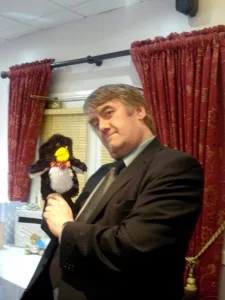
A photo of Dave Jennings at our wedding, holding a Mr Flibble penguin puppet

Last week I heard the very sad news that Dave Jennings, a very good friend of mine, had passed away from a heart attack outside his flat in Bradford.

I’ve known Dave for several years, initially through friends who were in the musicals society but since 2009 we have been on a regular pub quiz team together at the university.

Though originally from the Bradford area, Dave’s early career was in London, working as a music journalist for Melody Maker magazine. It was there that he reviewed a song by the band ‘Darlin’, which he described as a ‘daft, punky thrash’. Two of the former members of Darlin’, Guy-Manuel de Homem-Christo and Thomas Bangalter, went on to form Daft Punk, and the rest is history.

Melody Maker closed in 2000 and Dave returned north, eventually enrolling as a mature student on a course at the University of Bradford where I work. He graduated with a first class honours degree in 2006.

During his time at the university he was involved in both the theatre group and later the musicals society. Indeed, he was due to play the role of Orin Scrivello, the dentist in Little Shop of Horrors, but sadly he passed away before the last dress rehearsal. Thankfully, another member of the society stepped up and the show was performed as planned.

Outside of the university he has been a regular extra in the ITV soap opera Emmerdale, often in the background of the Woolpack having a drink. His acting showreel from 2009 is here to watch. And recently he had made a return to music journalism, doing some freelance articles for The Girls Are, and has learnt to play the banjolele, as evidenced in this video.

Dave was also a big geek, like me, particularly when it came to Doctor Who. In fact he shared a birthday with John Barrowman (Captain Jack) and Alex Kingston (River Song). For our wedding, where the photo was taken, he had a Mr Flibble hand puppet commissioned for us, which I’ve been using as my Twitter avatar for some time.

There have been few times over the past six days when I have not been reminded of Dave and the things that he did. Whether it was constantly beating me on Words with Friends with his superior vocabulary, talking about music or the latest Doctor Who episode, or our mutual enjoyment of the Steampunk subculture. Dave will be very much missed by both myself and his large group of friends. He was such a lovely and friendly person and a real shame that his passing has come so soon.

His funeral will take place this Friday, at Nab Wood Cemetery near Bingley, at 3:20pm.

Five years on

It’s been five years to the day since Hari and I ended our relationship. Though mostly a mutual agreement that things weren’t working, it was still a very difficult time for me, exacerbated by being unemployed and having recently lost my grandmother. It was pretty much the lowest point of my life so far.

The end of any relationship is hard, but particularly so when the relationship was with someone that you had been with for several years and were living with. The following few weeks were a struggle, not at least because I had to organise moving back home with my parents, cancelling utilities and so on.

Thankfully, things started to turn around soon afterwards, and around 6 weeks later I was back in a job. My friends were brilliantly supportive during that time and helped me greatly. And, later on, I met Christine, to whom I’ve now been married for almost a year now.

Hari has also moved on, and started a relationship with someone around the same time as I met Christine. We’re still in contact over Facebook but have only met in person once since the split, mainly because she now lives in Scotland. I’m sure we’re both happier now, and though it hurt at the time, breaking up was the right thing to do. And, with hindsight, I’m glad we called it quits when we did, rather than trying in vain to revive our relationship.

The re-launched Microsoft OneNote

A screenshot of OneNote on Mac OS X

Yesterday Microsoft unwrapped the latest changes to its OneNote software. Originally introduced with Office 2003, OneNote is now a separate product, albeit one integrated with Microsoft’s OneDrive (previously SkyDrive) service.

The main changes are that the basic OneNote system is free and available without having to buy Microsoft Office, and that there’s now an API for third-party services to connect to. Existing Office 2013 and Office 365 customers get some premium features, but the basic note-keeping and synchronisation tools are available for all at no cost now. There is also a Mac OS X app for the first time, as previously Office:mac 2011 didn’t include OneNote.

The new API access means that there’s already an IFTTT channel for OneNote, and the folks at Feedly have included support in their feed reader (free for now but paid customers only from next month). A few other apps are also available in OneNote’s app directory.

I imagine most people will be interested in a comparison with Evernote, which is the main leader in cloud-based note-taking. Though I’m not able to do a full comparison, personally I’ll be sticking with Evernote. The OS X app for OneNote is big (over 400 megabytes when installed) and slow to start up. I’ve found Evernote a bit easier to manage plain text notes, although OneNote offers more flexibility with arranging items within notes. Evernote also lets you export and print notes, unlike OneNote’s free offering.

Other competitors include Google Keep and Apple’s iCloud Notes. Google Keep is Android and web-only (an unofficial iOS app exists), but supports voice memos. iCloud Notes is available on iOS, OS X and the web, but there’s no Windows app and only simple text notes are supported. Whilst I think that the new OneNote is definitely better than Google or Apple’s offerings, Evernote is still the service to beat.