
Seatfrog – how to get a cheap first class upgrade

A screenshot of the Seatfrog app on iOS

Tomorrow, Christine, our three-year-old and I are off to London (actually for the second time this week, but that’s another story). We’re going by train, and, thanks to Seatfrog, we’ll be travelling in first class, at a relatively low additional cost, having already saved some money with railcards and advance booking.

Seat auction

In the UK, Seatfrog is available on LNER services on the East Coast Main Line. You buy your standard class tickets online, as normal, and then put your booking reference into Seatfrog. The day before departure, Seatfrog holds an auction; enter your bid, and if you win, your updated tickets appear in the app.

We bid £10 per ticket for our journey, and this won (the minimum bid was £5). However, there may be a higher reserve on some services – for our return, the reserve was £9. Upgrading to first class gets you a wider, reclining seat, the majority of which are leather upholstered on LNER services. Plus, free Wi-Fi, regular offers of tea and coffee, and, for journeys over an hour, a complementary meal. This is easily worth £10 a head and means we won’t need to buy extra food for our journey.

Of course, there’s no guarantee that you’ll win, and there’s no point bidding too high as you can buy an upgrade outright for £35 per ticket. At least if you’re outbid, no money is taken.

I suppose it’s a good way of filling vacant first class seats. I could also see this being useful for people travelling on business, who can only claim standard class travel on expenses. Seatfrog would allow you to trade up to first class from your own pocket if you’re happy to pay a bit extra yourself.

For now, Seatfrog is only available on LNER services, however, it’s run by an independent company and so it’s possible that other travel companies could adopt it – potentially airlines as well as train operators,

So, tomorrow we’ll be smugly sat in first class, knowing that we paid well under the odds for our tickets,
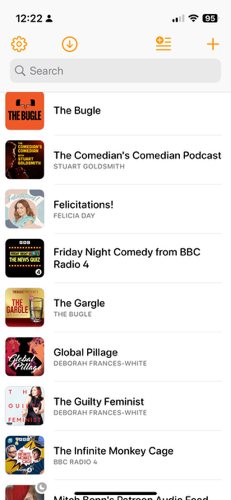
My Podcast Diet – August 2018

Matt Haughey, who has recently quit Twitter and returned to blogging more, has posted about which podcasts he listens to regularly and semi-regularly. It’s a good idea for a blog post, and so I’m going to steal it.

Podcasts that I listen to straightaway

These tend to be topical podcasts that would go stale very quickly.

  • BBC Radio 4 Friday Night Comedy Podcast – whichever show happens to occupying the 1830 Friday comedy slot on BBC Radio 4. Normally this alternates between The News Quiz and The Now Show, but Dead Ringers pops up in summer. Weekly, every Friday, somewhat obviously.
  • The Bugle – topical satirical comedy from Andy Zaltzman and rotating guest hosts filling the gap left by John Oliver (yes, that John Oliver). Weekly, every Friday.
  • The Guilty Feminist – this was the podcast that I saw live in March 2016, which mixes discussion of issues relating to feminism and stand-up comedy. Hosted by Deborah Frances-White with a rotating guest co-host. Weekly, every Monday.
  • Standard Issue Podcast – a magazine style-show covering women’s issues, as well as interviews, women’s sport, and regular features on TV shows and Disney films. Once a month, there’s a ‘gigcast’ with celebrity chats recorded live in front of an audience. Weekly, on Wednesdays, with occasional bonus content at weekends.
  • Reasons to be Cheerful – a new podcast co-hosted by Ed Milliband and Geoff Lloyd, which focuses on a political issue each week.

Podcasts I listen to regularly

  • The Comedian’s Comedian – stand-up comedian Stuart Goldsmith interviews a fellow comic (or comedy group) about how they work. Always enlightening. Weekly, on Mondays, but seemingly on a break at the moment – probably due to the Edinburgh Festival Fringe.
  • Made of Human – stand-up comedian Sofie Hagen (formally of The Guilty Feminist) interviews people about life and how they handle it. Warm and friendly. Weekly, on Wednesdays.
  • Felicitations – Felicia Day’s relatively new podcast, about what she’s been up to, and parenting. Weekly, on Thursdays, but seemingly on a break at the moment.

Podcasts that I listen to when there’s a new season

These podcasts run as seasons and so new episodes don’t come out all year round, but I listen to them regularly when they’re on.

  • Mrs Brightside – stand-up comedian Susan Calman interviews a fellow celebrity about depression and mental health. Weekly, on Mondays. Series one has just ended, but should be back later in the year.
  • The Infinite Monkey Cage – science podcast co-hosted by Professor Brian Cox and Robin Ince, with a different topic each week. Guests are a mixture of scientists and comedians. Weekly, on Mondays, with new episodes available now.
  • Global Pillage – comedy panel show about diversity, hosted by Deborah Frances-White. Weekly, on Mondays. No new episodes at present.
  • Richard Herring’s Leicester Square Theatre Podcast (RHLSTP) – stand-up comedian Richard Herring interviews a celebrity guest in front of a live audience in London’s Leicester Square Theatre. Weekly, on Wednesdays, back in the autumn.
  • Grownupland – a podcast for millennials about adulting.
  • Newsjack – weekly comedy sketches with an open-door writing policy, so anyone can submit.

How to: fix incorrect date and time on an Amazon Kindle Fire

Today, a colleague of mine asked for help with connecting her Amazon Kindle Fire (sponsored link) to the university Wi-Fi network (which is linked to eduroam). Whilst I’m not an IT employee, I offered to help.

eduroam, for those who aren’t aware, allows staff and students at universities to access Wi-Fi at any other participating university. This includes almost all UK colleges and universities, and many others across the world. To do this, it uses WPA-Enterprise, with authentication using a username and password, rather than a Wi-Fi key like you would get on a home Wi-Fi network.

The problem was that the Kindle Fire couldn’t connect, despite the username and password being correct. And then I noticed that the time was wrong.

Problem 1: wrong date and time

The underlying cryptography behind WPA-Enterprise, and most other secure internet systems, is reliant on accurate clocks. For whatever reason, this Kindle Fire thought that it was about 3am in September 2010. Consequently, it couldn’t establish a secure connection.

So, I went to change the date and time.

Problem 2: you can’t manually change the date and time on a Kindle Fire

There’s no option to manually change the date and time on the Kindle Fire (although this may have existed on older devices). If you try to change the time, you get an error, telling you that your device will get the correct time from Amazon automatically. At best, you can change the time zone if this is incorrect, but this was no help when the clock was out by almost 8 years.

Problem 3: The Kindle Fire cannot automatically update the date and time without an internet connection

So now we’re at an impasse. We can’t get on the internet because the time is wrong, but Amazon has locked down the ability to change the date and time, and we can’t get the correct time from the internet because we can’t connect to the internet. ARGH.

Solution: use a second device as a Wi-Fi hotspot

Fortunately, I managed to solve this by using my iPhone as a personal hotspot. As this doesn’t require authentication via WPA-Enterprise, the Kindle Fire was able to connect, get onto the internet, and update the time on the device to the correct time. I was then able to disconnect from the personal hotspot, and connect to eduroam without any problems.

I can understand why Amazon have locked down the date and time settings, as, if they are wrong, all your secure connections will fail. And considering that many web sites now use HTTPS all the time, this would break a lot of things. But it doesn’t account for when a Kindle Fire’s battery goes completely flat, and it resets to a default time. Which I assume is what happened in this instance.

I checked my iPhone, and Apple does let you manually override the automatic date and time that it receives when you’re online. I assume most Android devices are similar – by default, they set the time automatically but give the user the opportunity to override this if needed. Amazon’s decision, whilst understandable, is frustrating in edge cases like this one.

Stockeld Park Summer Adventure

A photo of an animatronic dragon at Stockeld Park

Last Monday, we went to Stockeld Park, near Wetherby. Stockeld Park is a privately-owned country house estate, but it opens for special spring, summer and Christmas ‘adventure’ events. The summer season started a couple of weeks ago, in line with summer holidays, and so I took our two-year-old along. We were joined by a friend and her almost four-year-old, so that we could take advantage of a family ticket.

This was actually my second visit to Stockeld Park. The last time I went was for the Christmas Adventure in 2009, with my extended family. Looking back, I seemingly didn’t blog about this. I had only just met Christine at the time; I was living in Bradford and she was in Blackpool. I’m guessing she was working that weekend as she didn’t join us. That 2009 trip was in the evening, whereas this time we went during the daytime.

The main attraction at Stockeld Park is the ‘Enchanted Forest’, a woodland walk, with various activities on the route. These include an animatronic dragon, a tree with various tiny doors (and doorbells which play a message from their ‘occupants’), and several themed slides and adventure playgrounds. It’s not a long walk, but if you stop off everywhere then it can take a couple of hours to get around.

In addition, there’s the obligatory café and shop, and an indoor bouncy castle. Outdoors, there’s a roller skating rink (this is replaced by an ice skating rink in winter) and a maze. For an extra fee, you can go on a boat on the lake, ride around the forest on a scooter (Nordic skis in winter) or play laser tag. So there’s plenty to do; we only did the enchanted forest and the indoor activities and this still took up most of the day.

On the gate tickets are quite expensive; only the under-2s are free, so expect to pay £52 for a family of four. Thankfully, we pre-booked; using the discount code ‘TRAIN’ that I had seen advertised, we got a family ticket for £40 for four people. You can also pre-book a picnic hamper; this came to £20 for four people. Again, this saves you money versus buying on the day, and we got a free balloon thrown in.

The Summer Adventure is open until the 2nd September; after that Stockeld Park closes until the week before Hallowe’en. We’ll probably go back for the Christmas Adventure; it’s open late and you get to see the enchanted forest illuminated. It’s great for kids aged two and up and two-year-old really enjoyed it.

New new new new iPhone

A photo of an iPhone 8

As I mentioned on Monday’s update/apology, I recently upgraded to an iPhone 8. It’s a 64 GB Product(RED) model; whilst the front looks like the space grey model, it’s got a red back, and includes a donation to (RED). (RED) is a non-profit that raises money for HIV/AIDS charities, and there’s no extra cost to consumers over the price of an equivalent iPhone in one of the other colours.

I had planned to wait until the autumn to upgrade, either to buy one of the new iPhone models or get an older model at a cheaper price. But I was essentially forced to upgrade early. My previous iPhone was a 5S, and the battery had started expanding to push the front cover away from the case. An expanding battery is a very bad thing; it means it’s at risk of exploding.

In the interim, I tried using my old iPhone 5, which I still had as a backup phone. However, Apple has dropped support for the iPhone 5 and so it can only run iOS 11. Furthermore, many apps won’t run because it lacks a 64-bit processor which the 5S and all subsequent models have. Pokémon Go is one such example; with other apps, only older versions run.

Jumping from the 5S, which is 2013-era technology (although I bought mine in 2015) to the 8, which was released last year, is a big leap. The 8 is much faster. I’m also warming to the larger screen; in 2015 I decided to buy a 5S rather than a 6 because I wasn’t keen on the bigger surface area. But the bigger screen is great for apps like Google Maps.

The lack of a headphone port isn’t an issue; I switched to Bluetooth audio a couple of years ago. In a similar vein, I had been using a wireless charger case for my 5S and already have wireless charging stands at home and at work. The battery life of the 8 seems better than the 5S had even when new. And whilst I take most of my photos on my Canon DSLR camera, I’m impressed with the camera on the 8. Live photos is a fun gimmick but it’s nice when taking photos of our two-year-old as it captures some of their mannerisms. Finally, I’ve noticed that I tend to have a better signal on this phone compared to previous models; I’m guessing it supports additional frequencies, or newer versions of the mobile standards.

Upgrading to the iPhone 8 has meant taking on a rather more expensive contract. I’m now limited to 4 GB of data per month; my previous contract had unlimited data, although in reality, I never hit 4 GB in a month anyway. I’m still with 3, who I’ve been with for almost 8 years now.

As for the iPhone X, as much as it looks impressive, right now it’s unaffordable for me. I imagine that whatever phone I get next, will be a descendent of the X. Hopefully, that won’t be for another three years at least, provided this new iPhone 8 lasts as long as my 5S did.

Crich Tramway Village

Tram

Back in May, on the way back from a wedding in Leicester, we dropped into Crich Tramway Village in Derbyshire. Crich is home to the National Tramway Museum, and has a large number of heritage trams from Britain and abroad that run up and down a mile long track.

At the lower end of the site is the village, with various heritage buildings that have been transplanted from elsewhere and re-assembled. There’s also the main tram sheds, for those trams that are still in working use, and a museum with some trams as static displays. The trams in the museum are arranged in date order, right from the first horse-drawn trams, to those that were built shortly before trams were withdrawn across almost all of the UK in the 1960s. Famously, Blackpool was a hold-out and kept its trams, and several examples are now here at Crich too. It was slightly weird seeing a tram that I’ve seen in service in Blackpool not too long ago, now in a museum.

Crich Tramway Village

Heading up the hill out of the village is a large park for kids to play in, and then a forest trail with various sculptures to look at. There’s even a wooden Mr Potato Head.

Entry to the site permits unlimited rides on the trams. The village has a variety of places to eat and drink; the pub on site was having a beer festival when we visited. And like many attractions, your entry fee gets you an annual pass, so that you can return any time within 12 months for free. Alas, it’s a little bit too far for a day trip for us so we may not be able to take advantage of a return visit unless we’re in the area for another reason.

Even if you’re not quite so interested in public transport as I am, it’s a good day out as there’s plenty to do. It helps if you choose a day with good weather, though, as it’s mostly outdoors.

Using the Gutenberg editor in WordPress

Yesterday, I upgraded to the newly-released version 4.9.8 of WordPress (soooo close to 5.0!) which allows you to opt into the new Gutenberg editor (available as a plugin). Gutenberg is the single biggest change to the WordPress blog post editing screen in years, and has been in testing for some time. The scale of the changes are probably why it’s available as a plugin for now, and not yet fully bundled with WordPress itself.

Gutenberg reflects the progression of WordPress from simply a blogging system to a more general-purpose content management system that can be used for a wide variety of web sites. When you create a new blog post, you insert ‘blocks’ of content. These blocks can be paragraphs of text, pull-quotes, images, or rich media such as embedded video or image galleries. Blocks gain some additional functions that were not previously available, including drag and drop re-ordering, and the ability to save blocks as ‘reusable content’ for future repeat use.

The new content editor will be familiar with anyone who has written posts on Medium as Gutenberg works in a very similar way. It’s also worth remembering that the last time the WordPress content editor underwent a major change, few people were using tablet computers and the iPad hadn’t yet launched. Whilst the drag and drop function doesn’t seem to work on a touchscreen, the new interface does seem to work better on handheld devices.

I expect that Gutenberg will become the default editor in WordPress very soon. If you use WordPress regularly, I would advise you to opt into it, to get to grips with it. The ‘classic’ editor is still there to go back to if you find it too frustrating but Gutenberg is likely to be the future. And it’s updated regularly in response to feedback, so any issues that you do have should be ironed out in time. It’s taken me a little time to get used to, but I’ve written this and yesterday’s post in it.

It’s been a while, again

As usual, I didn’t intend to leave it two months between blog posts, but life got in the way again.

The main reason for my absence is that we actually went on a proper holiday for the first time since our two-year-old was born. We accompanied my parents for 10 days in France, including a visit to Mont St-Michel, pictured above. This was at the back end of June, and I still have over 100 photos to sort. As well as Mont St-Michel, we visited the chateaux at Chenonceau and Chambord, Zooparc Beauval and the Jardin de la Source near Orleans.

This week I’ve been at home with our two-year-old whilst the childminder is on holiday. We’ve been to The Deep in Hull, Stockeld Park and a repeat visit to Ponderosa (which has improved significantly since our last visit). Right now, they’re asleep, so I have a rare chance to write a quick blog post.

After a long break, we’re finally moving forward with the house renovations again. I did some tiling for the first time in the downstairs toilet, which is now (mostly) painted and just needs flooring before it’s essentially finished. The next big project is our two-year-old’s room, which we’re hoping to get finished by the time they turn three in December.

On the technology front, I’ve replaced my iPhone (in addition to the new iPad in May). I had been planning to wait until the autumn, but the battery in my old iPhone showed signs that it was about to fail. I’ve upgraded to a Product(RED) iPhone 8, which is lovely and fast when compared to my iPhone 5S.

I’m hoping that I’ll have time to write at more length about what I’ve been up to; I have around 30 bullet points in my ‘blog post ideas’ note in Evernote.

Chester Zoo

Rhinos

A couple of weeks ago, I took our two-year-old on a day out to Chester Zoo, whilst Christine was working. Christine and I have been before, most recently in 2012 when we stayed in Chester for the weekend.

We’ve been planning to go back for some time, but it’s an expensive day out for two adults. You can expect to pay over £20 per person, even when booked in advance. But as under-threes go free, so for one adult and a very young child it’s not so bad. Even with a ticket booked on the morning of the visit, I still saved a bit of money over the gate price.

From Sowerby Bridge, Chester Zoo is a little over an hour’s drive with clear roads. So, after dropping Christine off at work, we headed straight over and got there just before the official opening time of 10am. And, apart from a half hour lunch break, we didn’t leave until 4:45pm.

This is because Chester Zoo is huge. It claims to be England’s most visited zoo, and it can certainly absorb a lot of people. Which is good – the weather was glorious and so there were thousands of people visiting. I reckon there were a couple of hundred cars there already, even before 10am. And yet it never felt too busy – we had no trouble getting close enough to see the animals.

Baby elephant

Chester Zoo’s new arrival

What I hadn’t realised was that, only three days before, a baby elephant had been born. The day we visited was only its second day out in public, which explained the crowds around the elephant enclosure.

There was also a baby rhino, which was just a few weeks old. I didn’t manage to get a good photo of it, unfortunately.

Since our last visit, Chester Zoo has extended somewhat, with a new ‘islands’ zone that focusses on animals from the islands of South East Asia. We got around most of it, but must’ve taken a wrong turn as we missed the tigers.

Towards the end, we went on the Monorail. This runs in a circuit around the site, although you can only travel point to point between two stations. I hadn’t been on it before, but it allows you to get another perspective of the animals. It’s £2.25 for a single trip or £4 for multiple trips, but as it was getting to the end of the day we just made a single trip.

Lizzie loves animals and really enjoyed herself. Unfortunately she wasn’t so keen on walking around or being in the pushchair, so I spent a lot of the day pushing an empty pushchair whilst carrying her. My back did not thank me the next day.

The rest of my photos are up on Flickr. Oddly, I never uploaded my photos from our 2012 visit.

New new iPad

A photo of a new 6th generation iPad alongside a green case with an embroidered puffin on it

As alluded to last week, I planned to buy a new iPad with monetary contributions received for my birthday. I ordered it online on Saturday (for the 5% education discount), and picked it up at the Apple Store in Leeds on Monday.

I’ve gone for the most expensive of the standard iPad models. It’s the 6th generation iPad, with 128 GB of storage and cellular capability.

Why not just Wi-Fi?

My previous iPads (a second-hand first generation iPad and then an iPad Mini 2) were both Wi-Fi only models. I’ve been using my iPad Mini more and more on the train to and from work, and the trains I catch are not (yet) fitted with Wi-Fi. Even when Wi-Fi is available, sometimes there’s a cost, sometimes it can be quite slow, and it can take a while to get connected. So I decided to pay a bit more, and have an iPad that has internet access everywhere.

For the SIM card, I’ve got a pay-as-you-go SIM from Three. It cost £60 upfront, and comes with 24 GB of data, valid for two years. Assuming I use around one gigabyte of data per month, that’s effectively £2.50 per month, which is cheaper than a lot of contracts. The data runs out once I’ve used all 24 GB, or after two years, whichever happens soonest.

The puffin case

An iPad Mini 2 next to a case with a wildlife pattern on it

As this is a standard sized iPad, I had to buy a new case for it. Christine made me a lovely case for my iPad Mini (pictured above), but it’s too small for my new iPad. And she doesn’t have time to make me a new one, what with working full-time, being a part-time student and a mum.

Also, that photo shows how badly smashed the screen on my iPad Mini is.

I still wanted something unique, so I went onto Etsy, and ordered this beautiful case (top photo) from The Canny Squirrel. It’s hand made from genuine Harris Tweed, and is big enough for an iPad with some space to spare. Which will be handy when I eventually buy a new Bluetooth keyboard.

Plenty of storage

Ideally, I would have liked to buy a 64 GB iPad, but Apple doesn’t offer the 6th generation iPad in that size. I’ve struggled with a 16 GB iPad Mini for four years, and felt that a 32 GB iPad would also be quite limiting, so in the end I decided just to buy the one with the largest storage capacity. At least then I can load it up with plenty of e-books, music, videos etc. whilst on Wi-Fi so that I’m not going over my data allowance.

What is the new iPad like?

Honestly, not massively different. I’m appreciating having Touch ID on it as well as my phone, rather than having to type out passwords. And it’s definitely faster. But as I set it up with an iCloud backup from my old iPad, it’s been basically business as usual. Though I will say that the setup process has improved – being able to transfer essential settings across from my iPhone was great and worked really well.

My old iPad Mini 2 lasted me four years of essentially daily usage, and I’m hoping to get at least the same from this one.