More in common

Speaking of cars, a few weeks ago I was driving along the M62 towards Manchester, when I was overtaken by someone driving the same car as me, a first-generation Peugeot 3008.

This wouldn’t be notable, except that the car had Ukrainian registration plates. So this car, the same make and model as mine, has been driven thousands of miles across Europe, out of a war zone to hopeful safety in the UK.

It was a reminder not only of how lucky we are in the UK to live in relative safety, but that we have more in common with people than we may think. I hope the family that owns that car feel welcome here.

“…we are far more united and have far more in common with each other than things that divide us.

Jo Cox MP (1974-2016), June 2015

Adding CarPlay to your car without installing a new stereo system

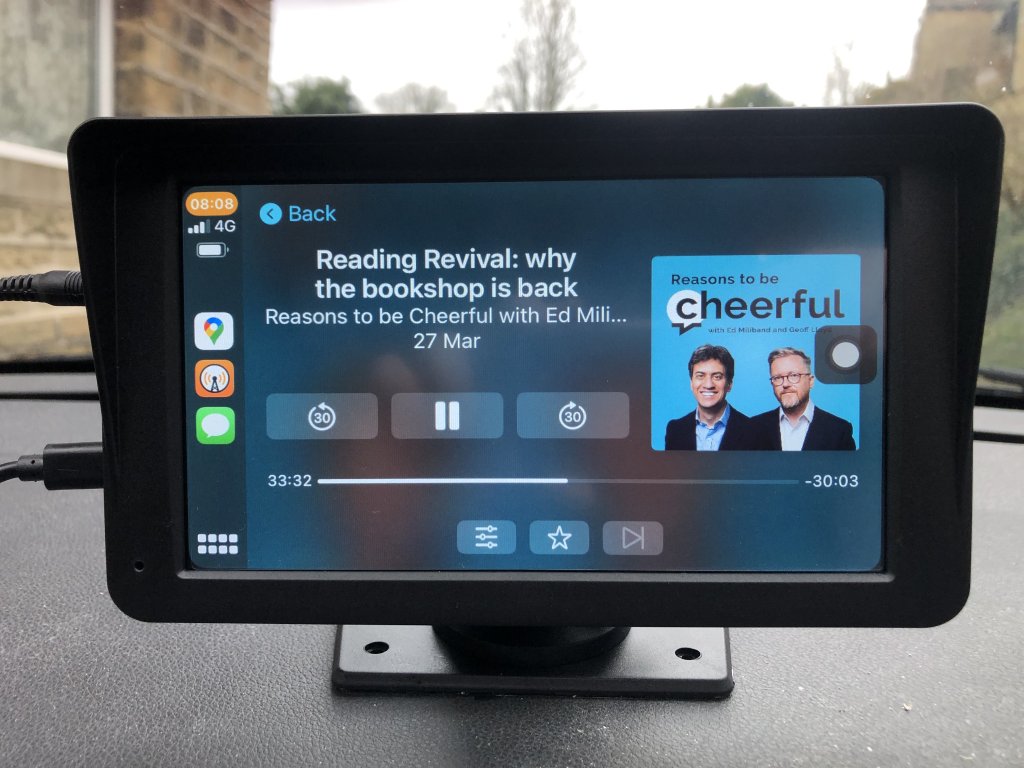
A photo of the free-standing Carplay unit in my car

I’m someone who always has my phone doing something passively in my car whilst driving – whether it’s listening to music, podcasts or audiobooks, or giving me directions in Google Maps. Until now, I’ve just had my phone sat in a cradle with a built-in Qi wireless charger, because my car stereo doesn’t support CarPlay.

And then I found out, via Matt Haughey, that it’s possible to buy an additional screen for your car that just offers CarPlay, or its equivalent Android Auto. So I followed suit.

The three ways to CarPlay

As Matt points out, there are now three ways that you can have CarPlay in your car:

  1. It’s already built in. If you have a relatively new car, then the built-in stereo system will support it natively, either through a USB connection or wirelessly.
  2. If not, you can replace the existing stereo system with an after-market, or third-party system which supports CarPlay.
  3. Or, do what I’ve done – keep your existing stereo system as-is, but add a free-standing unit that connects to your car.

The reason why I’ve gone for the third option is that neither of the others are available to me. I drive an original Peugeot 3008, which I bought second-hand in 2019. Whilst it’s one of the higher-spec Allure models with cruise-control, climate control and a head’s up display, whoever bought it new decided to have the most basic in-car stereo system on offer.

No really, it literally just has a radio, CD player, auxiliary audio connection and a USB port that supports iPods. It doesn’t even have Bluetooth.

When I first bought the car, I did investigate the second option, of having the stereo system replaced with a Sony after-market system that supported CarPlay. However, I was advised by an installer that this would cause issues. This was backed up by various horror stories that I found online.

Annoying, many cars that were sold between around 2010-2016 put various car configuration options into the stereo menus. So, if you removed the stereo, it meant that you couldn’t amend settings for your headlights for example. I have seen some videos where independent garages have managed to get a working CarPlay system built in to a car like mine, but considering that the after-market units are usually around £300 plus additional parts and labour, it’s an expensive option.

Free-standing

So, to the third option. Periodically, I’ve tried looking for something very similar as I though it would be an obvious thing to make and sell, but never managed to find anything. So when Matt’s blog post popped up, I went straight to Amazon to find something similar. Indeed, it looks like most of these units have been on the market less than 6 months.

Matt bought his because he’s bought a new Rivian electric SUV. As Jeff Bezos was an investor in Rivian, it doesn’t support CarPlay or Android Auto. Instead, has its own touchscreen interface incorporating Amazon’s Alexa. And that’s probably okay if you just want to play music, but you don’t get access to the various apps on your phone – especially podcast and audiobook apps, or Google Maps. Sure, pretty much every car nowadays has a built-in SatNav, but Google Maps also has live traffic data and live re-planning of routes whilst driving, in case a quicker route becomes available. I understand that Tesla cars also don’t support Android Auto or CarPlay, although you’ll never catch me driving a Tesla for as long as Elon Musk is associated with the company.

Eyetoo 7″ CarPlay screen

The unit I bought was this Eyetoo 7″ model from Amazon (affiliate link). It’s a more basic model, which just supports CarPlay and Android Auto without offering much of its own interface. As well as the unit with the screen, you get:

  • a very long USB-C cable that has a 12 V cigarette lighter plug on the other end. Seriously, it’s about two metres long.
  • an auxiliary cable to plug into your stereo.

It can also broadcast on an FM frequency that you can tune your car radio to, if you want fewer wires.

There are several other models, all by different Chinese manufacturers that I’ve previously never heard of. Some of these have some additional features:

  • Built-in dashcam
  • Connection for a rear parking camera
  • MicroSD card port and media player software on the device
  • USB port for connection a phone directly

Whilst a reversing camera would be useful, it would probably need to be professionally installed. In any case, my car does at least have reverse parking sensors so I didn’t bother.

The unit comes with both a suction cup for attaching to a windscreen, and a stand with sticky pads for attaching to the dashboard. As you can see in the above photo, I went for the latter. This leaves a tripod screw on top, which you could also use to attach a dashcam, I suppose. The stand is pretty sturdy and holds it up well – it doesn’t wobble around at all. That being said, it does mean that it’s not easy to remove if you want to use it in another vehicle.

It starts up as soon as there’s power to the 12 V socket – i.e. when you turn the engine on – and takes a few seconds to boot up. Connection to CarPlay is wireless, which is good as this model doesn’t have a USB port for a wired connection to your phone. It takes a further few seconds for CarPlay to open, but it does open automatically and will even start playing your music for you.

The screen is fine – it doesn’t have automatically adaptive brightness and it’s not very high resolution, but more expensive models look like they offer this if that’s important to you. But on the whole, I’m really happy with it – it’s great to finally have CarPlay in my car without having to spend a lot of time or money on having it professional installed, and it hasn’t broken anything that affects the car’s systems. I am looking at ways of tidying up the cables though – perhaps with some right-angled connectors.

If you’re looking to add CarPlay or Android Auto to your car without needing to take it apart, I would recommend looking into this as a viable option.

Adventures in setting up Homebridge for HomeKit

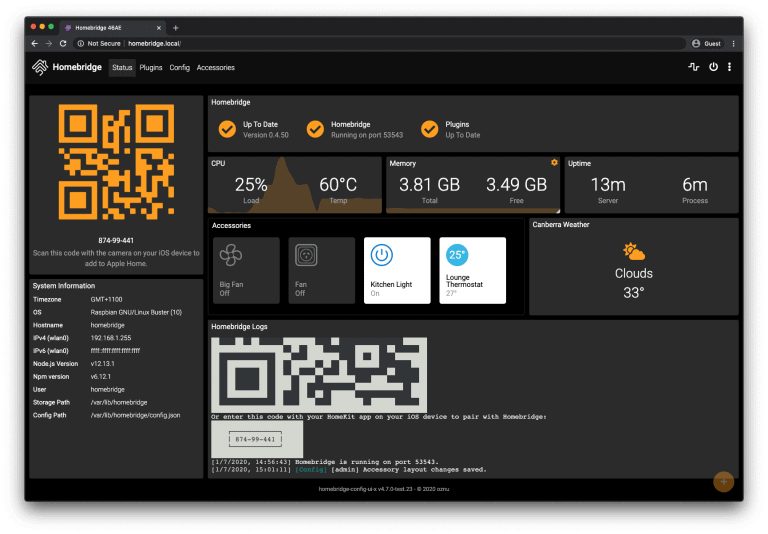
A screenshot of the Homebridge dashboard

A recent project of mine has been to get Homebridge up and running. It’s a server-based program that acts as a bridge between smart devices in the home, and Apple’s Home app on iOS.

One thing, I don’t know why

HomeKit, the technology underpinning Home, is famously limited; whilst most smart devices support Amazon’s Alexa and Google Assistant, very few support HomeKit. Indeed, out of the various smart speakers, plug sockets, dishwasher, thermostat, smoke alarm and TV that we have in our house, it’s only the TV that natively supports HomeKit.

Whilst just about everything else (except the smoke alarm) supports Google Assistant, and the Google Home app, it would be helpful to be able to use these devices with Siri. For example, when I’m driving, I want to be able to use the Hey Siri command to turn the heating on, so that we don’t come home to a cold house.

I tried so hard, and got so far

There’s a few ways to run Homebridge. If you have money to spare, then by far the easiest way is to buy a HOOBS box. HOOBS stands for ‘Homebridge Out of Box System‘, and you’ll get a plug-in device with a customised version of Homebridge that is simple to set up. You can also buy HOOBS on an SD card, that can be slotted into your own Raspberry Pi. Or, you can just download the HOOBS SD card image for a donation of £10.

I have two Raspberry Pis – a RPi 400 which is our seven-year-old’s computer, and a RPi 4 which is my Plex server. The latter runs Plex under Ubuntu Core, a minimal version of Ubuntu Linux which doesn’t include a graphical user interface, or even the Aptitude package manager. Instead, apps can be installed using Snap packages, which enforces greater sandboxing and security. There is a Snap package for Homebridge, but I couldn’t actually get it to work; once installed, I couldn’t open the browser page as instructed.

So, I’ve installed it using Apt on our child’s Raspberry Pi 400, and followed the proper instructions.

There’s only one thing you should know

When you first start Homebridge, it won’t do much initially. To get it talking to your devices, you’ll need to install the appropriate plugins, which you can do through the web UI. I suggest going with the plugins that have been ‘verified’ first, as you’ll probably find that there’s more than one plugin for some of the more popular services like Nest. Whilst installing plugins is relatively easy, configuring them can be difficult:

  • The Nest plugin, for example, has you logging into your Google Nest account in Chrome’s Incognito mode, whilst having Developer Tools open. You then have to copy and paste various data from the HTTP headers.
  • I have a series of smart plug sockets which use the Tuya Smart Life platform, but I had them registered under a different app which Homebridge can’t connect to. I had to de-register them and then set them up again on the official Tuya app.
  • Despite following the instructions, I couldn’t get my Bosch smart dishwasher to connect

Setting up Homebridge is therefore something best reserved for people who are comfortable using the Linux command line and with at least an intermediate understanding of how devices work. However, it does mean that I now have these devices in HomeKit as planned.

Homebridge even supports my Solar Inverter, although in a rather odd way. It appears as 12(!) separate accessories in the Home app, seeing as HomeKit doesn’t ‘know’ what a solar panel is. You can also make the Google Home app talk to Homebridge – again, this is the only way that I can make my Solax system work with Google.

But in the end, it doesn’t even Matter

Those of you who follow news in the smart devices/Internet of Things space will be aware of Matter, a new unified smart device standard with the support of Amazon, Apple, Google and Samsung. Matter will hopefully do away with the separate ecosystems that each company offers, and any Matter approved device should work with any other. However, the final Matter specification was only agreed last year, and I’m not expecting many of my existing devices to be updated to support it. At best, my Google Nest Mini devices will be updated soon, and my thermostat may be updated. For others, I would probably have to replace them with Matter-enabled devices in due course. Therefore, Homebridge offers me the flexibility that Matter will hopefully bring as an interim solution.

Solar, so good

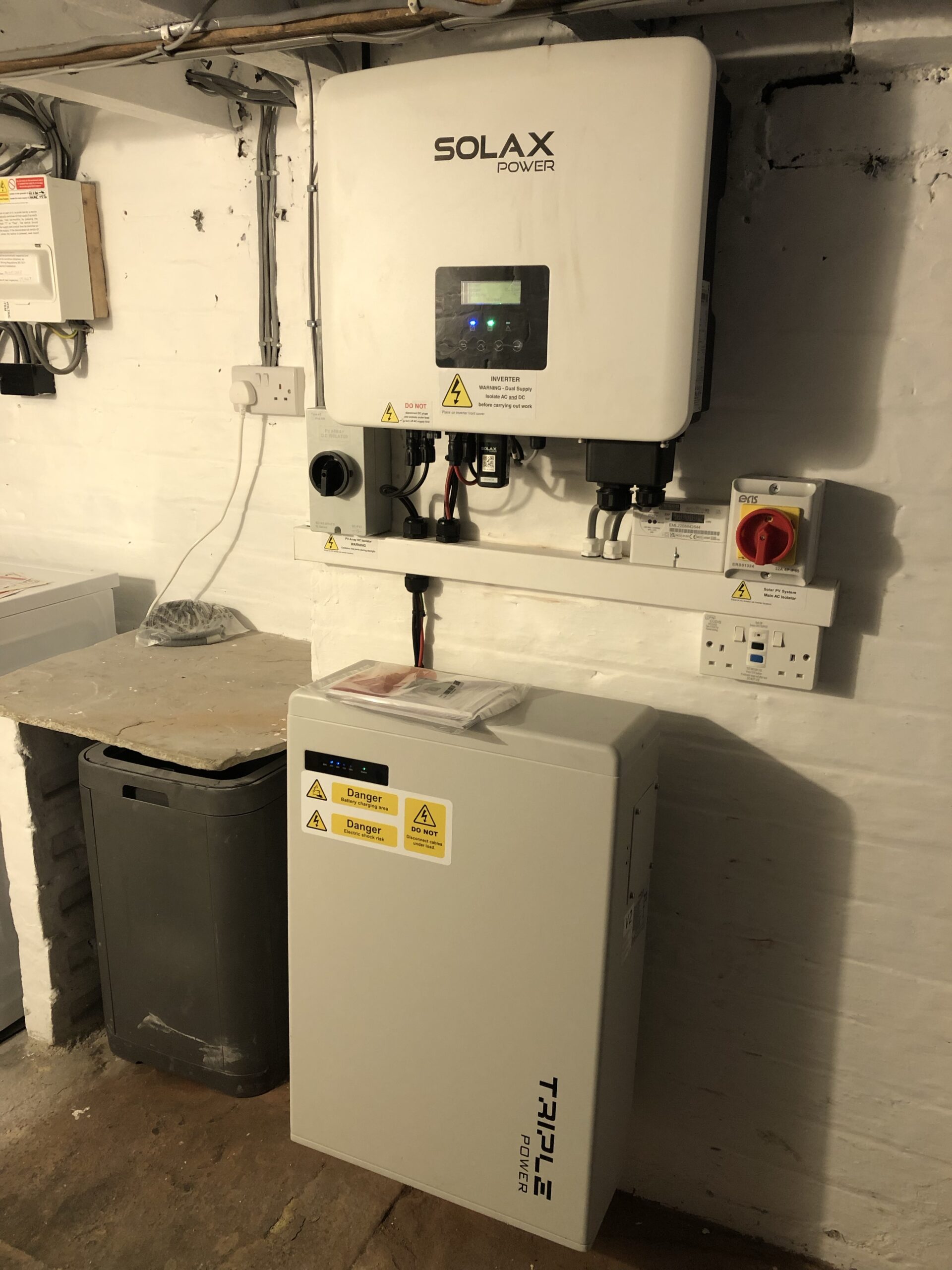
A photo of the solar inverter and battery in our cellar.

So, after spending thousands of pounds on a new kitchen, you would think that we’re done with home improvements for a while.

Erm, no. Because even though we’re not yet at the end of January, we’ve used the last of our savings, some money from The Bank of Mum and Dad, and a small amount of new borrowing to pay for the installation of solar panels.

I would show you a photo of them, but that’s hard to do without also sharing a photo of our house, which I’m loathed to do publicly. Instead, here’s a photo of the interior kit – namely, the inverter and the battery.

The battery is an optional add-on to solar systems and is designed to offer additional off-grid power at the time when the solar panels aren’t working – i.e. dull days or at night. It can store up to 6 kWh of electricity, and there’s a pair of plug sockets that are attached to the battery, meaning that we have backup electricty in the event of a mains grid power cut.

Here are our reasons for having a solar panel installation:

Saving money

Energy prices have increased everywhere recently, but especially in the UK where many of our power stations work by burning natural gas. Gas prices were already on the rise when Russia declared war on the Ukraine, and pushed prices even higher as countries started to reduce their reliance on Russian gas. So, switching to a renewable source of power that doesn’t cost money to generate (once the panels are installed and paid for) seems like a good idea.

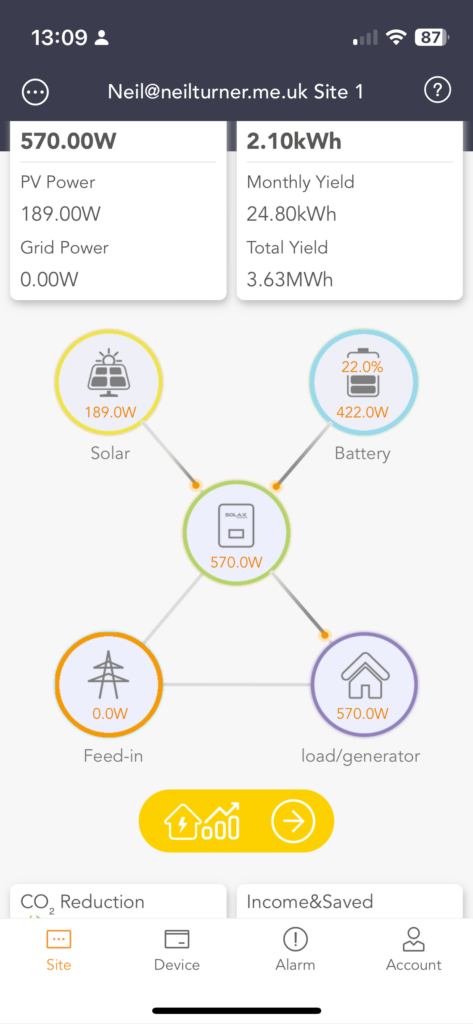
A screenshot of the Solax Cloud app on iOS, showing our solar system

January is a bit of an odd time to have them installed, though. The days are short, and we only get about 6 hours of usable daylight for generating electricity as I write this – normally 9:30am until 3:30pm. Yes, it’s light from around 8am but the sun needs to have moved around sufficiently to be shining onto the panels to get more than just a few watts of power.

Last week was very, very cold but with clear, sunny afternoons. That was enough for the panels to generate around 2.5 kW – and normally, when I’m working at home without any appliances on (e.g. washing machine, dishwasher, cooker etc.) we only use about 250 W of power. So, that’s a lot of overflow to also charge the battery and there were several days where it was fully charged at sunset. That then gave us enough power for teatime and up until beyond bedtime, meaning that we weren’t paying for grid energy.

Right now, it’s saving us between £1 and £2 per day, depending on the weather and how much energy we’re using. Our savings will increase soon, once we have our Microgeneration Certification Scheme (MCS) certificate, which will allow us to be recompensed for the excess energy that we can sell back to the mains grid under the Smart Export Guarantee. Realistically it’ll be the end of next month before this is up and running, but it means that, once the battery is fully charged, we can make a bit of money back. Not much – at best, we can earn about 16p for kWh at present, which is less than half the 34 kWh we pay to use electricity – but we would already be a few pounds up by now if it had already been in place.

The app which links to the inverter can be configured to calculate your savings, so we have an idea of how much money we’re saving.

Doing our bit for the environment

You may choose to believe that climate change isn’t real, but I’m convinced, along with something like 99% of climate scientists that it is happening. So having solar panels means that we can actually do something tangible about it. Whilst renewable energy sources are forming an increasing proportion of Britain’s mains grid energy mix, burning natural gas is still the source of the majority of our electricity, and there are CO2 emissions involved. Also, gas supplies are finite, and so regardless of whether you believe in climate change, there will come a point when we run out of gas, or have to go to greater lengths to access it. Again, the inverter’s app approximates how much CO2 we’re saving, which is over 50kg in just over a week. I reckon that’ll be half a tonne by the end of the year, which seems like a staggering amount for just one household.

We are, of course, parents, and so by doing our bit, we can show our seven-year-old that we care about the planet that they’ll inherit.

International Geopolitics

I’ve mentioned Russia’s invasion of Ukraine, and I suppose this could be a small act of solidarity with the Ukrainian people. Whilst Britain only sources a small amount of its gas from Russia, if that could be reduced to zero then that’s a lot of money that Russia isn’t getting to fuel its war machine. I’d like to think we’re helping, even if it’s only a tiny contribution.

Resilience

I mentioned above that, attached to the battery, are a pair of plug sockets which draw power only from the battery. If there’s a power cut, then these sockets will still provide power, so long as there’s some charge left in the battery. Indeed, the inverter normally avoids depleting the battery completely – typically it’ll leave 10-20% charge behind.

Even it’s sunny and the panels are generating, should the mains grid go offline (i.e. we get a power cut), then unfortunately all the regular sockets and lights in our house will go off too. But this extra pair of sockets will keep going, and so we could, for example, run a long extension cable up from the cellar to the freezer, to keep that going. We’ve had a couple of short power cuts in recent months, but these have been no more than 10 minutes at a time thankfully.

What to consider if you want solar panels

Our system cost a low five figure sum to install, and was done by a local firm. We got three quotes and all were almost exactly the same, so this seemed to be the going rate. There’s a great guide on MoneySavingExpert about whether they’re worth it, and I suggest that you also read that, as well as my own experiences.

These are things you need to consider:

  • You need a pro-dominantly south-facing roof; ours faces south-west, which is okay but not perfect. If your roofs point east or west, then solar panels probably aren’t for you.
  • You will get more out of solar panels if you can use the energy whilst it’s sunny. So, you’ll need to use the delayed start on power hungry devices like tumble dryers and dishwashers, so that you’re using them when the panels are working. If you work at home, you may benefit more, and especially if you have an electric or plug-in hybrid car that you can charge at home during daylight hours.
  • Solar panels will help with electricity, but not with your gas bill. So, you’ll get less of a benefit if you have a gas oven, or if you don’t have an immersion heater in your hot water tank. Annoyingly, in hindsight, we ripped out our hot water tank in 2016 and replaced it with a combi gas boiler, although as part of our kitchen renovations, we bought new electric hobs and ovens. Conversely, if your heating and hot water is electrically-powered, perhaps using a heat pump rather than a gas boiler, you could benefit more from solar panels.
  • In a similar vein, to maximise your savings, you may consider boiling an electric kettle for hot water for washing up, or using an electric shower to fill a bath. Using a slow cooker during daylight hours may be more economical than a cooker in the evening.
  • The return on investment period for solar panels is about 11 years, so it’s probably best to install them in a house where you don’t plan to move any time soon.
  • It’s probably best not to borrow all of the money for solar panels. Whilst you can save hundreds of pounds per year, through less usage and selling back your excess to the grid, the interest payments on any borrowings will extend the return on investment period. We’re borrowing around £4000 to fund the panels, which I’m funding using a credit card balance transfer to keep the interest down, but the rest was savings and a parental gift.
  • You probably won’t need planning permission, unless your house is a listed building or you live in a conservation area.

I’ll aim to post again in the summer, once our Smart Export Guarantee is set up and we have some sunnier weather, to indicate how much we’re saving.

21st-ish blogiversary

Today marks 21 years since I started my blog, on the 14th January 2002. Back then, I was 17 years old, in the sixth form, a few months away from taking my A-levels and living at home with my parents.

Surprisingly, I managed to keep up with blogging regularly for 16 years, but gave it up due to a lack of time and a monumentally screwed up server upgrade that also wiped out my only backups.

So there weren’t any 17th, 18th, 19th or 20th blogiversaries, as I only restarted blogging last summer. Which means that this isn’t a ‘proper’ blogiversary. But I’m counting it anyway.

Nowadays, I still don’t have much time to blog – a combination of full-time work and being a parent – but I’m aiming to rustle up at least a few blog posts every month.

So, happy birthday blog. I would say ‘here’s to another 21 years’, but who knows what the Web will be like in 2044. And I’ll be nearly 60 years old by then.