Readly and PressReader

A screenshot of the Readly app on an iPad.

When it comes to reading magazines on a computer or tablet, you may well have heard of Readly, seeing as it’s widely advertised. But there’s a competitor, PressReader, that’s also worth considering. I’ve used both, and so here’s a comparison of the two.

Fundamentally, both services let you read as many digital magazines (and some newspapers) as you like, for a flat monthly fee. Both claim to offer thousands of titles.

Readly

As mentioned, Readly is probably the best known, as it’s advertised in lots of podcasts and through other third parties. Indeed, if you fancy trying it, you may find that a two or even three month free trial is available with a bit of searching (as opposed to the standard one month free trial). Normally, it costs £9.99 per month and claims to offer over 7000 titles to read.

You can be notified of new issues, and have these automatically download when you’re on wifi for offline reading. Pages in magazines can be bookmarked, and there’s a ‘mobile view’ which reformats pages for easier reading on smaller screens. I use this a lot; though I read magazines on an iPad, it simplifies the formatting and reduces the amount of pinch zooming needed.

A screenshot of the PressReader app on an iPad. It's an alternative to Readly.

PressReader

I hadn’t heard of PressReader until a couple of months ago. It claims to offer over 8000 titles to read; many of these seem to be the same as Readly but it also includes some additional magazines like The Economist. There’s also some non-UK newspapers like the Wall Street Journal and New York Times.

Like with Readly, magazines can be downloaded for offline reading, and it’ll reformat pages too. Indeed, on the whole it does this better than Readly, although sometimes it cut articles short. It also handles light and dark mode better on iOS.

Pricing is where things get a little more complicated. There is a free tier available, with around 500 magazines available to read. The ‘premium’ subscription, with unlimited access to all of its titles, is much more expensive than Readly – £27.49 per month, with only a 7 day free trial. So, in a nutshell, PressReader is almost three times more expensive than Readly.

But it’s not quite that simple. Many local libraries offer free access to PressReader through its HotSpot system. Indeed, this is how I found out about it. In West Yorkshire, Bradford, Calderdale, Kirklees and Wakefield libraries all offer complementary access, as long as you have a library card with one of them. Sorry Leeds residents, but your council doesn’t offer this, although it is available for Leeds Beckett University students and The Leeds Library members. Some hotel chains like Marriott offer this too.

The catch is that you may need to re-authenticate with your library on a regular basis. Where I am in Calderdale, this is every 30 days but could be as little as 24 hours in some places.

So do I use Readly or PressReader?

If it wasn’t already obvious, I used Readly for quite some time. However, when I found out that PressReader was available for free, I switched last month and cancelled my Readly subscription.

I had been contemplating cancelling Readly in any case. When I first subscribed, I was regularly reading both Rail and Modern Railways, and previously had subscriptions for each. Readly was slightly more expensive per month, but offered a better reading experience. However, Modern Railways hasn’t been available from Readly since the beginning of last year, or indeed any other unlimited magazine platform.

Something to consider is that, when you cancel Readly, you’ll get a special offer to try to keep you as a customer. In my case, this was a 40% discount for three months, if I remember correctly. So if you do subscribe to Readly, maybe try cancelling it once a year to see if they offer you a discount.

Pocketmags Plus+

I thought it would also be worth mentioning Pocketmags Plus+ here as a third alternative. Pocketmags Plus+ doesn’t offer nearly as many magazines – around 600, rather than thousands – but it does have a few that aren’t available on the other platforms. There’s no free trial but the first month is 99p, and then £9.99 thereafter.

What to do if you find a bat

A photo of the common pipistrelle bat that we found on the floor of our cellar

On Friday, I found a bat on the floor of our cellar. There’s a photo of it above.

This was a problem. Bats are well-known for being mammals that can fly, and when they’re not flying, they hang upside down to rest. A ‘grounded’ bat lying on the floor is not a sign of a healthy bat.

A quick search led me to the ‘Help! I’ve found a bat‘ page on the Bat Conservation Trust web site. I gave the National Bat Helpline a call, and contained the bat in a shoebox with a small dish of water until a volunteer could arrive to rescue it.

Although it took a while, a lovely volunteer came on Friday evening to collect the bat and take it to a place of safety, where it could be fed and then (hopefully) be released back into the wild. By this time, my wife and eight-year-old got to see the bat, which was nice as my wife loves bats. And it’ll be an interesting story to tell at school this week.

We also found out that it was a male common pipistrelle bat, one of the more common UK bat species. Whilst the IUCN considers them to be ‘least concern’, all bat species in the UK are protected by law. Hopefully, the little guy will get better now that he’s being looked after, and we’ve donated some money to the charity.

However, we’re still not sure how the little bat got into our cellar in the first place. Though the cellar was partly open to the elements as recently as the end of 2022, we’ve since had a new window fitted and a hole fitted in, partly due to a couple of other furry rodents getting in. I suppose it could have been down there all that time and had finally run out of insects to eat. At least he’s in a better place now.

Nginx Proxy Manager

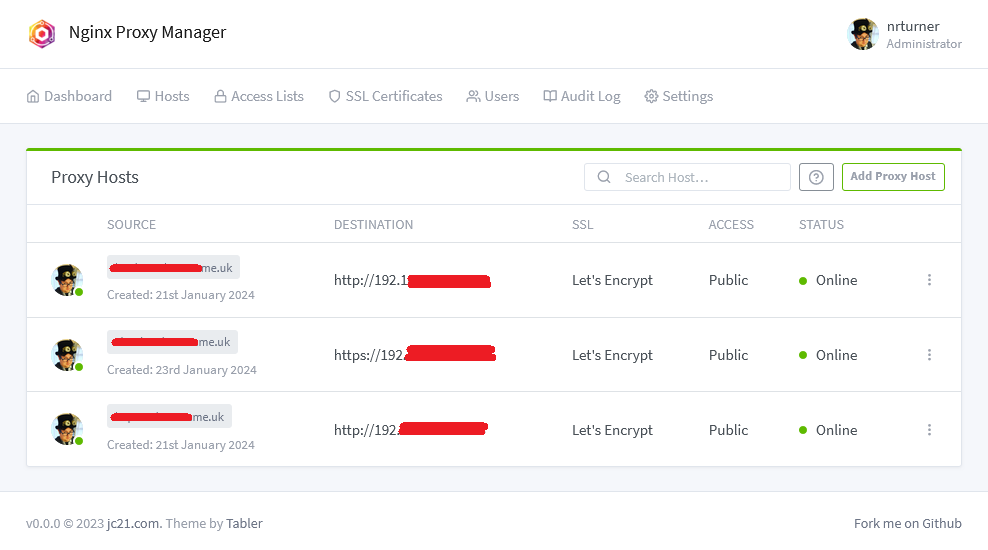
A screenshot of nginx proxy manager

I’ve recently started using Nginx Proxy Manager to act as a reverse proxy for the various web services that I have running on my Raspberry Pi. It’s a frontend to the nginx web server and makes setting up reverse proxies and SSL access really easy.

You may remember that I’ve used SWAG for this before, to enable HTTPS access to my Home Assistant installation. SWAG is find if you’re using Home Assistant Core or Container, but having switched to Home Assistant Supervised recently, I needed a new solution. Like SWAG, Nginx Proxy Manager can be run in Docker, but it’s also available as a Home Assistant addon.

The main benefit of Nginx Proxy Manager over SWAG is that it has a web-based UI, shown in the screenshot above. This makes setting up new proxy hosts really easy, as it has a nice and simple interface. Whilst SWAG includes pre-built configuration files for many services, there’s no interface available other than editing text files.

Nginx Proxy Manager will also manage SSL certificates. You can either import ones that you purchase yourself, or it will manage the process of acquiring and renewing Let’s Encrypt certificates.

As well as managing Home Assistant, I have Nginx Proxy Manager looking after Calibre-web and Nextcloud.

A brief explanation of reverse proxies

Apparently, you’re supposed to ensure that blog posts are at least 300 words nowadays, otherwise Google ignores it. So, here’s an explanation of why you should set up a reverse proxy server if you’re hosting services like Home Assistant at home:

  1. No port numbers. When you set up something like Home Assistant, you’ll end up with an address like http://192.168.0.1:8123. A reverse proxy will allow web browsers to connect on the standard web ports (80 for HTTP, 443 for HTTPS), which looks nicer and is more predictable. It also means you don’t have to forward lots of arbitrary ports on your router.
  2. SSL certificates. If you’re running a device on your home network, then ideally you only want to allow secure connections to reduce the risk of your personal data being intercepted. Self-signed SSL certificates are not ideal, as most web browsers issue dire warnings for web sites that use them. As not all web applications support SSL certificates natively, a reverse proxy can handle this for you.
  3. Web application firewall. By making all requests go via a proxy, the proxy server can filter out malicious traffic. Nginx Proxy Manager includes a ‘block common exploits’ mode, and you can also filter IP addresses. For example, you may wish to only allow access to certain IP addresses.

Installing in Home Assistant

If you’re running Home Assistant Supervised or Operating System, then you’ll need to install the Nginx Proxy Manager addon. It’s available from the Community Addons repository, which should already be available to you – you won’t need to add it separately. It’s not to be confused with the official ‘NGINX Home Assistant SSL proxy’ addon; this doesn’t include an interface and only enables a proxy for Home Assistant, and not for any other services. Indeed, if you’re already using this official addon, you’ll need to stop it from running first, as otherwise you’ll have a port conflict.

Once set up, you can access the web interface at http://[your IP]:81 . I suppose I could probably set up a reverse proxy host to get rid of the port number, but I don’t see a good reason to enable remote access to it.

One final thing to add is that the user guide for Nginx Proxy Manager isn’t great. It covers setup, but there’s very little help for configuring proxy hosts. The web interface is pretty straightforward so arguably detailed instructions aren’t necessary, but a little more help would be good.

GoblinTools

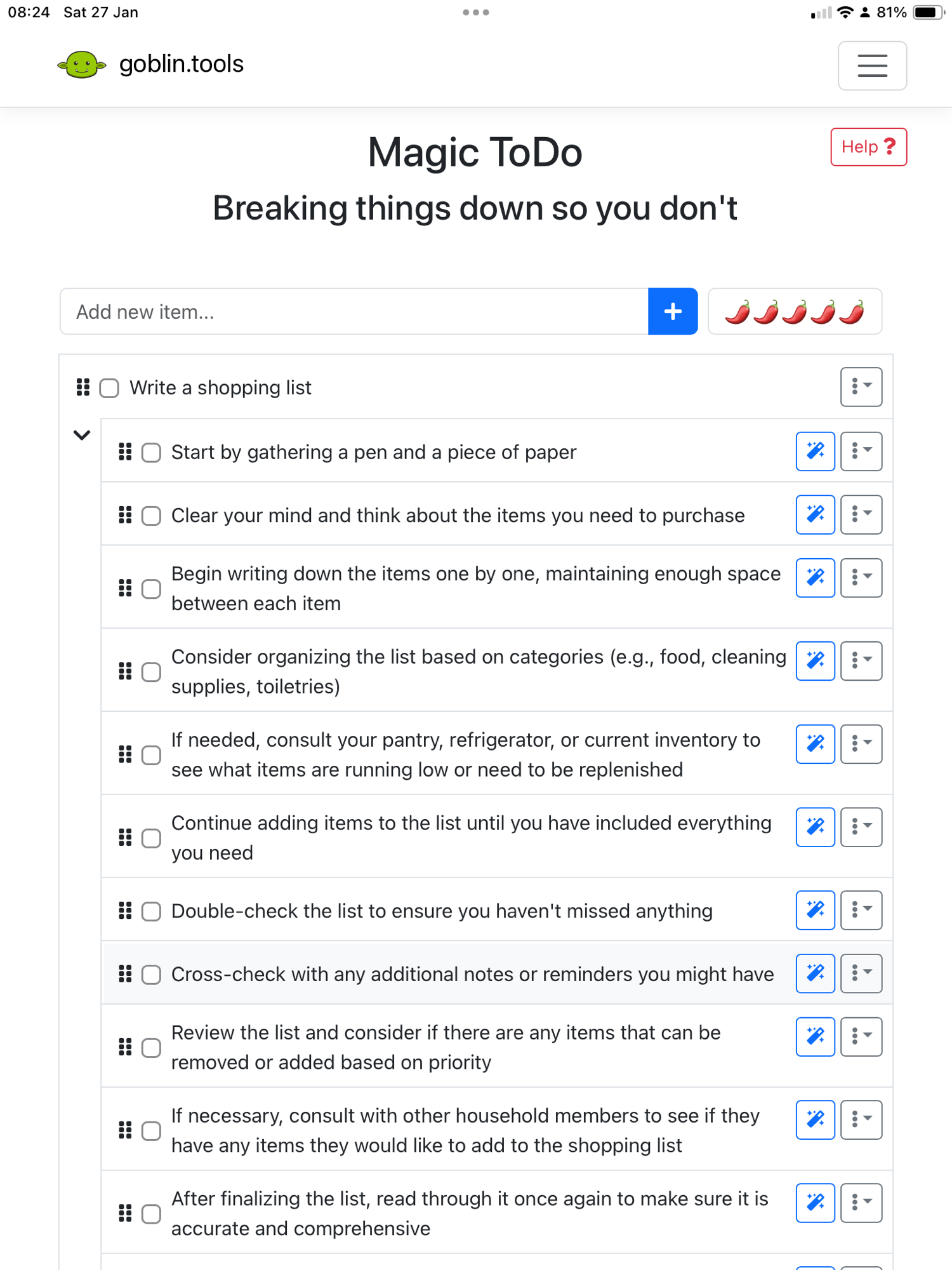
A screenshot of GoblinTools that has taken the task of 'writing a shopping list' and broken it down into easier subtasks

If you sometimes find doing things overwhelming, or need help converting some disparate thoughts into something coherent, then GoblinTools may help you. It was recommended to me by someone on Mastodon some time ago; sadly I’ve lost track of who tooted or boosted it onto my timeline because it was a while ago and I’ve been procrastinating about writing about it. Which is highly ironic for a productivity tool that is designed for neurospicy people.

GoblinTools is an AI-powered tool. The web version is free, with no ads, or you can pay a single solitary US dollar for the apps on iOS and Android. The tools it offers are:

Magic To-do

This is the first tool that appears on the home page. Type in a task, and the AI will try to break it down into smaller sub-tasks. In the screenshot, I’ve written ‘write a shopping list’, and it’s been split into 11 more simple tasks. These include ‘gather a pen and a piece of paper’, ‘checking your fridge’ and ‘asking housemates for anything they need’. The idea is that you put in a task that you know you must do, but are finding overwhelming. There’s also a slider for ‘spiciness level’ – if you are having big issues with executive function, then you can push this up further to break down tasks even more.

Formaliser and Judge

The Formaliser tool takes some text that you write, and tries to re-format it in a more formal way. For example, it can take the text ‘tell the boss to go fellate himself if he thinks I’m coming in tomorrow’, and replace it with ‘Please inform the boss that I will not be able to come in tomorrow.’. You can also make text less formal, more passionate, more sarcastic and so forth. As someone who tends to write very concise emails, the ‘more sociable’ option may be helpful for me to sound less cold.

The Judge tool is a tone analyser. Type in some text, for example from an email, and it’ll give you an interpretation of the tone. Here’s an example

Based on the given text, “No, I regret that this would not be possible,” it appears to come across as straightforward and polite. The tone seems slightly regretful or apologetic due to the use of the word “regret.” It suggests that the speaker is declining a request or denying a possibility in a respectful and considerate manner. Overall, the emotional tone is one of reservation and disappointment about the situation.

Estimator and Compiler

Estimator is a tool which offers an estimate of how long a given task will take. Although the example I offered was ‘Write a 300 word blog post whilst feeling very tired and with very little inspiration’ which it suggested 1-2 hours, which for me is overly pessimistic. This blog post took about half an hour with breaks to write.

Compiler is designed to accept an unordered brain dump and convert this into a list of tasks, which can then go into GoblinTools’ Magic To-do tool.

Chef

The Chef tool is designed to take a list of ingredients and cooking utensils that you have, and come up with a recipe that you can cook. It gave me this based on some random ingredients that I provided:

Dish: Cheesy Peanut Butter Pasta Salad
Serving Size: 2

Ingredients:

  • 200g pasta (7oz)
  • 1 cup rice, cooked (195g)
  • 4 tablespoons peanut butter
  • 1 cup cheddar cheese, grated (115g)
  • 1/4 cup sundried tomatoes, sliced (30g)
  • Salad greens (lettuce, spinach, or your choice)
  • Salt and pepper to taste

Instructions:

  1. Cook the pasta according to the package instructions until al dente. Once cooked, drain and set aside to cool.
  2. In a large mixing bowl, combine the cooked rice, peanut butter, cheddar cheese, and sundried tomatoes.
  3. Add the cooled pasta to the mixing bowl, and toss everything together until well combined.
  4. Season with salt and pepper to taste.
  5. Serve over a bed of fresh salad greens.
  6. Enjoy your Cheesy Peanut Butter Pasta Salad meal for two!

I’m not sure how edible this would be, although it looks like GolbinTools avoids the issue that a previous AI recipe generator had where it suggested making chlorine gas; adding ‘bleach’ to the ingredients resulted in a note at the end saying ‘Ensure that the bleach ingredient is excluded from any food preparation due to its toxicity.’

To me, this seems like a responsible and genuinely useful use of artificial intelligence. AI should be a benefit to society, and helping people do things better can only be a good thing. A lot of AI is misused, but I can see myself using GoblinTools at times when my executive function is at its lowest.

A basic Home Assistant automation

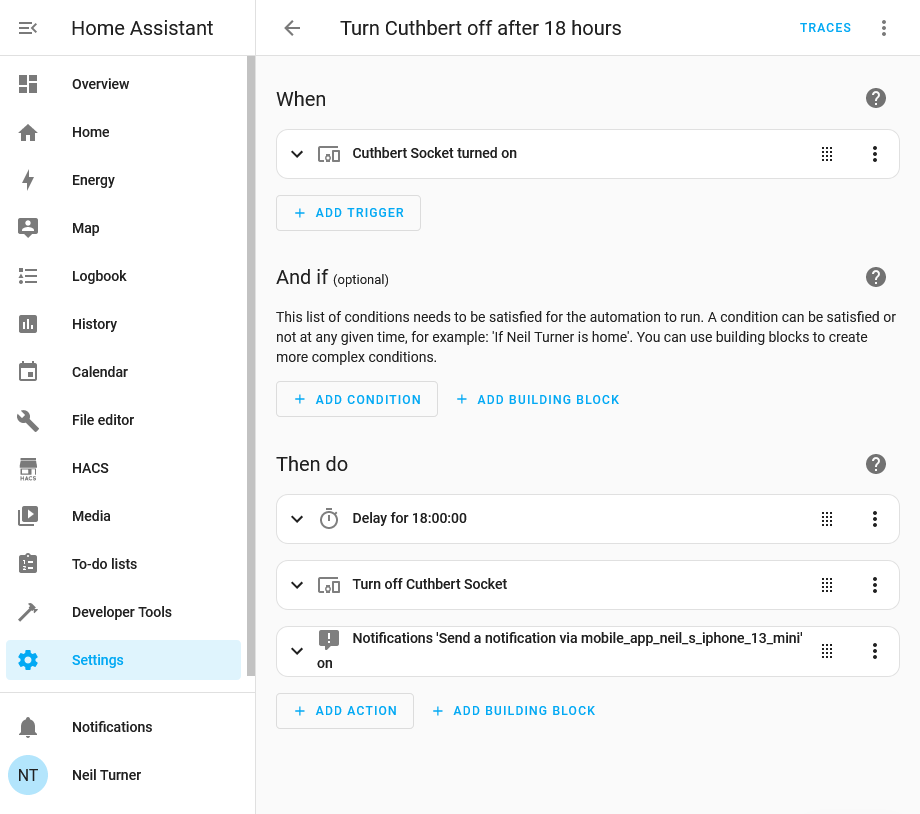
A screenshot of Home Assistant showing an automation to turn off a smart plug after 18 hours

One of the biggest benefits of running Home Assistant in your home is its powerful automation tools for controlling your smart devices. In this example, I have a smart plug socket which I want to run for 18 hours, and then automatically switch off. This is the smart plug that we use for our heated drying rack, and it ensures that the rack doesn’t continue heating for longer than necessary, to save energy. As I run Home Assistant on a Raspberry Pi 4, it only uses 15 watts of power, compared to the few hundred watts that the drying rack requires.

Automations in Home Assistant have become much easier in recent releases. In times gone by, you’d have to write YAML scripts to automate your devices, but now there’s a relatively straightforward interface. Generally, automations work on the principal of ‘if this, then that’ – a bit like IFTTT, but it runs in your own home.

Tuya me, to you

For my automation, I use the trigger of the smart socket being turned on. In my case, this is a Tuya wifi-enabled smart plug, which I’ve called ‘Cuthbert’. We have four Tuya plugs, all with silly names like Cuthbert, just because. Tuya are a white label manufacturer, and so the brand names on the plugs vary despite them being exactly the same. I wouldn’t necessarily recommend them, as presumably every time you turn them on and off, your request goes via Chinese-controlled servers. I would probably buy Matter-enabled plugs instead now but they work fine. Plus, the recent 2024.02 release of Home Assistant massively improves Tuya support and no longer requires you to create a developer account, which is nice.

Automation actions

Anyway, having selected the ‘When’ event, we now need to specify the ‘Then do’ actions to take. First of all, we need a time delay, otherwise as soon as the socket is turned on, Home Assistant will turn it off again. The ordering of actions is important, as I found out the hard way; I originally had the delay after the command which meant that the socket just turned off straight-away. So, we specify a delay and then the action to turn the socket off.

The third action is optional, but it just sends a notification to my phone to tell me that the automation has completed. I’m using the Home Assistant Companion app but you could use an app like Pushover, or trigger an email.

This is a really simple automation, but you can create more complex ones. I’m hoping that, at some point in the future, we’ll have some smart blinds in our kitchen, and I’ll be able to use Home Assistant’s sun integration to open and close them at sunrise and sunset.

Sign language on trains

A photo of a screen in a train announcing the next stop is Bradford Interchange, with a video of the announcement in British Sign Language.

Northern Rail has started playing videos with announcements in British Sign Language on some of its trains. It’s a trial at present, and I happened to see one last week.

This is in addition to the existing text-based and audio announcements, and is designed to increase the accessibility of the railways for people with disabilities. Elsewhere in the north, Transpennine Express is rolling out BSL screens at stations.

When I shared this photo on Facebook, it got the usual likes and hearts from friends. But, predictably, there were some comments on the lines of ‘can’t they just read?’. And, recently, over at X/Twitter, its overly impulsive edgelord owner recently asked the same question in a tweet.

I too would have probably asked the same question until recently. However, over Christmas, I read Samantha Baines’ brilliant book ‘Living with Hearing Loss and Deafness’ (sponsored link). Baines’ book helpfully explains that British Sign Language is, well, a language – and it’s distinct from English. Furthermore, some deaf people who have always been deaf will have BSL as their first language and English as their second. If you ever go abroad, to France for example, and have to constantly translate signs into English, it can get tiring after a while. Now imagine that your first language is sign language, and you have to translate written English into the signs that you have learned, all the time.

So that’s why making BSL more widespread in Britain is important. Indeed, it is now a legally-recognised language in England, Wales and Scotland. That means BSL has the same status as British English, Welsh and Scots Gaelic.

As someone who wears hearing aids, learning British Sign Language is something that I plan to do in time. This is because my hearing could continue to deteriorate to the point where hearing aids can’t compensate. Being able to understand BSL may still allow me to communicate with some people should that happen. So whilst these BSL announcements won’t necessarily help me, they will hopefully make trains more accessible for BSL users.

How we dry laundry

A photo of our tumble dryer that we use for drying our laundry.

One of the benefits of our kitchen renovation in 2022 was that it gave us space to install a tumble dryer in our cellar. Previously the cellar was inaccessible, and so our washing machine was in the kitchen; now both are in the cellar and out of the way.

Tumble dryer

We bought this Grundig heat pump tumble dryer at the end of 2022. Being a heat pump model, it’s very energy efficient; if you want to know how heat pumps work, this interactive guide from The Guardian is worth watching. Consequently, it’s cheap to run; whilst it cost more upfront than a regular condensing tumble dryer, over time, it works out cheaper. It’s not a ‘smart’ model but it’s simple enough to use, and at some point I may connect it to a smart plug with energy monitoring, so I get notified when it’s finished.

However, we can’t dry all of our laundry in a tumble dryer. About a third of our clothes aren’t suitable, due to either being handmade or having care labels advising against tumble drying.

Drying laundry outside

Ideally, we would dry as much laundry as possible outside. We have a small garden with washing lines, and there’s no cost involved when you let the sun and wind dry your clothes for you.

But we also live in the Pennines, which is one of the wetter areas of England, so we get fewer dry days than elsewhere. Indeed, it’s rare that we can dry our laundry outside at all in winter. When it is sunny and there’s a gentle breeze, drying laundry outside can be the quickest way, beating even the tumble dryer. But on a dull day with no wind, even after a full day outside, our laundry can still be damp.

Heated drying rack

A Dry:soon heated airing rack, for drying laundy

So we needed a way of drying our laundry indoors that doesn’t use the tumble dryer. For this, we bought a Dry:Soon heated airing rack from Lakeland. The rack gently heats your clothes to dry them, and there’s an optional cover to go over the rack to keep the heat in.

These became popular in 2022 when electricity prices started to rise, as a cheaper alternative to tumble dryers. Indeed, they are cheaper to run than older condenser dryers. However, they don’t save much energy compared with our heat pump dryer, and so we just use it for clothes that can’t go in the tumble dryer.

How long clothes take to dry depends on how full the rack is and what material they’re made of, but I typically found 18 hours is enough to get all clothes completely dry. Our model doesn’t have a timer or a moisture sensor – just a rocker switch to turn it on and off. So I have it connected to a smart plug, and an automation in Home Assistant that turns it off automatically after 18 hours.

What ChatGPT thinks about Omar’s

On Monday, I wrote about Omar’s Balti House in Bradford. But before publishing it, I also asked ChatGPT the following:

Write a 300 word blog post about Omar’s Balti House in Bradford, West Yorkshire

So, here’s what it came up with:

Nestled in the heart of Bradford, West Yorkshire, Omar’s Balti House stands as a culinary gem, offering a delightful journey through the rich tapestry of flavors that define Balti cuisine. This renowned restaurant has earned its stripes as a go-to destination for locals and visitors alike, seeking an authentic taste of Pakistani and Kashmiri culinary traditions.

As you step into Omar’s Balti House, the warm ambiance immediately envelops you, setting the stage for a memorable dining experience. The restaurant’s commitment to authenticity is evident not only in its decor but, more importantly, in the carefully crafted menu. From aromatic biryanis to sizzling kebabs, each dish showcases the expertise of the chefs in delivering a true taste of the region.

One standout feature of Omar’s Balti House is its namesake dish—the Balti. Served in a distinctive, wok-like bowl, the Balti is a symphony of flavors, combining tender meats or vegetables with a medley of spices. The result is a harmonious blend that captures the essence of Pakistani and Kashmiri cuisine. Whether you’re a spice enthusiast or prefer milder flavors, Omar’s caters to all taste preferences, ensuring a culinary journey that suits every palate.

The commitment to quality extends beyond the kitchen, with Omar’s Balti House sourcing the finest local ingredients to create dishes that are not only delicious but also reflective of the restaurant’s dedication to supporting the community. The menu evolves with the seasons, ensuring that patrons can savor the freshest produce while enjoying a diverse range of dishes.

In addition to its culinary prowess, Omar’s Balti House prides itself on providing exceptional service. The attentive staff adds a personal touch to the dining experience, making guests feel not only welcome but also part of the extended Omar’s family.

For those seeking a taste of authenticity in Bradford, West Yorkshire, Omar’s Balti House emerges as a must-visit destination. With its rich tapestry of flavors, warm ambiance, and commitment to quality, this restaurant stands as a testament to the vibrant culinary heritage of Pakistan and Kashmir.

I have an interest in AI, and especially large language models like ChatGPT and their impact on my industry, higher education. We are seeing students using AI tools to write assessments, and even their personal statements for their university applications. And I think the above text is a good example of how AI is at the uncanny valley stage – it looks okay on first glance, but a more detailed critique highlights its flaws.

Firstly, I wouldn’t describe this as a ‘blog post’, even though this is what I asked ChatGPT to write. It reads more like a puff piece that you would read in some marketing to promote a town or city as a place to live or invest in.

It talks quite a bit about the balti dishes that the food is served on, although that could be because I mentioned ‘balti’ in the writing prompt. A major issue with AI is that they’re not always able to explain why they’ve done something. But it doesn’t mention the enormous naan breads anywhere – which, arguably, is what Omar’s is best known for.

And there are some things it has plain made up. The menu does not ‘evolve with the seasons’. Indeed, the menu doesn’t really evolve at all; whilst it has been reprinted a few times and the prices have gone up over the years, many of the dishes that are on there were ones that were available 20+ years ago. Also, I’m not sure about the ‘local ingredients’ either.

This all feeds into my concerns about the thousands of web pages currently filling up our search engines with AI-written content. How much of it has actually been proof-read, and is accurate?

In education, AI generated content is an issue for two reasons. One, it’s cheating, in the same way that plagiarism and essay mills are – it’s just that you’re using something written by a computer rather than another person. But there’s a quality issue too. I specialise in doctoral level admissions, and much of what current AI language models generate just isn’t at that level. You tend to get vague lists of things with few references (and sometimes these are made up), and if you ask it for a longer essay then it’ll probably start repeating itself. I’m sure if I’d asked for, say, 600 words on Omar’s balti house, it would have run out of unique things to say and just repeat the same statements in another way.

Most universities are now very much aware of both the opportunities and the threats that such AI models present; Turnitin, used by many universities, can now indicate whether an assignment has been written using AI as well as detecting plagiarism. There are simpler tools available online, such as AI Detector, where you can copy and paste a short piece of text. Indeed, when I put ChatGPT’s text above in there, it said that there was a ‘relatively high’ chance that it was written by AI.

I’m sure these language models will improve over time, and will overcome their current shortcomings. At which point, we may struggle to work out what has been written by a human and what was hallucinated by a computer. We’re certainly not there yet, and I don’t know how long it’ll take to get there, or whether it’ll be like driverless cars which seem to be perpetually ten years away. I hope this blog post serves as an explanation of why I won’t be farming out my blog post writing to AI any time soon.

Omar’s Balti House in Bradford

A photo the outside of Omar's Balti House in Bradford

I’m sure I must have written about Omar’s Balti House on Great Horton Road in Bradford at least once before, although I don’t think I’ve ever written a whole blog post about it. We went there last week with a group of friends, which is an excuse to write about it.

Bradford is not short of curry houses and has repeatedly won the title of ‘Curry Capital of Britain’ over the years. And whilst Omar’s may not have the renown of other curry houses like Mumtaz, or the likes of Aagrah and Akbars which have become chains, it’s one that is held with affection amongst people who have lived in Bradford. Indeed, I’d argue that it’s a rite of passage for students who study in Bradford. I first visited early on in my first year at university, and have been back many, many times since.

Omar’s is known for serving its meals in the same metal balti dishes that they’re cooked in, and for it’s enormous naan breads. No really, they’re claimed to be the largest in Yorkshire and typically measure almost a metre across. Indeed, eating one of these naans on your own, with a balti dish, is a food challenge – and the record is currently 35 minutes having been last set in 2019. Before that, the record had stood for over a decade.

Massive naans aside, the food at Omar’s is good, and despite being a small restaurant they do cater for large groups. They also serve some western food, which is good when you have an eight-year-old who hates even the mildest spicy food.

How to join a preferred Thread network in Home Assistant

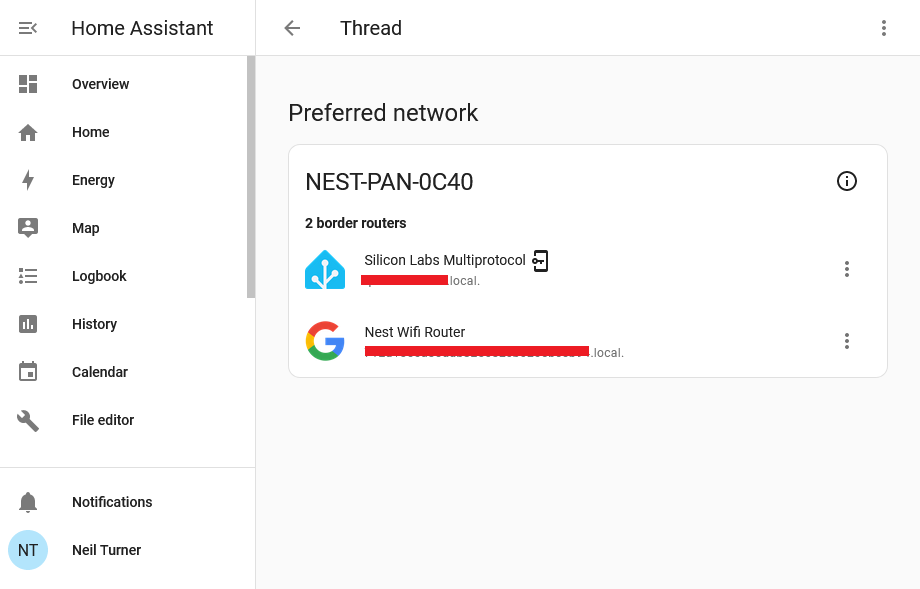
A screenshot of Home Assistant's Thread Integration showing two Open Thread Border Routers on the same network

If you use Home Assistant, and have an existing device that includes a Thread Border Router, then it should automatically add the Thread integration so that it can communicate with Matter devices. Some of Google’s Nest Hub and Nest Wifi devices include Thread, as do some of Apple’s newer Homepod devices and some of Amazon’s Echo devices. Because they broadcast their existence on your home Wifi network using mDNS, Home Assistant can detect their presence.

What Home Assistant can’t automatically do, however, is join these existing Thread networks. As this article from The Verge states, there isn’t a mechanism for sharing Thread network credentials between devices. That means that you can end up with a home that has several devices, all with the own Thread networks that don’t talk to each other, and your Home Assistant device not able to talk to any of them.

Hiding on your phone

The good news is that Home Assistant can access Thread network credentials from your phone, and this should allow you to join one of your existing Thread networks. In the above screenshot, I have my third party Thread dongle attached to the existing Nest thread network used by my Google Nest Wifi system.

The reason why I’m writing this blog post is that it’s not obvious how to enable Home Assistant to join a Thread network that it doesn’t have credentials for. Think of the Thread network credentials as being a bit like your Wifi password (or ‘pre-shared key’ to give it its official name). However, whilst you’ll usually either use whatever password is printed on your router, or a short password you set yourself, your Thread devices will come up with their own long alphanumeric key. And then, they’ll keep it a secret.

Thankfully, your phone should have this key – in Google Play Services on an Android device, and iCloud Keychain on an iOS device. And, thankfully, the Home Assistant Companion app for these platforms can access these credentials and provide them to Home Assistant, allowing you to connect to your existing Thread networks.

Matching the manufacturer to the network

But there’s a catch:

  • If you have a Google Wifi or Nest Hub device, then you’ll need an Android device to access the credentials.
  • If you have an Apple HomePod, then you’ll need an iOS device to access the credentials.

This is why I found it difficult to join the Thread network that my Google Wifi devices had created. I’m an iPhone user, and so it wasn’t able to access the credentials. They’re not available to the Google Home app on iOS, for example.

Thankfully, my wife has been a stubborn Android user for as long as I have been a stubborn iOS user. So, I just needed to ‘borrow’ her Android tablet, install the Google Home and Home Assistant Companion apps, and log in to both. Then, on the Home Assistant app, navigate to the Thread settings where an ‘Import Credentials‘ button appears. Once I tapped this, Home Assistant was able to join the Thread network created by my Google Wifi devices. Had I owned a HomePod, the process would have been similar.

One Thread network to mesh them all

Thread is a mesh network protocol, and having all devices on the same network is beneficial. Each additional device helps maintain the reach of the network. So it’s a shame that new devices just seem to set up their own networks, and don’t bother to try to join a Thread network that may already exist. Some of this is down to the Connectivity Standards Alliance, who haven’t specified a way of exchanging Thread network credentials. But it’s also worth noting that Matter and Thread are still very new standards. By comparison, Zigbee was designed in the 1990s and standardised over 20 years ago.

A few weeks ago, the Home Assistant developers hosted a livestream about ‘The State of Matter’, and there’s a useful summary here (which is good as the live stream was the best part of three hours). There’s still work to be done with supporting Thread networks in Home Assistant.