Last week, we took our nine-year-old for their first visit to the Jorvik Viking Centre in York. Now I grew up in York, and so have been many times over the years, but the last time Christine and I went was in 2012.
Jorvik is undoubtedly one of York’s best known tourist attractions, having opened celebrated its 40th anniversary last year. However, I’m writing about it now because, until the 23rd February, Jorvik is dressed up for winter.
Recreation of Jorvik ride
The main part of Jorvik sees visitors sitting in carriages that move around a recreation of York, or ‘Jorvik’ as it was known in the time of the Vikings. The carriages seat six, and feature a commentary in multiple languages. This part takes around 15 minutes, and the carriages rotate to highlight different parts of the recreated city. The buildings are laid out roughly as they were found when the site was excavated in the 1970s.
Before you go on the ride, there’s a glass floor to walk over which has a recreation of that 1970s archaeological dig. Previously, the site had been a factory for Cravens Confectionery, a now defunct sweet and chocolate manufacturer (alongside Rowntrees, now part of Nestlé, and Terry’s, now part of Mondelez). Local planning rules in York mean that an archaeological dig must take place whenever foundations are to be dug, and this large site resulted in a five year excavation that unveiled many artefacts of York’s past. Indeed, once the ride has finished, you can view some of the finds that were excavated, and find out more about how the Vikings settled in York.
As mentioned, Jorvik has been dressed up for winter, so at present there’s snow on all the recreated buildings and on the ground. If you’ve been to Jorvik recently, maybe give it another visit as it looks very different at present. I didn’t take any photos on my visit this time unfortunately.
Accessibility
Jorvik is accessed down some stairs, although there is a lift. If you’re a wheelchair user, you’ll need to book in advance by phone (not online), as only one of the carriages has been adapted for a wheelchair and the staff will need to give you a specific timeslot. However, all the carriages offer a hearing loop for hearing aid users, and subtitles for the commentary. Famously, Jorvik recreates the smells of Viking York and this is worth being prepared for if you’re sensitive to unusual scents. There’s an extensive accessibility page on Jorvik’s web site, detailing what you can expect and how they can help you.
The days of there being massive queues for Jorvik snaking around the Coppergate Shopping Centre are mostly gone, as you now need to pre-book. You should do this online if you can; you can book on your phone on arrival, but be prepared to have to come back later. We turned up without pre-booking and had to return after 45 minutes. However, the following day, there were signs up saying that all time slots were booked up and no more bookings were being taken that day.
I did this last year, and found it interesting to look back at the various statistics of things that I have done over the year. So, here it is again for 2024. It helps that loads of web sites now offer their own version of Spotify Wrapped.
Countries and counties visited
In 2024, I didn’t visit any countries besides England where I live.
Over the course of the year, I have spent at least some time in the following English counties:
West Yorkshire
North Yorkshire
South Yorkshire
Lincolnshire
Greater Manchester
Lancashire
Cheshire
Norfolk
Northumberland
County Durham
Merseyside
Greater London
West Midlands
This doesn’t include any counties that I have passed through without stopping. Compared to last year, I didn’t go to Leicestershire, Northamptonshire, Hertfordshire, Surrey or Hampshire, but I did go to Northumberland, County Durham, Merseyside, Greater London and the West Midlands which were all counties that I didn’t go to in 2023.
For context, I went as far east as 2023, but further north and (slightly) further west. However, as we didn’t go to France this year, I went significantly less far south.
Methods of transport used
Because we didn’t take our car to France, I didn’t drive as much this year – about 8000 miles, or 20% less than last year.
However, I have done more train travel. As well as my commute to work, we took the train to London in March. I have driven once in London and vowed never again; not least because our car is a diesel and therefore subject to additional charges inside the ULEZ. I also took our nine-year-old to Leeds last week on the train.
We’ve also been on trams a couple of times in Manchester – we tend to drive to Hollinwood tram stop and use Metrolink as a park and ride service. And whilst we didn’t cross the channel by ferry this year, we did cross the Mersey by ferry instead. Once again, no aeroplane flights in 2024.
Music listened to
Over the year, I scrobbled 12,671 tracks on last.fm, so slightly down on the 13,194 from 2023 (and 13,447 from 2022). That’s almost 35 songs per day, again down by about one a day from 2023. Assuming an average song is around three minutes, I listen to almost two hours of music every day on average. Spotify reckons that I listened to 436 minutes, or just over 7 hours of music on the 25 October.
Whilst I don’t exclusively listen to music on Spotify, on there, pop was my top genre, following by trance, rock, pop dance and Europop this year, according to my Spotify Wrapped. My most-listened to song was ‘React’ by Switch Disco featuring Ella Henderson and Robert Miles, which I listened to 14 times. Which is unsurprising as it’s one of our nine-year-old’s favourite songs, and samples Robert Miles’ ‘Children’.
My top artist was Armin van Buuren, which surprised me but there’s almost always one of his songs in my weekly Release Radar playlist. The rest of my top five were Patty Gurdy (blog post), Madam Misfit (blog post), David Guetta and Dua Lipa. I listened to 4,235 different bands and artists over the course of the year.
Books read and listened to
According to My Goodreads Year in Books for 2024, I read 77 books this year – 16 fewer than 2023. This amounts to 17,845 pages (although many of these were listened to as audiobooks).
The shortest book I read, at 32 pages long, was ‘The Giraffe, The Pelly and Me’ by Roald Dahl(sponsored link) – clearly, one of the books that I read to our nine-year-old this year. Meanwhile, I listened to 15 and a half hours of Nicola Coughlan reading ‘The Shadow Cabinet’ by Juno Dawson(sponsored link), which translates to 528 pages and the longest book. That’s longer in terms of pages than my longest book last year (‘What Just Happened?!’ by Marina Hyde(sponsored link) – 472 pages) but shorter in terms of listening time (17 hours).
Overall, the average length of book that I read was 231 pages, which is 11 more than 2023. Matt Haig’s ‘The Midnight Library’(sponsored link) was the most popular book that I read last year.
Beers and ciders consumed
I log the beers and ciders that I drink using Untappd, and these stats are from my year in beer. However, I only logged 11 such drinks this year (compared to 58 in 2022). I just haven’t been particularly interested in drinking beer and cider this year, and it’s notable that my favourite style was ‘non-alcoholic’.
Steps taken
My total steps taken was very similar to 2023. Overall I took 3,526,369 steps, which is 5% less than 2023 and means that, on average, I walked just under 10,000 steps per day. Overall that’s almost 2,600 kilometres (again down by around 100 compared to 2023). These are all tracked using my Fitbit Versa 3.
Time spent learning French
I started Duolingo’s French course on the 1st January 2022 (so I have a three year streak now), and in 2024, I spent 4,228 minutes learning – that’s 70 hours or an average of 12 minutes per day. Again, slightly down on 2023, but then we didn’t go to France this year. I also managed to remain in the Diamond League for the entire year, and successfully completed every friends quest and monthly challenge.
My Duolingo Score for French is 100, which means that I’m in the low B2 level (‘vantage’) of the CEFR for French. Currently Duolingo’s maximum score for French is 130, which is high B2 level and should be sufficient to study a university course taught in French. I’m hoping to achieve that by the end of 2025, although there’s a possibility of us going on holiday somewhere else which may see me switch languages for a bit.
Podcasts listened to
I listen to the majority of my podcasts through Overcast (with the remainder in BBC Sounds). My most listened to podcast was RHLSTP (RHLSTP!) with 78 hours over the year. The Guilty Feminist, The Comedian’s Comedian, The Bugle and The Infinite Monkey Cage make up the rest of my top 5. ‘Reasons Revisited’ is the now defunct podcast which was hosted by Ed Milliband and Geoff Lloyd; now that Ed is a government minister again, there are no more new episodes.
Tracking my podcast listening is a relatively new feature in Overcast and so this is a new statistic that I didn’t track in 2023.
Photos taken
Another new statistic that I didn’t track in 2023 was number of photos taken. It’s an estimate – basically it’s the total number of images backed up from my phone to Dropbox over the year. That could also include screenshots, memes and a few videos. Overall, it was 1,813 in 2024, compared to 1,417 in 2023. So whilst I may have been less active, listened to less music and not been abroad, I did take around 28% more photos in 2024.
So, that’s 2024 quantified, and a useful summary of the statistics from various web services that seem to spend their December telling me data they hold about me but in a nice way. I suppose I need to get a bit active in 2025 then.
I’m recycling this prediction from last year, as it didn’t happen then, and I doubt it’ll happen in 2025 either. Elon Musk is apparently going to co-lead Donald Trump’s ‘Department of Government Efficiency’ or ‘DOGE’, the name presumably chosen because Elon’s sense of humour hasn’t caught up with his age. So he’ll have more on his plate, and at a time when large numbers of people have left X which will affect advertising revenue. Remember that a lot of the money Elon used to buy Twitter (as-was) was loaned, and he’ll need to start paying those loans back at some point. Having briefly looked at Twitter again this morning, the adverts I saw were for mostly unknown companies, some of which had Community Notes attached to them basically stating they’re a scam. So that’s going well.
I still don’t think Elon will sell X this year, but I expect it’ll largely stagnate again.
Donald Trump will be terrible in ways we haven’t foreseen
But I also expect that there are things we don’t yet know about that Trump will react to in the worst way imaginable.
Trump and Musk will have a public fall-out
Musk’s control of X, and massive donations in the run-up to the election seemed to have allowed him to curry favour of Trump – hence Musk being allowed to co-lead DOGE. But I also expect that their egos will clash, and only one of these two people will be President. What the impact of this will be remains to be seen but I can’t help but see Elon as something of an Icarus character at present.
Labour will do poorly in local elections
There’s a likelihood of local elections on the 1st May 2025, although most of these are for county councils which the government is proposing to abolish, so some areas may have elections after all. Labour’s popularity has dive-bombed since winning the 2024 general election, as the government has introduced some unpopular policies. It’s a tactic that may pay off – the next general election may not be until 2029. But I imagine some people who voted Labour last time may be tempted to vote for other parties. And most of the council seats being defended are currently held by the Conservatives.
Reform UK, the party led by Nigel Farage, managed to return five MPs last year and is hoping to make gains in the local council elections too. And there’s a possibility of a massive cash injection from Musk to give them more resources to do this. I can see Reform putting up a strong challenge to Labour and the Conservatives in some seats. Whether they’ll win any, or just split the vote, remains to be seen.
There won’t be a General Election in 2025
Okay, this is a very easy prediction to make. General elections in the UK need to happen approximately every five years, and so the next one isn’t scheduled to 2029, as mentioned above. But governments can call early ones, and indeed this happened in 2017 and 2019.
The overall situation in the Middle East will improve
I don’t know if there will be a ceasefire in Gaza this year; I hoped for one last year, and it didn’t come to pass. But the situation in Syria is, at long last, encouraging, and I hope that the region as a whole stabilises.
Well, we’ll see what happens at the end of the year.
Good grief, has it really been 25 years since the Millennium?
As per usual, we didn’t stay up to see in the new year – that’s a thing we would have done years ago, but Christine and I are both in our forties now. I’m back at work tomorrow, but Christine has the rest of the week off.
January will be my blogiversary month again, and this time it’ll be 23 years (minus the four year hiatus) since I started blogging. Over the Christmas break, I reinstated over a hundred old blog posts from the 2010s from the Web Archive, so at least it looks like I’ve been regularly blogging throughout most of those 23 years.
My plan for 2025 is to carry on posting new blog entries every other day, as this seems like a manageable amount. I kept it up throughout most of 2024.
Things that are currently in our calendar include Sci-Fi Weekender again in March, down in Great Yarmouth, and our summer holiday in July. We’re not currently planning to go abroad again this year – instead, we’re off to Wales for a week. The last time we went to Wales was in 2018, back when Sci-Fi Weekender was hosted near Pwlleli, so although all three of us have been, our nine-year-old was only two and probably doesn’t remember it.
At some point, we’ll probably also go to London again, but we haven’t planned or booked it yet.
I also have some big admin things, as my passport needs renewing – technically it’s in date, but was issued more than 10 years ago which means it’s not valid in many countries. Like I said, I’m not planning to travel abroad, but passport renewal turnarounds seem pretty quick at the moment, and then it’s done. I’ll be keeping my current passport safe though, as it has some interesting stamps in it from my 2015 work trip to the Middle East.
January started with a trip to the Science and Industry Museum in Manchester, to have a look at their Operation Ouch exhibition about food and, um, poo. They have another exhibition about brains and bogeys in 2025 so I’m sure we’ll be back there soon. We also went to Eureka in Halifax; despite having an excellent children’s museum practically on our doorstep, we don’t go there that often. And there was also a brief trip to the Royal Armouries in Leeds.
I added a newsletter to the blog in May, which is a weekly list of new blog posts. So far, a grand total of four people are fully subscribed, although two were in December so maybe it’s picking up momentum?
In 2023, my dad had some health issues which persisted for some time into 2024, ultimately resulting in him going back into hospital again in June this year. Thankfully, this time the doctors treating him seemed to get on top of the issue, and so he’s now much better than he’s been in a while.
We didn’t have any days out in September (bar a trip to the cinema to see Inside Out 2), but I did write about travel more generally in a blog post about furthest compass points.
Another cinema trip, this time to bawl our eyes out at The Wild Robot which is as good as everyone says it is. Our (now) nine-year-old got one of the follow-on books as a birthday present. We also went to Bolling Hall Museum with friends, and had a return visit to the Askham Bryan Wildlife & Conservation Park (which I wrote about in 2017 when it first opened).
Throughout the year, I mostly stuck with my target of publishing a new blog post every other day, which I’m really pleased about. I don’t have the time to contribute something every day – I’ve tried that in the past and I just end up writing waffle to fill up space. And, as we’re a family of two full-time working parents, our ability to have fun days out is mostly limited to weekends and holidays. But we did have the opportunity to do a few fun things this year, and have some new experiences. Whilst we didn’t go abroad this year, we squeezed a lot into our summer holiday to Northumberland, and seeing thousands of puffins on the Farne Islands will be something I hope to remember for a long time.
Remember when Elon Musk took over Twitter in 2022 that it would become X, the ‘everything app’? I predicted that this wouldn’t happen in 2024, and, so far, it hasn’t. I don’t use X anymore, although I keep my account live, and upon logging in to write this, the only new things I could see were some kind of job search, and Grok, its AI ChatGPT competitor. This is a far cry from apps like WeChat.
One of the few things that Elon Musk is actually good at is over-promising and under-delivering, so this isn’t surprising. But X was supposed to be able to offer all sorts of new functionality, including financial services, if Musk were to be believed.
Labour will win the 2024 General Election
Yes, they did. But any other result was unlikely, to be fair. It has been a rocky ride since then, with Labour front-loading their time in power with unpopular policies like the limits on the Winter Fuel Payments. However, with the next general election not due until 2029, there’s time to re-build.
What I didn’t expect was how well the Liberal Democrats ended up doing in the election. Their tactics of concentrating on seats mainly in the south west massively paid off, with one of their best ever results.
There will be a ceasefire in Palestine
Nope, sadly. We’re over a year in now, and fighting continues. The recent regime change in Syria is a potential bright spot though.
But the war in Ukraine will continue
Yes, sadly. But it’s notable that things are not going well for Russia, with forces being drafted in from North Korea. That’s because Russia is rapidly running out of people fit to fight on the front in Ukraine, as shown by its massive fall in unemployment.
Energy prices in the UK will start to fall again
They did, and then they started going back up again in October, by around 10%. Overall, Brits are still paying significantly more for energy than we were a few years ago, although there are at least a wider range of tariffs available now.
The UK will do okay at Eurovision this year
No, we didn’t really. We came 18th out of 25th, with all the points coming from professional juries and none from the voting public. I was hoping we would do better, with Olly Alexander representing us, but I don’t think it was the best song.
Trump won’t win the US Presidential Election
Oh dear, a big no. Honestly, in the run-up to the election I though Kamala Harris had it in the bag, so I was surprised and disappointed that she didn’t win.
So, overall, half of my predictions were (mostly) correct. Which isn’t bad, although clearly there were some that I wanted to be correct but weren’t. Oh well.
So it’s time for a playlist of the month for December. I did my best Christmas songs last year, and whilst I considered doing a ‘worst Christmas songs’ playlist this time, I decided that no-one really wants that. Anyway, as it’s a new year in a few days’ time, here’s a New Year’s Day playlist. I cannot confirm or deny that these are the first 10 songs that I liked when searching for ‘new year’ on Spotify.
New Year’s Day by U2. I know this better as the 2003 remix, New Year’s Dub, but here’s the 1983 original. Yes, you’re old.
Happy New Year by Abba. I’m not a big Abba fan, and this was released before I was born. It’s a typical Abba song.
No Tears for New Years by Katy Perry. After a couple of older songs, here’s a brand new one from Perry’s latest album.
New Year’s Day by Taylor Swift. This is actually the first time I’ve included a Taylor Swift song in my playlists of the month. It’s from her sixth album Reputation, so, at the time of writing, there’s no (Taylor’s version).
New Year by Sugababes. The second single from their first album, and was released before any of their numerous line-up changes. I suppose you can consider it both a Christmas and New Year song.
New Year’s Revolution by NOFX. Start the new year with a bit of pop punk. Although “Next year is gonna be bad, The next one even worse” maybe isn’t the most upbeat way.
Is It New Year’s Yet? by Sabrina Carpenter. Another relatively new song, having been released last year.
New Year’s Resolution by Otis Redding and Carla Thomas. And now for a much, much older song; this one is from 1967. A bit of a slow jam this one.
What Are You Doing New Year’s Eve? by Ella Fitzgerald. Staying in the 1960s, Ella Fitzgerald is well known for her classic versions of Frosty the Snowman and Sleigh Ride, but she also did this New Year’s song too.
New Year’s Day by Rob Thomas. You may know Rob Thomas as the lead singer of Matchbox Twenty, or the guest vocalist on Carlos Santana’s song ‘Smooth’. This is another slow piano track.
Wishing you all a very Merry Christmas, a Joyeux Noël and a Feliz Navidad, should you be celebrating today.
Once again, we’re staying with my parents in York for Christmas, having arrived last night. Whilst I’ve been lucky enough to work somewhere that closed at 4pm last Friday, for Christine, Christmas Eve was a normal working day. We’re here in York for a few days.
As per usual, we’re not having turkey – it tends to fall to my mum to cook Christmas dinner and she’s not a fan of turkey. Instead, we’re having pork.
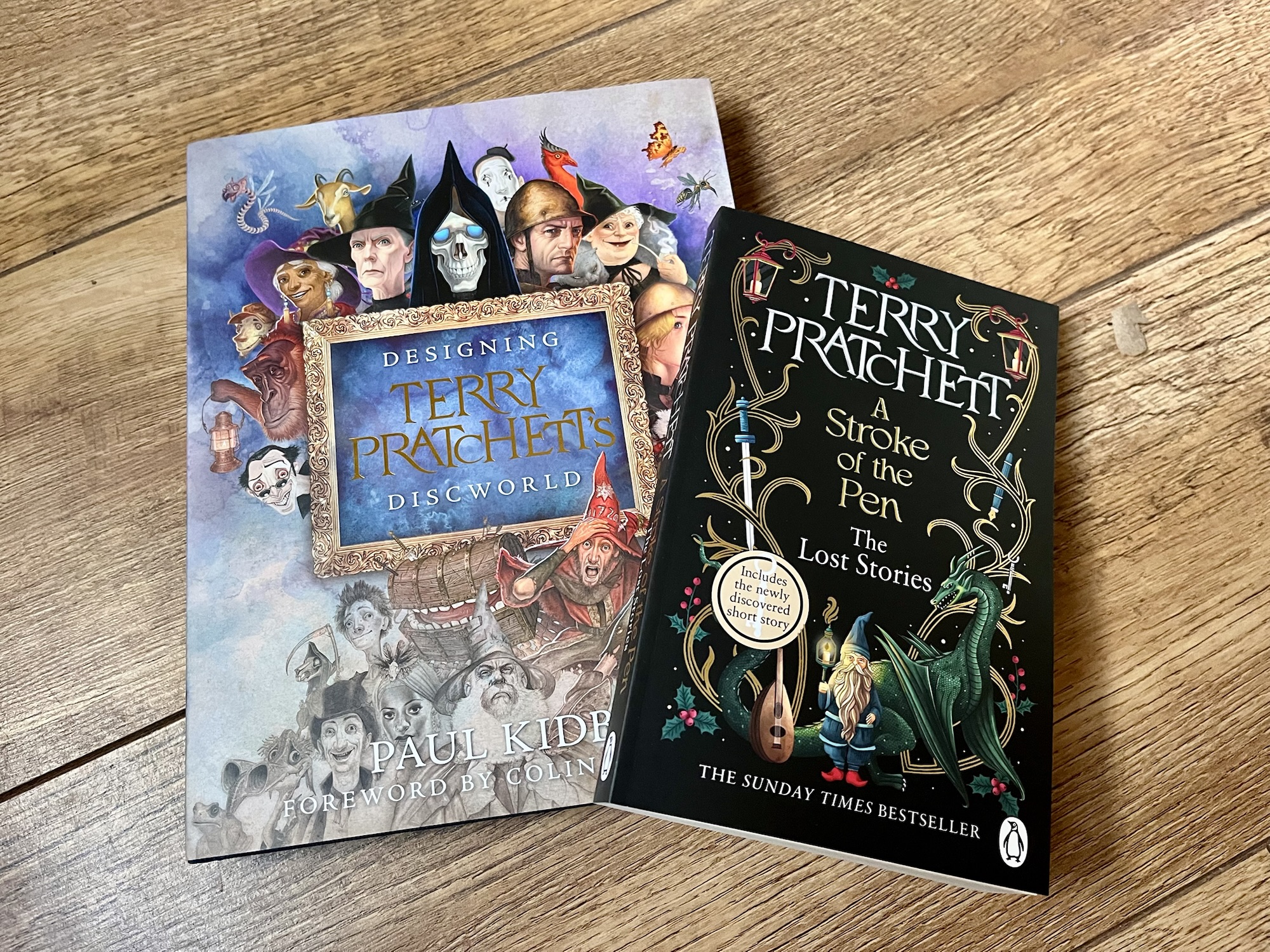
Pictured above are the gifts that I bought for Christine:
A Stroke of the Pen by Terry Pratchett(sponsored link) – a collection of his short stories that were originally published under the pseudonym Patrick Kearns. It includes a foreword by Neil Gaiman, his former collaborator on Good Omens, which was written before his accusations of sexual assault.
Yes, there’s a theme. My gift to her last year was Tiffany Aching’s Guide to Being a Witch(sponsored link), written by Rhianna Pratchett about her father’s characters, and required a bit of a mad goose chase around the various bookshops of West Yorkshire to find a copy. Thankfully, the glorious Waterstones in Bradford came up trumps.
I’ll have probably opened my presents by the time you read this, but I’m writing this ahead of time.
Between now and Christmas Eve, I’ll be posting about the best books that I’ve read (or the best audiobooks that I have listened to), just in case you need any last minute present ideas. On Thursday, I wrote about my favourite non-fiction books, and yesterday, my favourite adult fiction books. Today, I’m focussing on the fiction books that I’ve read to our soon-to-be nine year old this year. All of these are books that I have awarded five stars on Goodreads.
The links below to buy the books are all sponsored links to Amazon, but you’re welcome to borrow these from your local library, or buy them from an independent book shop.
Luna Wolf: Animal Wizard by Alesha Dixon
Our eight-year-old picked this out of the school library, and wasn’t aware that I used to listen to Alesha Dixon’s music as a teenager, from when she was part of the girl band Mis-teeq.
Luna Wolf: Animal Wizard is co-written by Dixon in collaboration with Katy Birchall, and is about a girl called Luna who has recently moved to London with her father, following her mother’s death. Through her volunteering at a local animal rescue centre, and her bond with one of the rescue dogs, she begins to uncover her mother’s exciting past, and a plot to capture some very special animals that her mother worked with.
The Day My Dog Got Famous by Jen Carney
We picked up The Day My Dog Got Famous from our local library, and it’s written and illustrated by Jen Carney. It follows the story of Ferris, who lives with his two mums, his dog Aldo, and a revolving door of foster brothers and sisters. Alas, despite Ferris’s attempts to make Aldo appear amazing, by drawing comics, Aldo is anything but, and this presents a problem when his next-door neighbour Destiny challenges him to a video contest.
I’ve read many books to our nine-year-old over the years, and this stood out because it’s a bit more inclusive than others. It’s nice to see families represented that don’t fit the standard 2.4 children pattern.
Rainbow Grey by Lauren Ellen Anderson
Another book which is written and illustrated by the author. Lauren Ellen Anderson is probably better known as the writer of the Amelia Fang books, which we haven’t yet started.
Rainbow Grey follows the character of Ray Grey, who is a ‘weatherling’ and lives high up in the clouds. But whilst every other weatherling has powers to control the weather, she doesn’t. Until one day, when she ventures down to earth, and encounters a mysterious artefact.
There are now three books in the Rainbow Grey series and we’ll be on the lookout for the others.
Honourable mentions
Whilst the above books were deserving of five stars, these are the four star children’s fiction books that I also read this year:
Truckers by Terry Pratchett. Our eight-year-old didn’t like this – the concept of a ‘department store’ is a little dated now – but I enjoyed it.
That’s the end of my 2024 lists of best books; hopefully, if you were stuck for ideas for Christmas presents, these will have helped you. Obviously, it’s cutting it a bit tight to order anything in time for Christmas now…
Between now and Christmas Eve, I’ll be posting about the best books that I’ve read (or the best audiobooks that I have listened to), just in case you need any last minute present ideas. On Thursday, I wrote about my favourite non-fiction books, and today, I’m focussing on the fiction books aimed at grown-ups that I’ve read or listened to this year. All of these are books that I have awarded five stars on Goodreads.
The links below to buy the books are all sponsored links to Amazon, but you’re welcome to borrow these from your local library, or buy them from an independent book shop.
Baby Does A Runner by Anita Rani
Okay, slight conflict of interest time: Anita Rani is our chancellor at work, although it’s a largely ceremonial role and no, I haven’t actually met her in person yet. In 2021, she published her memoirs, The Right Sort of Girl, which were great – having spent some of my formative years in Bradford, I related to a lot of Rani’s experiences. Baby Does A Runner is fiction, and is about a young British-Asian woman who sets off to her family’s ancestral home in India to uncover a family secret. Whilst it’s not a true story, there’s a lot about topics like the Partition of India which certainly wasn’t taught to me in history lessons at school. It does well to tackle colonial-era views of India.
Rani reads the audiobook herself, and does an excellent job of it, giving each character a unique voice and accent.
Her Majesty’s Royal Coven and The Shadow Cabinet by Juno Dawson
I’ve grouped these books together as they form the first two books in a trilogy; book three, Human Rites, is due out in summer 2025. Book one, Her Majesty’s Royal Coven, follows four witches, Niamh, Leonie, Elle and Helena who knew each other from school, and now each have their own professional working lives. Only Helena remains part of the secretive government department, Her Majesty’s Royal Coven, and there are rumours that a ‘sullied child’ will bring forth Leviathan and a terrible disaster.
The Shadow Cabinet picks up from the same cliff-hanger scene at the end of the first book, and sees Leonie take off on a wild goose chase around Europe. Meanwhile, we find out about The Shadow Cabinet, a board consisting of witches, warlocks and so-called ‘mundanes’ (non-magic users) in government. Again, there’s a cliff-hanger at the end of this book, and I’ll have to wait several more months to find out how it ends.
In the meantime, there’s a prequel, Queen B, set in Tudor times, which I’ve yet to read.
Both books come highly recommended. Again, I relate to the settings, as many scenes take place just up the road from us in Hebden Bridge, and Hardcastle Crags in particular. They’re also the first fiction books that I’ve read/listened to by Juno Dawson; I’ve previously enjoyed her non-fiction books, The Gender Games and What’s The T?
Both audiobooks are read by Nicola Coughlan, known for her roles in Derry Girls and the later series of Bridgerton, and her narration is excellent.
The Midnight Library by Matt Haig
Another author for which I’ve only really read their non-fiction before. I believe I picked up The Midnight Library cheaply in an Audible daily deal, and my only regret is that I didn’t listen to it sooner. It goes to some dark places; consider this a trigger warning for suicide, and a subject that Matt Haig has written extensively about in his non-fiction books.
The story follows Nora, who’s reached rock bottom and sees no way out. Except, she ends up in a mysterious library, seemingly staffed by the librarian from her school days, and each book shows her a possible life that she could have lived, had she made different decisions. The ending wasn’t quite as predictable as it could have been, which kept the book interesting, and it is very well written.
The actress Carey Mulligan narrates the audiobook and does a decent job of it.
Honourable mentions
Whilst the above books were deserving of five stars, these are the four star fiction books that I also read this year: