Upgrading to Windows 8.1

Screenshot of the start screen in Windows 8.1

Yesterday I upgraded to Windows 8.1. I run Windows in a virtual machine on my Mac using VirtualBox, and I upgraded it from Vista almost exactly a year ago. The process was reasonably smooth, in comparison to last year’s debacle, but it wasn’t without some minor incidents.

Getting started

First of all, I wasn’t quite sure how one would go about upgrading. So I opened up Internet Explorer and searched Bing, and it told me to open Windows Store, the app store for Windows 8. So I did, and… nothing. I couldn’t see anything that would suggest what to do next.

Thankfully this page came up with a possible solution. I hadn’t booted Windows 8 in a few months and so I was behind on installing fixes from Windows Update. 35 updates were presented to me; after the first run, all but 1 of these failed, so I rebooted and tried again. This time 4 installed correctly, but again, the others failed. Finally after another reboot I got the rest to install, and so I then rebooted again. This time, upon opening the Windows Store app a full-screen button for installing Windows 8.1 came up.

The first attempt at downloading the update failed, but then it got under way on the second attempt.

Installation

At this point I went to bed and left it to install overnight. I woke up to find the installer asking me to agree to the new license agreement, and to enter my details for my Microsoft Account. Then, it did a little housekeeping, and before long I was back at the Start screen, freshly upgraded. Post-upgrade, there are a couple of contextual tutorials that show you how to do things in the new ‘modern’ interface, which helps.

The verdict on Windows 8.1

I haven’t spent much time with Windows 8.1 post-upgrade but it does seem to be a minor improvement. You can do more things in the modern interface without dropping back to the Desktop – Control Panel, for example, has been largely replicated. However, I still find it harder to navigate than before, with some apps hidden away on the ‘All Apps’ menu, and it’s more difficult to find the ‘Shut Down’ button than on Windows 7. And the new interface is still over-optimised for touchscreen computers – even with an Apple Magic Mouse with sideways scrolling, it still takes longer to do things. Having to hold the mouse pointer in a small corner of the screen to then bring up menus is slow compared to clicking.

Using Windows 8.1 makes you realise why Apple keeps OS X on desktops and iOS and touchscreen devices. Having the old desktop and new modern interface in the same operating system feels like a kludge, especially when you get booted out of one into the other unexpectedly (which happens now and again). And trying to enable it for both touchscreens and mouse-controlled computers results in a compromise that disadvantages the latter, in my opinion.

I don’t think these problems are insurmountable, but let’s just say that I hope there’s a Windows 8.2 that fixes them.

The Transpennine Real Ale Trail

Huddersfield Station

On Saturday myself and a group of friends went to do the Transpennine Real Ale Trail. Many of the stations on the railway line between Leeds and Manchester via Huddersfield have pubs serving real ale either on the station or nearby, and eight of these form part of an official trail.

Though it’s been done for years, the trail grew in popularity following the broadcast of Oz and James Drink to Britain, a BBC TV show with Oz Clarke and Top Gear’s James May which was broadcast in 2009. The number of people attempting the real ale trail increased significantly, although sadly many weren’t in it for the real ale. Go back a to any Saturday afternoon earlier this year and you would expect to see large groups of people – mostly men – frequently in fancy dress, drinking lager and engaging in anti-social behaviour.

A particular problem point was the small and usually quiet village of Marsden. Though Marsden has a pub right by the railway station, conveniently called The Railway, many prefer to go into the village to the Riverhead Brewery Tap and others. This BBC News video gives you an idea of how bad it was last year.

Since then, many of the pubs on the route have stopped serving lager and spirits on Saturdays, and will refuse service to those in fancy dress. In other words, patrons have to drink real ale or soft drinks. And, based on our experiences, it seems to be working – whilst a Saturday in late October is bound to be less busy than in mid-summer, the route was much quieter and the people there were better behaved. At Slaithwaite (pronounced ‘slowwwit’) station, Northern Rail had provided a couple of marshals to manage the numbers of people on the small platforms. And at Huddersfield there were a number of British Transport Police officers around, but that may be more to do with the local football team playing local rivals Leeds United at home that day.

On our visit, we went to six of the eight ‘main’ pubs on the trail. Starting at Stalybridge, we then called at Greenfield, Marsden and Slaithwaite, before then skipping straight to Dewsbury and then back to Mirfield. By this point it was getting late, so we didn’t go to Huddersfield or Batley this time around.

I’ve done Huddersfield many times before though, and the station actually plays host to two pubs. They’re both on platform 1 – The Kings Head and The Head of Steam – although the introduction of ticket barriers means that you need to exist the station to access them now. The Head of Steam is my favourite and has the largest overall drinks selection (including a good cider menu) but real ale drinkers tend to prefer The Kings Head as its ale selection is stronger.

It’s a good way to spend an afternoon with friends and I’m pleased that the solution to the problems with rowdy drinkers seems to have worked. Other ale trails are available around the country and this month’s CAMRA magazine has a special feature on pubs at stations, which seem to be enjoying something of a renaissance of late. CAMRA also published a book last year; it’s out of stock on Amazon unfortunately but is available in CAMRA’s own shop, and members get £2 off.

Mavericks – my review

A screenshot of Finder on Mac OS X Mavericks

Following Apple’s keynote presentation on Tuesday, OS X 10.9, aka ‘Mavericks’ was released. Apple broke its long-standing tradition of charging for OS X updates by offering Mavericks for free, and on any machine capable of running Lion. Furthermore, it looks like a direct upgrade from Snow Leopard to Mavericks is possible on those machines not yet updated, which may go some way in explaining why Mavericks is over five gigabytes in size.

By making Mavericks free, Apple can now dodge questions about whether the update is value for money. I know some felt that Mountain Lion wasn’t really worth the cost, even though it was only $20 and was already the cheapest OS X update to date (barring the ancient 10.1 ‘Cheetah’ update from 10.0). That being said, my early plays with it suggest that its value is at least that of Mountain Lion, and therefore a worthwhile update.

Installing Mavericks

Having been up at 5:45am on Tuesday (for work) I decided not to attempt to install Mavericks as soon as it came out, although I did watch most of Apple’s keynote live. Instead I waited until yesterday, and gave myself things to do whilst it installed, which, from beginning the download to completing installation, took around two hours on my early 2010-vintage Mac Mini. Then there were a raft of software updates to install afterwards – iPhoto, iTunes, XCode, a Digital Camera RAW update and improvements to some of the voices for the text-to-speech feature, plus various third-party apps. This took another hour or so but was technically optional.

Up and running

Once I had Mavericks up and running, it seemed to work fine. Well, no different to Mountain Lion, anyway. My Mac still takes quite a while to boot up but that’s probably to do with various apps and utilities that I have running. I did have to fiddle with the screen settings, as for some reason Mavericks decided to set my two screens to be an extended desktop and not mirrored like I prefer – my second screen is actually the living room television. Mavericks also changed some of my Magic Mouse’s settings so that left and right swiped no longer did anything. Frustrating, but easily changed back.

Scrolling seems smoother, which is nice, and Launchpad is now quite a bit faster – especially when opening stacks. This is a relief as it’s the main way I access apps that aren’t in the Dock.

Activity Monitor

The Activity Monitor saw major changes in Mavericks, with a new tabbed interface. I like it, and it feels simpler now, even though it shows more information. A new ‘Energy’ tab shows which apps are putting the most strain on your battery, if your Mac is a laptop – mine isn’t, but it’s still interesting to see which apps are power-hungry. Predictably Firefox was using the most energy whilst I was writing this but some background processes were also quite hungry too, so I may have to re-evaluate which apps run on startup.

It also tells you whether OS X is making use of one of its new features, Compressed Memory. When you start to run out of available RAM, OS X will now compress some of the data in RAM to make more available. This does add a bit of processing overhead, but it’s still faster than using a swap file (virtual memory) on a hard disk or even a solid state drive (SSD). I noticed that since installing Mavericks, OS X attempts to use as much RAM as possible to minimise swap file usage.

Maps

I had a brief play with the new Maps app. It’s basically the same as the iOS app, which sadly means it’s full of the same crappy data. A year on and there are still big problems with missing places (such as Bradford’s Alhambra Theatre), or places that have long-since closed.

I did note that my search history from my iPhone carried over to my Mac, which is interesting. However, I’ll be sticking to Google Maps for now.

Finder

Finder now has tabs in Mavericks; I’m sure some people will be overjoyed at this but I’m not too bothered. You can at least drag documents between tabs so I suppose I may use it from time to time. I don’t think I’ll use tags though, as I never used the labels that came before.

Miscellaneous points

  • The CPU coalescing feature is quite clever, but of limited use to a desktop user like me. I’ve heard that it is effective at extending battery life, which is good – it’s always nice to have a battery that lasts longer after an update than the more usual opposite.
  • The colours seem brighter on my screen, but that may be co-incidental with me changing the screen settings.
  • I like how newly-installed or updated apps sparkle in Launchpad.
  • I’m aware that there are major problems between Mail and Gmail accounts, however, I’ve recently stopped using Mail so thankfully I haven’t experienced this first hand.
  • LinkedIn is now supported alongside Twitter and Facebook. You can post status updates from the Notification Centre, and your connections will appear in Contacts. I wonder if iOS will follow suit in a forthcoming update.
  • I’ve turned on the iCloud Keychain. To enable it you have to also tell OS X to require a password to unlock your Mac if left idle, which isn’t done in a very intuitive way.
  • Users of older versions of Parallels desktop have found out that it doesn’t work on Mavericks. The latest version does but it’s a paid-for update. Consequentially my article about converting Parallels VMs to VirtualBox has been well-visited over the past few hours.

Elsewhere

As usual, John Siracusa has written a very extensive review of Mavericks at Ars Technica, which is well worth reading as it explains how some of the new performance features work. Dave2 is mostly positive about it too, although Lifehacker’s initial review is less so.

For me personally, it seems fine. Those wanting to err on the side of caution may want to wait for the inevitable 10.9.1 update which will follow in a few weeks (especially if you use Gmail in Mail), but I feel it’s good enough to take the plunge now. And you can’t argue with the price.

Armley Mills Industrial Museum

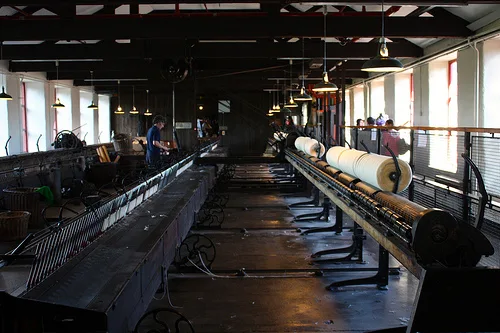
Photo of the inside of Armley Mills Industrial Museum

Yesterday Christine and I, along with a few friends, went to the Leeds Industrial Museum at Armley Mills.

Regular readers will note that this is the third industrial museum in the area that I’ve visited recently. Last year we went to the Bradford Industrial Museum, which is open regularly. And in August this year we went to the Calderdale Industrial Museum, which is only open select weekends throughout the year. The Leeds Industrial Museum is housed at Armley Mills, towards Kirkstall, and straddling a patch of land between the River Aire and Leeds Liverpool Canal.

Our reason for visiting was for the twice-annual Leeds Steampunk Market. It had moved to Armley Mills from its usual venue of Left Bank near Burley Park. Rather than being arranged in one place in a main hall, this time the market was spread out across the museum and over the four floors, including outside. This made it seem less busy, but well over 600 people had come through the door on Saturday, and the numbers were looking similarly healthy on Sunday when we visited. A 50% discount for those who came dressed in costume may well have helped, and indeed Christine and I took advantage of this.

#steampunk

This was our third visit to the Steampunk market and we have now both amassed the basic Steampunk outfit. Sadly we didn’t take any photos this time (bar the Instagram image above) but my spray-painted gold goggles attached to a top hat made an outing. I suppose over time we’ll be able to come closer to some of the outfits that the more committed followers of the Steampunk subculture have. As usual there were some excellent costumes on show by other attendees.

As for the actual museum at Armley Mills, I managed to take a few photos (uploaded to Flickr of course) but to be honest we will need to go back and actually look at the exhibits properly next time. Especially as in some cases it was difficult to tell if something was a museum artefact or a piece of Steampunk art.

The next Steampunk market in Leeds will be at the White Cloth Gallery on November 30th and December 1st. I may be there.

Assorted notes on London

The Thames, from Blackfriars
  • Normally we take a rolling case with us to London. This time we packed lightly and ensured that all of our clothes fitted into a rucksack (for me) and a shoulder bag (for Christine). This meant that we could use lockers and cloakrooms in the various museums that we visited, which were free or cost considerably less than the Left Luggage facilities at stations.
  • For a nice view of the River Thames, go to Blackfriars station. It has recently been rebuilt, and now spans the Thames with entrances on both the north and south banks, however more importantly big glass windows have been provided. The photo taken above was taken from Platform 1, looking east, and frames Tower Bridge really well.
  • We saw a pair of urban foxes. They didn’t make any of these noises. It’s not the first time I’ve seen an urban fox but I hadn’t been so close to one before.
  • On our second night in London we stayed at the Pullman Hotel on Euston Road – roughly halfway between St Pancras and Euston stations. It’s not a hotel we’d normally be able to afford but it was definitely worth staying at (certainly better than our Friday night hotel). You also get brilliant views of London from the upper floors, and you don’t need to have a room there to use the lifts.
  • We had a mosey out to the Thames Barrier, which as of 2005 is much easier to get to thanks to the Docklands Light Railway. Alight at Pontoon Dock, and then have a nice stroll through Thames Barrier Park which is in itself quite a nice place.
  • The Museum of London is well worth visiting. It’s free and offers an interesting history of the city, from early settlers to the present day. There’s even a small collection of items from last year’s Olympic Games. We didn’t have chance to visit the Museum of London Docklands this time though.
  • The Wellcome Collection looked interesting but most of it is closed until the spring, so we didn’t spend much time there. The bookshop is excellent though.
  • The British Library also has an exhibition of interesting texts in its archives, including two of the four surviving copies of Magna Carta, which will be 800 years old in a couple of years’ time. There’s enough there to kill time for an hour or so.

On a top secret hotel mission

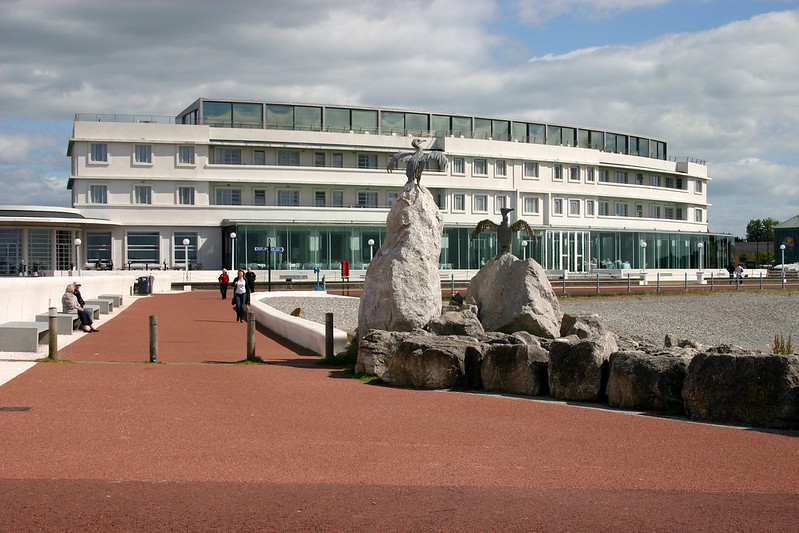
Midland Hotel

Christine and I are back from a lovely weekend in London. We decided to try out lastminute.com‘s ‘Top Secret Hotels’ for one of the nights. This is where the web site offers a deep discount at a (usually) four or five star hotel, but it doesn’t show you the name or any specific information about the hotel until you have booked. This means that premium hotels can fill spare rooms without damaging their reputation by lowering prices.

The hotel we booked was listed as having four stars, four out of five on TripAdvisor, and was located somewhere between Kensington and Fulham. Once the email came through, it was revealed to be the Millennium and Copthorne Hotels, located at Stamford Bridge, the ground for Chelsea Football Club. Apparently, we saved around £45 on the cost of the room.

Note that the hotel pictured above is The Midland Hotel in Morecambe, Lancashire. I didn’t take a picture of the hotel we stayed at this time.

Unfortunately the hotel was a bit disappointing. I’ve gone into more detail on a TripAdvisor review (awaiting moderation) but I would give the hotel three out of five, based on the price we paid; at full price, probably two out of five. There were a few things wrong with the room, but also, when booking a secret hotel, the bed layout cannot be guaranteed. So whilst we were hoping for a double room, we actually got a twin room. It does clearly state that this could happen when you book, but it’s worth knowing about.

Frankly, I’ve stayed at much nicer budget hotels, like Premier Inn and Holiday Inn Express, and paid less for the privilege. Whilst it was interesting to try somewhere a bit mysterious, I think we’ll stick with the hotel brands that we know and feel comfortable with next time.

The Sowerby Bridge Geese

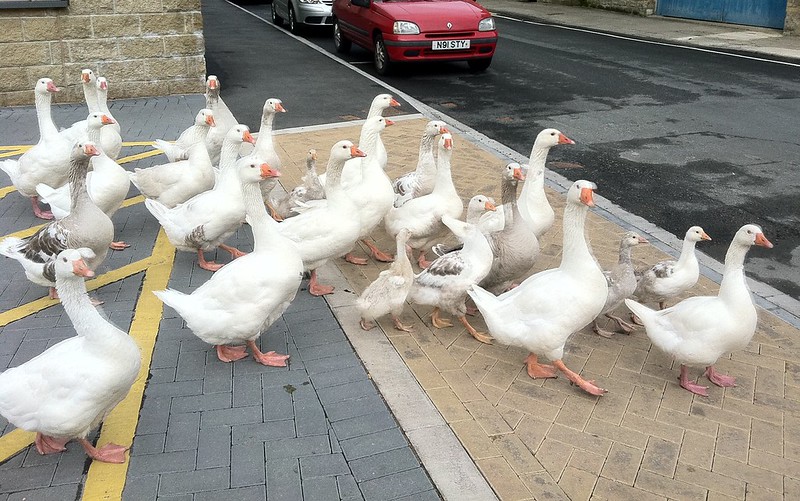
Geese

Pictured above are some of the geese that make up a gaggle in my home town of Sowerby Bridge. They nominally live on the River Ryburn, the smaller of Sowerby Bridge’s two rivers which joins the River Calder in the town. Usually they are found on the river outside the swimming pool, but occasionally they waddle a little further afield.

They never stray very far. I’ve never seen any of them fly – they will occasionally flap their wings but they don’t seem to be capable of using them. They just waddle or swim, and the furthest they get is a couple of streets away.

There are probably around 20 of them, and they tend to move together as one big gaggle. This helps when trying to cross the busy A58 road that runs through the town, which they often do, as this video shows. And frequently it’s at rush hour.

Their presence in the town is, unsurprisingly, controversial. Letters from concerned nearby residents have been sent to the local paper and local councillors. The local council have asked that the public do not feed them, and a sign stating this has appeared at one of their regular haunts. However it’s fair to say this sign is regularly ignored as I’ve often seen people throwing bread into the river for them.

I have to admit I’m mostly on the side of the geese (even if their honking occasionally wakes me up on weekend mornings). Whilst they can be a bit threatening to small children and have a habit of defecating a lot, I don’t think there are many humane ways of getting rid of them. And I think they add character to the town, especially in the spring when the newborn goslings hatch. There’s even a Facebook fan page with over 800 ‘likes’. They’ve been here longer than anyone can remember, and I don’t think the town would be the same without them.

My Apple predictions – how did I do?

iPhone 4, meet iPhone 5

Following yesterday’s predictions that I made, we now know what Apple will be launching later this month. Were my predictions correct?

New iPhone models

I was pretty-much bang on about the two new iPhones – the cheaper 5C and the premium 5S. There were so many leaks of information that these were expected by many, and so it was a bit of let-down when Apple were unable to surprise us. As predicted there would be a new processor, which was indeed the A7, although the M7 co-processor to manage the motion sensors was a surprise. And as expected the iPhone 5S will ship with a fingerprint scanner on the home button.

The iPhone 5C is, as expected, a cheaper plastic phone, but it’s not significantly cheaper than the iPhone 5 was. Unless Apple will be selling it more cheaply in emerging markets and then pricing it higher in the more lucrative Western markets.

Both handsets will actually come in five versions (so ten in total), with different models for different networks, due to the big variation in frequency bands for 4G LTE. Vodafone is listed in the UK, meaning that the 5S and 5C will work on its 4G network. The iPhone 5 didn’t because Vodafone and O2 will be using the frequency bands that were freed up when analogue terrestrial television broadcasts were turned off last year. Whilst O2 isn’t listed, as the original launch partner for the iPhone in the UK I expect this is an oversight and that they will offer 4G services on the new handsets, and I expect 3 will do as they will offer 4G on the existing iPhone 5 last this year.

Apple have unexpectedly returned to the case market with new cases for both models. There’s also a new docks – one for the 5 and 5S, and one for the 5C.

Retiring of the old models.

Nope. Got this wrong. The iPad 2 and iPhone 4S are still on sale, and even the iPhone 4 will be available in China. Apple did kill off one its phones though, and surprisingly it was the iPhone 5. The 5C and 5S will therefore completely replace it. Normally Apple keep at least the previous two models on sale, although the third-generation iPad with retina display was retired after 8 months so it’s not completely unheard of.

The iPod Classic gets a stay of execution

I fully expected Apple to finally give the iPod Classic the Old Yeller treatment, but it’s still on sale, surprisingly. There were no major changes to the iPod range yesterday (with one exception, see below) and my hope of a 128 GB iPod Touch didn’t become a reality.

No NFC

As expected, Apple have not added support for NFC to their phones. I agree with Apple that Bluetooth SMART has more potential than NFC.

No Apple TV changes

Sadly there are no changes coming to the Apple TV, despite my hopes. Apple needs to offer more services on the platform if it hopes to be competitive against rivals like Roku, particularly outside of the US.

And everything else

We didn’t get to see the much-rumoured smart watch yesterday. I imagine Apple are working on one but are waiting until they can offer something significantly better than the competition. Samsung released its Galaxy Gear smartwatch to very mixed reviews last week and I’ve heard quite a few people have been underwhelmed by the Pebble smartwatch. Maybe next time.

Apple made a very slight change to the iPod range; the ‘space grey’ colour was added to the existing models. Other than that, there were no changes to the iPod line-up.

After two years, the Cards app for iOS, which allowed you turn your pictures into greetings cards, was discontinued. I don’t know anyone who used this so this isn’t surprising. That being said, I don’t know anyone who uses the ‘Stocks’ app that comes with every iPhone and can’t be deleted, yet it’s still there in iOS 7.

My predictions for today’s Apple event

Invite to Apple's 10th September event

Today Apple is announcing something, at around 6pm BST. It’s probably the seventh iteration of the iPhone, and the rumours suggest that this is the case, but until Tim Cook steps up on stage this evening we won’t know for sure.

I’ve got a few predictions, mostly based on the rumours that I’ve been reading over the past few weeks. I don’t actively seek out rumours but they do appear on sites like The Unofficial Apple Weblog and Twitter from time to time. So here’s what I expect:

Two new iPhone models, including a budget model

There are credible rumours that Apple will release two new models of the iPhone today – a new iPhone 5S, and a cheaper iPhone 5C. The 5S will probably have the same form factor as the existing iPhone 5 but have some extra hardware features and a beefed-up processor – possibly the A6X as used in the fourth-generation iPad but maybe a new A7 processor. I also believe the rumours of a fingerprint scanner on the home button.

The iPhone 5C will be a cheaper and more plasticy model that will be particularly aimed at emerging markets like China, but I think it will also do well in western markets. I know there are people out there who want to buy an iPhone but can’t justify the cost, and don’t want an old model.

The iPhone 4, 4S and iPad 2 will be retired

The three year old iPhone 4 is sure to be retired but I expect the 4S to go, and the iPad 2. This will mean that all of Apple’s mobile products will use the Lightning connector, rather than the 30-pin Dock connector, and all of its phones will have the same screen size.

The iPod Classic will be retired

It’s been 4 years since the last update to the iPod Classic, which is the only remaining iPod model to include a hard disk (as opposed to flash memory). Wired thinks it’ll be dropped and I agree. I hope that a new 128 GB iPod Touch will be released, so that Apple can still cater for those who want to be able to play their entire large music collection on the go.

Neither of the new iPhones will have NFC

NFC, or near-field communication, is becoming standard on many Android and Windows phones. But I can’t see Apple adopting it. They’ll go for Bluetooth SMART instead. Because the iPhone already has Bluetooth, this shouldn’t require any new hardware, and should be better for battery life too.

According to this AppleInsider article, this will be branded as iBeacons in iOS 7, and will be available not only in Apple’s new handsets, but the existing iPhone 4S and 5 as well.

Third-party apps for the Apple TV

Okay, this is less a prediction and more of a hope. Apple has been steadily increasing the number of platform partners for the Apple TV but it’s still very US-centric. The only UK channel available at present is Sky News.

I hope that Apple opens an App Store for the Apple TV, opening the door to apps such as BBC iPlayer, 4oD, Demand 5, ITV Player, Now TV and the like. This will make the device significantly more useful.

We will find out in just over eight hours’ time what comes to pass.

Calderdale Industrial Museum

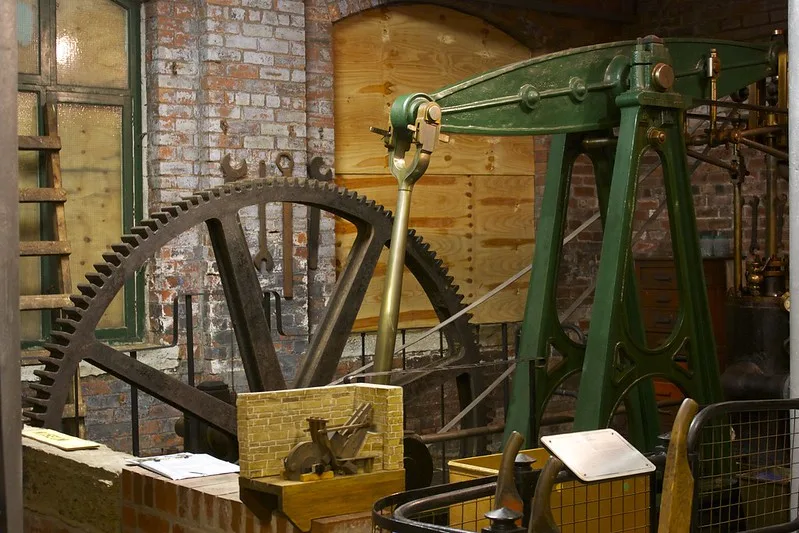
Calderdale Industrial Museum

A few weeks ago Christine and I went to the Calderdale Industrial Museum in Halifax. The museum opened in 1985, but sadly closed only a few years later and has been mothballed ever since. A group of volunteers called CIMA are working to get the museum open again, and the 10th August was one of their regular open days where visitors could have a look around. I’ve uploaded the photos of my visit to Flickr.

Not all of the museum is accessible; the volunteers have been working for a couple of years but some parts are still out of bounds. However, there are three floors of exhibits, which include stationary engines like the one pictured, weaving machines and histories of some of the major companies that were founded in Halifax. These include Percy Shaw’s catseyes company, Mackintosh – maker of Quality Street and now a part of Nestlé, and the Halifax Bank.

A lot of the windows are still boarded up and not all of the light bulbs had been replaced, so the museum is quite dark. The paintwork on the walls needs some attention as well, as shown in some of my photos.

It was my first visit, but Christine had been as a child, back when the museum was open properly in the 1980s. I think she was disappointed at how the museum had been left to rot for so long. The volunteers have done well but will have their work cut out to get the museum back to where it was when it was closed, never mind taking it forward. I also got the feeling that the local council, which still owns the museum, isn’t being 100% co-operative.

There are also question marks hanging over the museum’s future. It backs on to The Piece Hall, which in January will under-go a 15-month modernisation, and it is next to the proposed site for Halifax’s new central library. The plans may see the museum building being cut down somewhat, although the artists’ impressions do at least show it so hopefully it’ll still be around in future.

There are two more open days planned for 2013, on the 14th and 15th September as part of the national Heritage Open Days events. If you’re in the area I would definitely recommend a visit – it’s easy to get to as it’s just around the corner from Halifax station. Entry is free, but I’m sure CIMA would be delighted if you were able to donate some money to help them get the museum open again more often.