New new new iPad

A photo of an iPad Air 6

A couple of weeks ago, I bought myself a new iPad. I’ve gone for the 6th generation iPad Air, which has now been discontinued having been on sale for around 10 months until March this year. The fact that it’s discontinued is why I’ve bought an iPad Air, rather than a standard iPad; I ended up buying it cheaply from Costco for £360, versus around £300 for a standard iPad.

Saying goodbye to my old iPad

My previous iPad was a standard iPad 6, and I’d had it for seven years. During that time it was used almost daily, and it was starting to show its age. As well as a dented case on the back, the battery was not holding charge well and it became very picky about which Lightning cable it would actually charge from. It’s also no longer fully supported by Apple; it can only run iOS 17 which has only had minor security updates since last autumn. I expect it won’t get any updates at all soon. Still, seven years of almost daily use is pretty good going. Before that, I’d had an iPad Mini 2 for four years, and before that, a year with a second-hand original iPad which was the first one that I owned.

This new iPad Air 6 is a Wi-Fi only model, whereas my previous iPad also had cellular data. My main reason for going Wi-Fi-only was to take advantage of the cheap deal at Costco, but also I don’t use cellular data as much as I used to. Back in 2018, I was spending quite a bit of time on trains that didn’t have Wi-Fi; nowadays, I tend to only commute to work twice a week, and the trains all have Wi-Fi now. I also have a higher data allowance on my mobile plan, and so I can hotspot off my iPhone if needed.

Size, performance and connectivity

Being an iPad Air, it sits between the standard iPad, and the iPad Pro in terms of performance. It has one of Apple’s M-class processors, which you see in the iPad Pro and its Mac range, rather than the A-class processors that come in the standard iPad and on iPhones. That also means it has Apple Intelligence, Apple’s on-device AI. Not that I’ve really used Apple Intelligence much, apart from some minor photo editing. But overall, I’m very happy with the performance, compared to my previous model.

Also compared to my previous model, the 11″ iPad Air 6 that I bought is about the same size and weight. There is also a 13″ model, but this is fine for me and I’m used to the size.

Whilst the case is roughly the same size, with the narrower bezel, the screen has a much larger viewable area, and with a higher resolution. To unlock the screen, the iPad Air moves the Touch ID sensor to the lock button on top (only the iPad Pro has Face ID for unlocking). That takes a little getting used to; to unlock, you rest your finger on the button, rather than pressing it.

Apple is phasing out the Lightning connector, and all new iPads now come with a standard USB-C port, rather than Lightning. In the box, there’s a USB-C to C cable, but no AC adaptor; which is fine for me as we have several. Christine, being more of the Android persuasion, already has plenty of USB-C to C cables as well. There’s also no 3.5mm audio socket, so I’ve already picked up a USB-C to 3.5mm adaptor. Speaking of audio, there are speakers on both short sides of the iPad Air, rather than just the base.

A bargain price

Considering that the iPad Air 6 retailed for £549 when new, and a refurbished model costs £469 direct from Apple, getting mine from Costco for £360 was an absolute bargain. Before you rush off to your nearest Costco, bear in mind that mine was ‘sold as seen’, and they may have already sold out by now. Still, the money I saved was more than the cost of our annual membership. And, being a more powerful model than the one I’d planned to buy, I hope that it’ll last longer too. I don’t know if it’ll manage seven years, like my last iPad did, but 4-5 years would be good going.

Does your phone have a wrist strap?

A photo of my iPhone 13 Mini with a third party case and wrist strap.

I’ve recently added a wrist strap to my phone. This is primarily on the back of Terence Eden’s advice for mobile security. As well as advising the use of a password manager, password/biometric lock and not sideloading apps from shady sources, he also mentions physical security of the handset.

In figures from April 2023, it’s estimated that 248 phones are stolen in London every day, 98% of which are never recovered. There may be a change in the law to allow police to search a property without a warrant, if they have reasonable suspicion that a stolen phone with location tracking on is there, but it’s not in force yet. And in any case, phone thieves will probably just put your phone in foil-lined box to block the signals. Previous victims have tracked their stolen phones only to find them ending up in China.

Whilst my phone “only” cost around £700, I’ll only finish paying it off next month. If you have an iPhone Pro Max with the maximum 1 terabyte of storage, you’ll have paid £1600 which is a lot of money to lose. Some Samsung Android phones also cost serious cash to buy new nowadays too.

I often have my phone out when walking around, mainly for playing Pokemon Go. All it takes is someone brazen enough to snatch it out of my hand for it likely to be gone for good. So I’ve finally decided that a wrist strap would be a good idea in the hope of preventing this.

Both the strap, and the phone case I use, are relatively cheap ones from AliExpress – collectively costing less than £5. The case has a pair of holes for threading a strap through, but you can also buy wrist straps that attach to the bottom of any phone case if yours doesn’t have holes. Somewhat annoyingly, the holes are on the left side of the phone, and I’m right-handed.

My wrist strap itself is adjustable, so you can tighten it around your wrist and reduce the risk it falling (or being pulled) out of your hand.

Whilst I was mainly motivated to reduce the risk of my phone being stolen, having a wrist strap also reduces the risk that you’ll drop your phone. As well as reducing the risk of the phone being damaged, it means you’re less likely to drop it in places where it can’t easily be retrieved. Maybe if Rebekah Vardy’s agent had a strap on her phone, she wouldn’t have ‘accidentally’ dropped it in the North Sea. Snide remarks aside, I use my phone’s camera quite a bit, so having a wrist strap makes me more confident that I’m not going to drop it into a lion enclosure at a zoo or something.

Just a quick word of caution though. If you keep your phone in a pocket, make sure you tuck the wrist strap in as well so it’s not hanging out. Otherwise, counter-intuitively, it might make your phone easier for pick-pockets to steal.

Silencing unknown callers

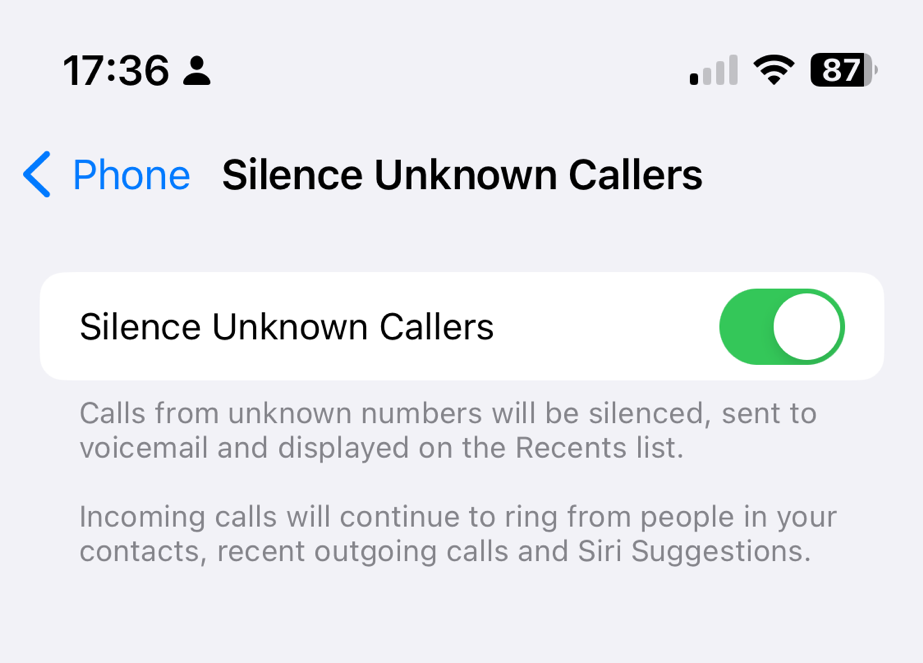
Screenshot of the iOS option to silence unknown callers
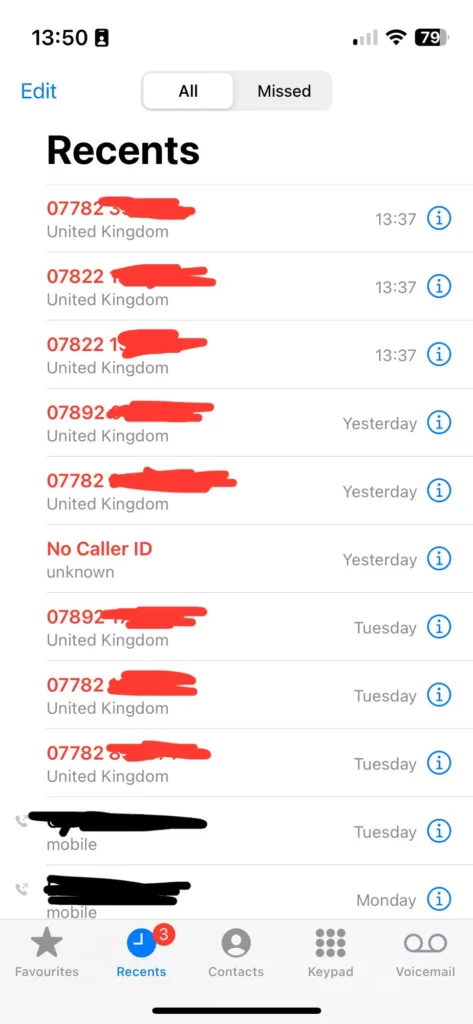
My recent calls list, showing lots of missed calls from numbers not in my contacts

Over recent weeks, I’ve been plagued by calls from numbers not in my contacts. Sometimes, as per the screenshot, I’ll get three calls from three different UK mobile numbers within seconds of each other. So, I’ve enabled Silence unknown callers on my iPhone.

I made a mistake by answering the first call, and it turned out to be some kind of cryptocurrency scam. However, it wasn’t just a random dial; they had my name and email address as well as my phone number. This suggests that they’ve hoovered up my personal data from a previous breach – possibly the Patreon breach of 2015, but there have been many others.

Since then, I’ve been getting three or four calls at a time, usually twice per day. It’s a different number every time, so whilst I may have not been fully convinced it was a scam when I answered the first time, I am convinced now. I’ve tried to hide the numbers in the screenshot because the numbers have almost certainly been faked and probably belong to innocent people. It also suggests to me a deliberate effort to get around call blocking apps like Truecaller, for which I have a premium subscription.

What this means is, if people call me, my phone will only ring if the number is in my contacts, if I’ve called it recently, or it’s a ‘Siri suggestion’. The latter could include numbers in recent text messages and emails, for example.

If you want to enable this yourself, open Settings on your iPhone, go to Phone and then scroll down to ‘Silence Unknown Callers’.

I’ll keep this on until the random calls stop. At the time of writing, they’ve slowed down but haven’t stopped completely. Maybe they’ll get the hint in time.

SoundPrint – an app for finding quiet spaces

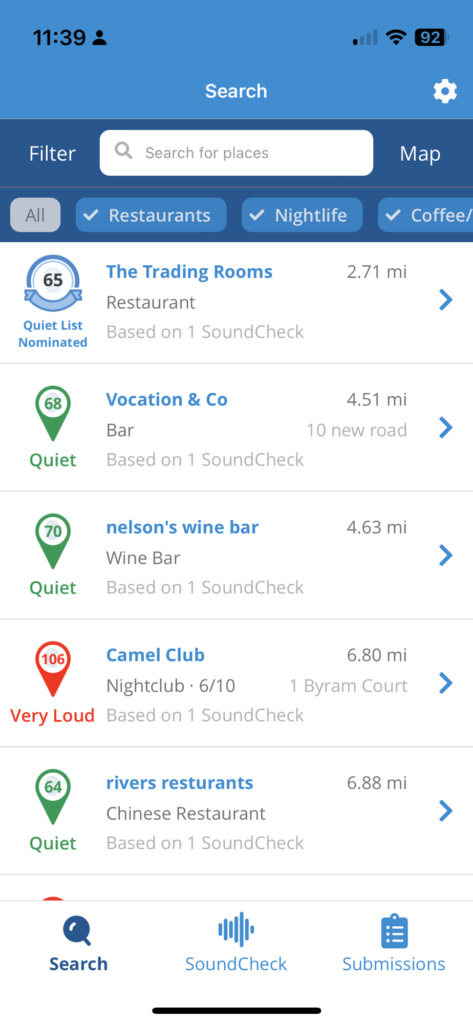
Screenshot of the SoundPrint app

Today I want to share with you an app called SoundPrint, which is an app for finding quiet spaces to eat and socialise.

You can install the app on your phone (iPhone and Android), and it’ll pop up a list of places nearby where other SoundPrint users have done a brief sound test. The venue database is from Foursquare, a site where I’m a superuser and still an active user of its Swarm app.

Incidentally, Swarm came in very useful when writing my review of 2023 and 2023, quantified, as I could see exactly where I had been all year.

Using the SoundPrint app

You don’t have to register an account if you’re just browsing to find a venue. However, if you want to contribute your own sound checks, then you can register an account. A sound check is as simple as holding your phone up for 15 seconds to measure the noise levels, and then telling SoundPrint where you are. You can also specifically recommend places for SoundPrint’s ‘Quiet List’ if they are particularly quiet, and submit noise complaints for very loud venues. SoundPrint will try to reach out to such venues with suggestions for how they can become quieter.

Venues are categorised as ‘quiet’, ‘medium’, ‘loud’ and ‘very loud’ with the number representing the decibels (dB) recorded by user’s sound checks. It’s worth noting that the repeated or prolonged exposure to noise above 85 dB can lead to hearing loss.

I found out about SoundPrint from Samantha Baines’ excellent book ‘Living With Hearing Loss and Deafness’ (sponsored link). I saw it whilst out Christmas shopping and subsequently borrowed from our local library. I’m partially deaf and wear hearing aids, and this book has lots of helpful tips, both for deaf people and their friends and family.

That being said, SoundPrint isn’t just for people who have hearing loss. If you are autistic, then you may benefit if you find noisy places overwhelming. I can see my wife using this app as well, as though she has good hearing, she struggles in noisy environments.

New new new new new iPhone

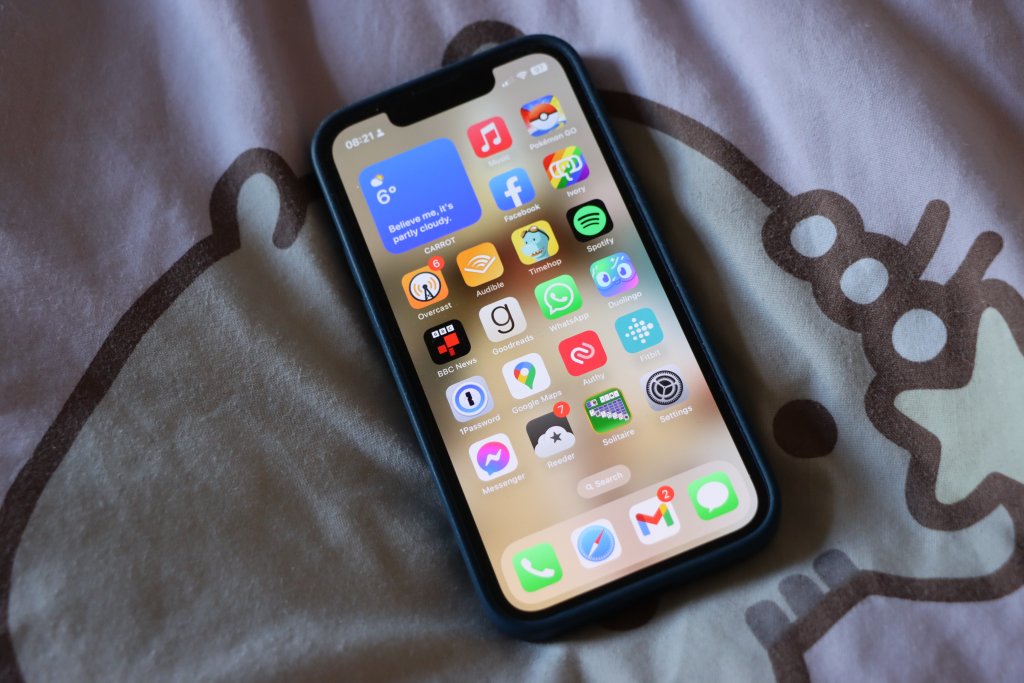
A photo of an iPhone 13 Mini with iOS 15 showing the home screen

Last week, I bought myself a new iPhone 13 Mini. This is the fifth iPhone model I’ve owned:

As you can see, with each model I’ve kept it a little longer than the previous one. Before my first iPhone, I would generally keep a phone handset for 18-24 months at a time, and indeed that was the case with my first iPhone – it was on its last legs by the time I traded it in. Its replacement, the iPhone 5 laster a little longer but I had issues charging it after a while. The iPhone 5s laster slightly longer again, but in the hot summer of 2018 its battery started expanding and the back was coming away from the phone body, so I decided it was high time for a replacement.

I was hoping to get my iPhone 8 to make it to five years, and in late 2021 I even had the battery replaced to give it some extra life. Alas, this new battery was also starting to wear out – I would have to recharge my phone more than once a day to get through.

Whilst I could have had yet another new battery fitted, I suspect that Apple won’t support such an old model much longer with new iOS updates, and they were offering up to two years 0% finance on new models. I’m not eligible to upgrade with my current phone network, as I’m on a 2 year fixed SIM-only contract, so buying the new phone direct from Apple on 0% finance seemed like the best option.

Apple conveniently provides a Compare iPhone models tool, and so I was able to decide between the various models on offer to work out which was best for me. As you may note from the above, my purchases of the 5s and 8 were at times when physically larger models were available, but I’ve generally preferred the smaller iPhone models. That pretty much ruled out buying an iPhone 14, as there’s ‘mini’ version available – and it was also £200 more than the iPhone 13 Mini.

Apple also offers its iPhone SE range, and the current third generation is essentially an iPhone 8 body with iPhone 13 internals. However, that means a smaller screen, and Touch ID rather than Face ID, as well as a more basic camera, slower 5G, less water resistance and no support for MagSafe, when compared with the iPhone 13 Mini.

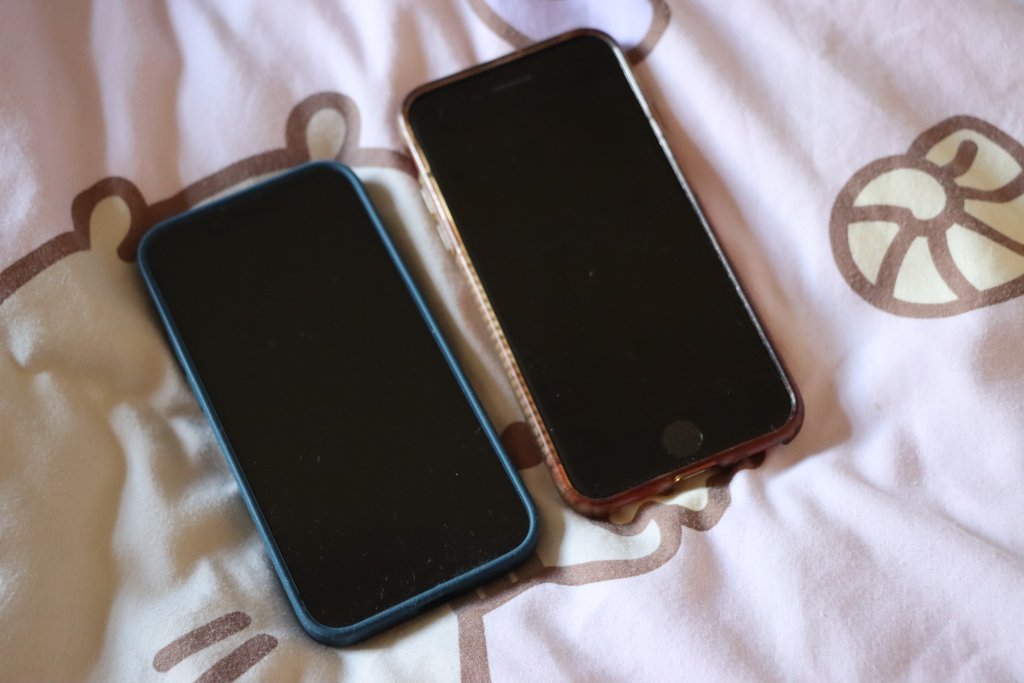
A photo of an iPhone 13 Mini (left) next to an iPhone 8 (right)

The iPhone 13 Mini is also slightly smaller and lighter (albeit by a mere four grammes) than the iPhone SE. Despite this, the screen is bigger, as the bezel is smaller – it doesn’t need to accommodate the home button for Touch ID.

As for the iPhone 14, as well as it being too large for my liking and more expensive, it’s not much of an upgrade. Again, there’s an even better camera, the ability to make SOS calls via satellite, crash detection and slightly better battery life, but the processor is the same as the 13 Mini and SE; the only benefit is one extra GPU core.

Having had the new phone for a week, I’ve appreciated the extra speed, and the convenience of Face ID which seems to work well, even when I’m wearing glasses. The transfer process from old phone to new also went pretty well and I was mostly up and running on the new phone in a couple of hours – some of which was spent installing iOS 16.4. The new camera is also great and I’ve taken a couple of photos with the ultra-wide aperture lens (giving a fish-eye appearance).

Hopefully I’ll be able to keep this new phone going for the full five years. Whilst it’s always nice to have the latest and greatest device, I also appreciate the cost savings of not upgrading regularly. If everyone held onto their phones for several years, I’m sure there would be wider environmental benefits.

New new new new iPhone

A photo of an iPhone 8

As I mentioned on Monday’s update/apology, I recently upgraded to an iPhone 8. It’s a 64 GB Product(RED) model; whilst the front looks like the space grey model, it’s got a red back, and includes a donation to (RED). (RED) is a non-profit that raises money for HIV/AIDS charities, and there’s no extra cost to consumers over the price of an equivalent iPhone in one of the other colours.

I had planned to wait until the autumn to upgrade, either to buy one of the new iPhone models or get an older model at a cheaper price. But I was essentially forced to upgrade early. My previous iPhone was a 5S, and the battery had started expanding to push the front cover away from the case. An expanding battery is a very bad thing; it means it’s at risk of exploding.

In the interim, I tried using my old iPhone 5, which I still had as a backup phone. However, Apple has dropped support for the iPhone 5 and so it can only run iOS 11. Furthermore, many apps won’t run because it lacks a 64-bit processor which the 5S and all subsequent models have. Pokémon Go is one such example; with other apps, only older versions run.

Jumping from the 5S, which is 2013-era technology (although I bought mine in 2015) to the 8, which was released last year, is a big leap. The 8 is much faster. I’m also warming to the larger screen; in 2015 I decided to buy a 5S rather than a 6 because I wasn’t keen on the bigger surface area. But the bigger screen is great for apps like Google Maps.

The lack of a headphone port isn’t an issue; I switched to Bluetooth audio a couple of years ago. In a similar vein, I had been using a wireless charger case for my 5S and already have wireless charging stands at home and at work. The battery life of the 8 seems better than the 5S had even when new. And whilst I take most of my photos on my Canon DSLR camera, I’m impressed with the camera on the 8. Live photos is a fun gimmick but it’s nice when taking photos of our two-year-old as it captures some of their mannerisms. Finally, I’ve noticed that I tend to have a better signal on this phone compared to previous models; I’m guessing it supports additional frequencies, or newer versions of the mobile standards.

Upgrading to the iPhone 8 has meant taking on a rather more expensive contract. I’m now limited to 4 GB of data per month; my previous contract had unlimited data, although in reality, I never hit 4 GB in a month anyway. I’m still with 3, who I’ve been with for almost 8 years now.

As for the iPhone X, as much as it looks impressive, right now it’s unaffordable for me. I imagine that whatever phone I get next, will be a descendent of the X. Hopefully, that won’t be for another three years at least, provided this new iPhone 8 lasts as long as my 5S did.

Contemplating Apple’s updated iPad range

Yesterday, Apple quietly updated its iPad and iPhone product range. The iPhone 7 and 7 Plus are now available in red, supporting Product (RED), and the budget iPhone SE is available with more built-in storage.

As for Apple’s tablets, there’s a new iPad Air, but with the ‘Air’ moniker dropped. It’s now just known as the iPad, but uses the same form factor as the iPad Air. Externally it looks the same, but the chip has been bumped up from an A8X to an A9, which brings better performance. It’s available with either 32 or 128 gigabytes of storage, and the cheapest model is £339. This is a significant price cut from the £379 iPad Air 2 that it replaces.

The iPad Mini remains at version 4, and, interestingly, is now only available with 128 gigabytes of storage. Consequently, the cheapest iPad Mini is £419, which is only £10 cheaper than the new 128 GB iPad; back in 2014, the difference was £80 between the equivalent 16 GB models. I suspect that Apple plans to stop selling small form-factor tablets in the near future, which would be a shame as I think it’s a nice size.

Replacing my iPad

My current tablet is a 16 GB iPad Mini 2, which was a present for my 30th birthday in 2014. I use it daily, both at home and at work. At home, it’s effectively my primary computer. I use it far more than my Mac, which, being a desktop, is fixed in one place. Being able to use it anywhere in the house is a major advantage when looking after a small child.

At work, it’s useful in meetings as I don’t need to print off reams of documents beforehand. I also find it handy at events, for checking information whilst away from my desk. And it provides entertainment whilst travelling; I can read Pocket articles or magazines whilst commuting to work.

However, its screen is badly cracked. The screen has already been repaired once, for which I paid about £40 to a shop in Bradford. The workmanship wasn’t great and the home button sticks sometimes. In any case, I broke the screen again literally only a few weeks later. A decent repair job on the screen is likely to cost around £100, or around a third of the cost of a new iPad.

Advantages and disadvantages

There would be several advantages of buying a new, standard-sized iPad:

  • Larger screen, which would suit me as I read a number of digital magazines.
  • Touch ID.
  • Being able to use two apps in split-screen mode (my iPad Mini 2 only supports slide-over).
  • Faster processor.
  • More storage, as I often run out of space with only 16 GB.
  • Being eligible for continued iOS updates, as I suspect Apple may drop support for the iPad Mini 2 after iOS 11.

And some disadvantages:

  • I like the smaller size and lighter weight of the iPad Mini.
  • A new case would be needed – Christine hand-made my current one, but I doubt she will have time to make a new one for me.
  • I would also need a new Bluetooth keyboard, although as Lizzie likes playing with my current one I’m sure she would like to keep it as a toy.

Although the large crack on my iPad’s screen is unsightly, I’m seriously considering holding out with it, until I can afford to buy a new model. Right now, money is tight, and I can’t really justify paying for repairs to my existing model, or for buying a new one.

I could, of course, consider an Android tablet, which may be cheaper. But I’m worried that I would then have the additional expense of buying replacement apps again and getting used to an unfamiliar operating system. The current best Android tablets cost around the same as an iPad, and a cheaper model may not be any better than what I already have.

I’ll revisit this in the summer, when I’ll hopefully have some more money. By then, we will hopefully know more about iOS 11, and which devices it will support. That could sway my decision further.

How to: fix wrong location on iPhone

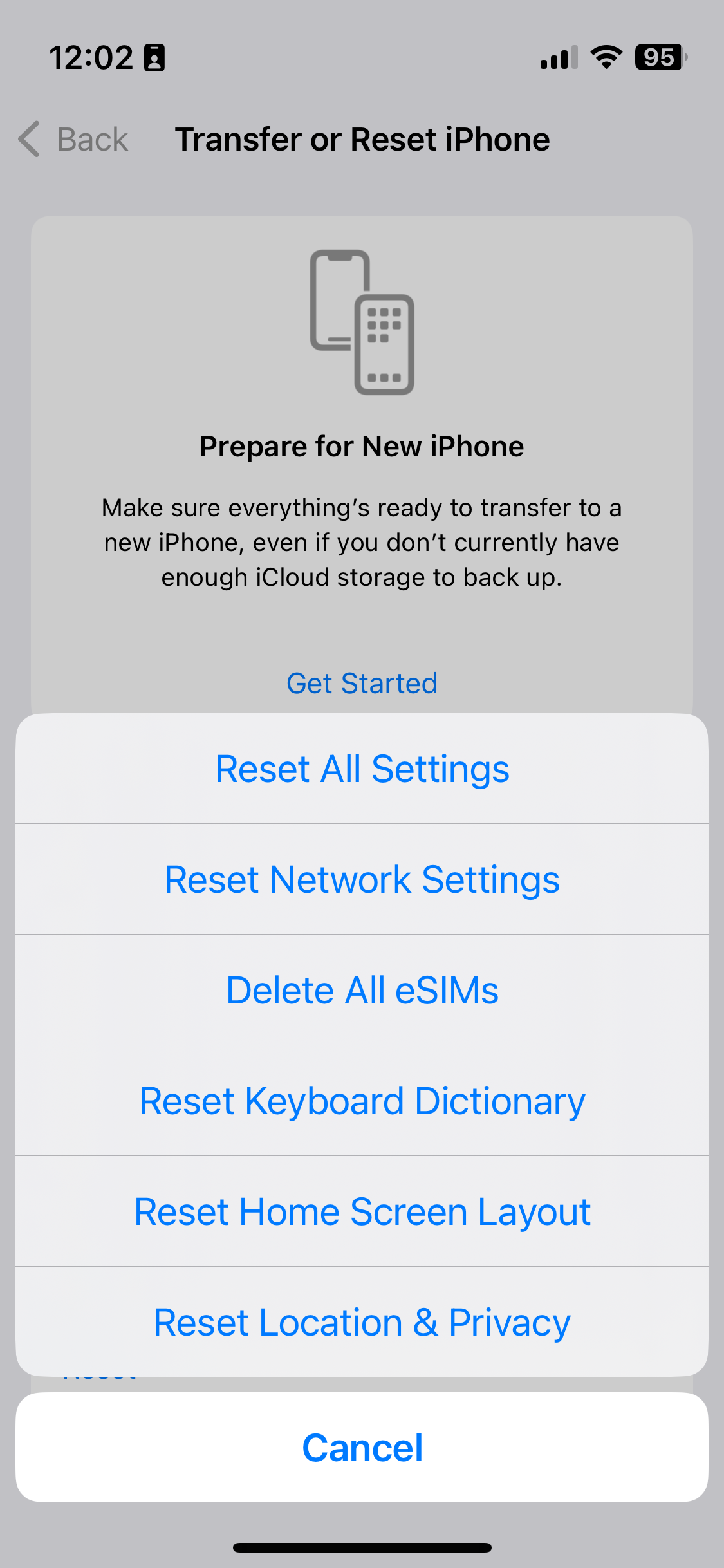
A screenshot showing how to reset settings on iOS 16

Over the Christmas break, my iPhone would randomly decide that I was in my office. I’d have an app open that used my location, but instead of showing me where I actually was, it’d suggest that I was in Bradford. Which isn’t so useful when, in reality, you’re at home, or in York.

It caused particular problems when using Google Maps for directions, as it’d randomly jump to Bradford and then back again. Swarm was basically unusable. And it completely broke the ‘Track Exercise’ function of the Fitbit app. I had to actually uninstall and reinstall the Fitbit app a couple of times because it wouldn’t let me stop the exercise. This was even after restarting the app.

Turning Wifi off helped. Apple’s iPhones, and indeed many other devices, use the SSIDs of available Wifi networks to approximate your location. This is done by querying a web service, which means that you can still get an approximate location even when indoors, and out of view of GPS satellites. But turning off Wifi was hardly a long term solution.

How to actually fix the location problem

A bit of Googling uncovered this article about fixing your location. It offers several solutions, depending on whether the issue affects just one application, or all. In my case, it was all applications, and the solution that worked was the fifth on the list. This involves resetting your phone’s location and privacy settings.

To do this, open Settings, and choose General. Then, scroll right down to the bottom and choose Reset, then select ‘Reset Location & Privacy’ – on iOS 10.2, this is the last option. Your device will ask you for your unlock password – pop this in, confirm, and hopefully your device will get the location correct from now on.

There is a drawback to doing this, however. You’ll have noted that this resets both your location and privacy settings. This means that any apps that you have granted access to your contacts, photos, calendars, camera, microphone, media library and so on will need to request them again. Although, oddly, apps will retain their location permissions, along with any permissions regarding background app refresh, notifications or mobile data access.

Despite these issues, it was a relief to fix the problem.

This blog post was updated in November 2023 with an updated screenshot, but the instructions are broadly the same.

Pokémon Go

A screenshot of Pokemon Go on iOS

It probably won’t surprise you that I’ve spent quite a bit of the last week playing Pokémon Go. I downloaded it within hours of its official UK release; the screenshot shows how far I’ve got, and overall, I’m level 11. This is mostly through capturing Pokémon on the way to and from work, and on my lunch break.

Christine has been playing it a little longer. She has an Android phone, and so she was able to sideload the APK file from a third-party web site prior to its official release on the Google Play Store. She’s therefore slightly ahead of me, and has had the benefit of being on maternity leave to have more time to catch Pokémon.

I’m enjoying it, although it is further exacerbating my iPhone’s battery issues. As I write this, Pokémon Go has used 51% of my battery over the past 24 hours. Even before last week, I was struggling to get through a full day on one charge. To be fair, I use multiple Bluetooth devices with my phone, and use it on a train journey with frequent tunnels. So my iPhone’s battery was already getting a strong workout even before I started playing. But, notice how my phone was already down to 61% before 9am in the screenshot.

I haven’t added any Pokémon to gyms yet, and have only played a couple of battles. I’m waiting until I’ve collected more, and had the chance to upgrade or evolve them. Many of the nearby gyms have Pokémon with combat power over 1000 already, and my best is under 800.

It’s been fascinating to see how much of a phenomenon Pokémon Go has become. It’s already outperforming many other social apps, including Twitter and Tinder, in terms of how long people use it. And the news has been full of stories, both good and bad, about the game and its players. I never played Ingress, its spiritual predecessor, but I had friends who did. It seems that Niantic, its developer, has found the perfect balance between Ingress’ gameplay, and the popularity of the Pokémon franchise.

I don’t know how long I’ll keep playing. At the moment I’m still discovering new Pokémon and enjoying levelling them up – even if I’m sick of always finding Drowzees everywhere. Maybe the game will become less fun or stale after a while, but at the moment I like it.

New post on Medium: Bluetooth on iOS

I’ve written another post on Medium. It’s just a short two-minute read, but covers an issue I’ve been experiencing in iOS as I’ve amassed more Bluetooth devices: how on earth do you work out which one is which when they’re all called things like ‘SE50’ and ‘MM256’?

I’ve chosen to post it on Medium in the hope that it might get exposed to a slightly larger audience than usual. I think my previous piece on Medium got a little more exposure than it would have done normally – it didn’t exactly ‘go viral’ but I get the impression that more people saw it than if I had just posted it here on my blog.

If you enjoy my Medium pieces, then please ‘recommend’ them.