
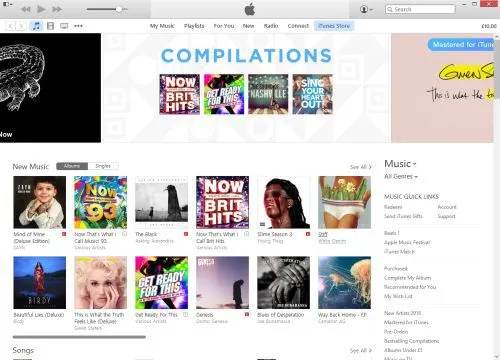
How Apple can make iTunes great again

A screenshot of iTunes on Windows 10

iTunes. It’s the software that many of us use begrudgingly for listening to music, purchasing content, syncing with our devices and watching videos. Mac users get it as part of OS X, whether they want it or not, but Windows users need to download it, to be able to synchronise their music libraries with their various iDevices.

Apple is known for its great hardware design (with just a few exceptions), and people like me are very loyal to our iPhones due to its (in my opinion) superior user interface. So why did iTunes, one of Apple’s most-used desktop computer programs, become so hated by its users? Why would writer and Guardian journalist Charlie Brooker describe it as ‘…a hideous binary turd that transforms the sparkling world of music and entertainment into a stark, unintuitive spreadsheet’?

To find out how iTunes came to be the bloated mess that it now is, we need to look back into its history.

A brief history of iTunes

iTunes has not always been called iTunes. Way back in the late 1990s, it was called ‘SoundJam’, and was written by an independent third-party developer for the original Mac OS System 9. Apple later bought out the developers, releasing iTunes 1.0 in 2001, which built on SoundJam’s features and added the ability to burn CDs with tracks from the user’s library. Fundamentally, the basic music management features of iTunes are largely unchanged in 15 years.

iTunes 2.0 was the first release for Mac OS X, and the first to support Apple’s brand new music player, the iPod. This took iTunes from being an application that simply managed music on your computer and your CDs, to your iPod as well.

Version 4.0 and 4.1 were big steps forward for iTunes. Version 4.0 brought the iTunes Music Store (later just the iTunes Store when it expanded to other content), and 4.1 brought iTunes to Windows for the first time. Adding the iTunes Store added another layer of complexity to an application that already did quite a lot of different things.

As Apple improved its iPod range, iTunes had to keep up. So the 2004 launch of the iPod Photo, with a colour screen for showing photos, saw photo syncing added to iTunes 4.7, and the launch of the fifth generation iPod Classic in 2005 meant that iTunes would gain support for video playback. By now, it was possible to use what was originally a program for managing music, to manage your movie and TV show libraries as well. Podcast support arrived in version 4.9.

2007 brought the first iPhone. Up until 2011’s release of iOS 5, iOS devices relied on iTunes for various tasks like software updates and backups, and so all of this had to be handled in the app as well. Ultimately, this led to a major redesign of the iTunes interface in 2012 (version 11), but it retained its underlying code and all of its numerous existing features. And iTunes 12 saw Apple Music, its new streaming service, bolted on to iTunes.

So what is iTunes now?

We know what iTunes was, when it first came out 15 years ago: a music library management program that let you play music, and import and export tracks to CDs. Its feature set has since ballooned into:

  • an all-encompassing media and app store
  • music and video player
  • podcast manager
  • internet radio player
  • streaming music service
  • CD ripper and burner
  • mobile device sync and backup tool
  • online music storage manager

All of these are rolled into one, monolithic app, which is supposed to run on both OS X and Windows. Whilst Apple controls OS X and iTunes’ integration with it, the Windows version has developed a reputation for being slow and a pain to update. iTunes for Windows actually includes a number of helper utilities (Apple Mobile Device Support, Bonjour, Apple Software Update and others) and I’ve lost count of the times when I’ve tried to update iTunes on Windows to find that the installation failed. Sometimes, you just have to uninstall and reinstall everything, which is time-consuming and far from ideal for a piece of software that is updated on a near bi-monthly basis. I wouldn’t be surprised if many Windows users still have old versions, due to updating issues.

What can Apple do to make iTunes better?

In my view, Apple needs to take a look at what it has done on iOS. There’s no monolithic, all-encompassing ‘iTunes’ app — instead, its individual functions have been broken down into multiple apps. Here’s how iOS does it:

  • Music — this handles the music you own (in your iTunes library) and Apple Music.
  • Videos — playback of videos in your iTunes library is handled by a separate app.
  • Podcasts — again, podcasts have their own app. This was baked in to the Music app in earlier versions of iOS, but was later spun-out and it now comes as standard.
  • iTunes Store — the store is a separate app; once you buy something, playback is handled by the Music or Videos apps.
  • App Store — apps for iOS devices are bought separately from audio and video content.
  • Settings — handling your settings is done in the main iOS Settings app.

So I suggest that Apple splits iTunes on the desktop into the following:

  • iTunes Music — a music player that takes iTunes back to its roots. It’ll handle all aspects of playing music — whether this is from your own library, a CD, Apple Music or internet radio. CD burning can go in here too.
  • iTunes Video — this could replace Apple’s QuickTime player, which hasn’t seen much development in recent years. It can handle the playback of video content from your library — whether that’s films, TV shows, or home movies imported from iMovie.
  • iTunes Podcasts — a separate podcast manager, like on iOS.
  • iTunes Store — like on iOS, the store app is kept separate. When an item has downloaded, a single click would allow users to open the content in either the music or video player, where applicable, or in a third-party player if Apple wants to play nice.
  • Apple Sync Settings — on a Mac, this could be an additional preference pane in System Preferences. On Windows, I would have previously suggested a new Control Panel applet, but I gather such things have been phased out in Windows 10 and so this would have to be a separate app. This would handle the synchronisation of data between your computer and Apple device (a modern-day reincarnation of iSync), so you can choose what is copied across and handle backups and software updates.

A simple onboarding splash screen could help users find out where things have moved to when they upgrade.

What else needs to change?

Splitting iTunes up into several component apps will hopefully make it faster (less code to load into memory) and easier to use (less features to cram into a single interface). I also hope that doing this would improve the Windows version, which has never been as slick as its Mac counterpart.

But one other thing that Apple needs to change is the incessant prompts for your AppleID password. Some of these make sense — unless you turn it off, you’ll be prompted every time you buy something, and that’s fine. But sometimes I get asked for my password for no discernible reason. This came to a head last week when my AppleID was locked due to ‘suspicious activity’ on my account — which was me renaming my iPhone to ‘Phoney McPhoneface’ — yeah, I know. This led to at least four prompts to enter my (18 character) password on my phone, and iTunes asked for it twice. In all of these situations, I entered the password correctly, so why all the prompts?

I’m sure there are many more ways that Apple can improve iTunes. The change I’ve suggested here is a major one, and would probably be the biggest shake-up since its launch in the 1990s. But I honestly think that it would make a major difference to iTunes’ many millions of users around the world.

This post was originally posted on Medium.

New post on Medium: Bluetooth on iOS

I’ve written another post on Medium. It’s just a short two-minute read, but covers an issue I’ve been experiencing in iOS as I’ve amassed more Bluetooth devices: how on earth do you work out which one is which when they’re all called things like ‘SE50’ and ‘MM256’?

I’ve chosen to post it on Medium in the hope that it might get exposed to a slightly larger audience than usual. I think my previous piece on Medium got a little more exposure than it would have done normally – it didn’t exactly ‘go viral’ but I get the impression that more people saw it than if I had just posted it here on my blog.

If you enjoy my Medium pieces, then please ‘recommend’ them.

New, new iPhone

iPhone 5 and iPhone 6

Later today I will have a brand new iPhone 5S, which I ordered on Friday. I wasn’t expecting to need a new phone so soon but sadly my current iPhone 5 is not in a good way.

The need to upgrade

I bought my iPhone 5, along with a new two-year contract, in September 2012, shortly after launch. My iPhone 4 had pretty much conked out: it kept randomly rebooting, and was getting rather slow. However, by September 2014, my iPhone 5 was still in good shape. Sure, the battery life wasn’t as good but it still worked fine. So instead I took out a new 12 month SIM-only contract with the intention of keeping my iPhone 5 until next year.

Unfortunately, more recently, my iPhone 5 has developed a fault with the Lightning port. It will only charge if I plug a cable in at a certain angle – and if the cable becomes even slightly loose, it won’t charge. Whilst I can usually get the cable in a good enough position to charge it at home, it’s almost impossible to do when out and about unless you actually hold the cable in position. And there have been several occasions when the cable has been knocked slightly and I’ve ended up starting the day with a phone on 30% battery.

It’s been like this for a while but it seems to have got worse of late. I’ve tried cleaning out the Lightning port as best I can, and I’ve used many different cables, but it still doesn’t work properly.

It may be fixable, but as the battery life isn’t great either, I decided that really, I’d be best with a new phone.

Rule-breaking

Co-incidentally, I recently received an ‘exclusive’ offer from Three, the network I’m with, to upgrade early to a new iPhone 6. Normally ending my contract now, and not when it ends in September, would incur a penalty, but Three were willing to waive these charges if I signed a new two-year contract with them. I registered my details on their ‘rulebreakers’ page and got a call back later on Thursday to discuss the deal.

The offer was for a brand new iPhone 6, in my choice of colour, at no up-front cost, with a 2-year contract that included 2 GB of data (including tethering), unlimited calls, unlimited text messages and a few other perks. The catch was that the monthly charge would be £46 per month, and it was only the 16 GB model. I’m currently paying £18 per month for a SIM-only deal so this would be a huge hike in my monthly payments – more than 2.5 times higher.

But I agreed to it – I needed a new phone, and I’d be getting Apple’s latest and greatest model. Even though I had the opportunity to home test an iPhone 6 in September, and found it rather too big for my liking.

Cutting too many corners

At first, I didn’t think the lack of storage would be an issue. My iPad Mini 2 is the 16 GB model, and whilst I don’t have much space left on it, it does just about everything that I need it for.

My iPhone 5, however, is the 64 GB model. And it turns out I was using half of the space on it. At first I thought these were things I could do without – a 2.5 GB full HD quality episode of Sherlock, for example. But after deleting the stuff I didn’t use, and then the stuff I occasionally used, and then stuff that I didn’t really want to delete but would do if I absolutely had to, I was still using over 20 GB of space. Essentially, if I wanted to get by on a 16 GB phone, I’d have to make do with not having all the apps I wanted, all my photos, or all of my music. And it’d be a compromise that I’d have to live with for the two years of the contract. A contract that would be costing me over £1000 over the two years.

The lack of storage might not have been so bad if it weren’t for the limited data allowance as well. Whilst I’ve only ever used more than 2 GB in a month once or twice, if I have less storage capacity on my phone then I’d need to store more data in the cloud, which would eat further into my data allowance. A small capacity phone and unlimited internet might have worked, as would a large capacity phone and limited internet, but not the worst of both.

Cooling off

I’m fortunate, in some respects, that I’d agreed to this over the phone, which meant that I was legally entitled to a 14-day ‘cooling off’ period, as per the Consumer Contracts Regulations. And in fairness to Three, they made me fully aware of my rights to cancel on the phone call and what to do. So on Friday I called them, and cancelled the upgrade, which was done without any fuss. After all, I’ll still have a contract with them until September. The iPhone 6 had already been dispatched at this point, so I’ll need to refuse the delivery when it comes today.

With that sorted, I ordered a new 32GB iPhone 5S direct from Apple. Whilst not as big as my current 64 GB model, I can comfortably get by with 32 GB of space – and Apple doesn’t offer larger storage on the 5S anymore. It cost £499, which I can pay off from my credit card over the next few months, and even with a bit of interest, it’ll save me around £180 over two years, assuming that I stay on an £18 per month contract. And the phone is unlocked too – whilst I’m happy with Three and don’t intend to switch networks, if I do, then I can take my phone with me.

I also prefer the size of the iPhone 5S to the 6. I’m not bothered about a bigger screen and would prefer a device that I can use with one hand, for the times when I’m standing on a train and need to hold onto a grabrail, for example. Whilst it is last year’s model, Apple tend to offer updates for 3-4 years after release, so it should be good until September 2018. And there aren’t many other improvements to the iPhone 6 that are relevant to me: I don’t have any 802.11ac wifi devices and Apple Pay hasn’t been launched here yet.

With hindsight I should have turned down the ‘rulebreaker’ deal in the first place, as soon as I heard it was a 16 GB model, but I guess desperation got the better of me. I’m fortunate that I’ve been able to cancel without penalty, and been able to find a solution that serves me better. Even if it does mean using last year’s model.

Shiny new iPad

iPad Mini with Retina Display

As I mentioned on Sunday, my birthday present from my parents was a shiny new iPad Mini with Retina Display. We bought it from the Apple Store in Trinity Leeds, since we were going to Leeds for a birthday meal anyway.

This is to replace my old iPad, a first generation model. Although I’ve only had it for a year, it’s now over three years old and no longer supported by Apple. It won’t even run iOS 6, never mind iOS 7. Many apps either won’t install at all, or can only run as an older version. Plus, it’s rather slow and some apps, including Apple’s own like Safari, crash a lot. Whilst the larger screen means it’s better to use than my iPhone for some things, for others it was slow and frustrating – I’d avoid browsing sites like Buzzfeed or Lifehacker because of the risk of crashing it.

Choosing an iPad

I’d narrowed the choice down to the iPad Air or the iPad Mini with Retina Display. I ruled out the older models – the iPad with Retina Display and the iPad Mini (without Retina Display) – because they came with older processors which are much more likely to be deprecated by Apple within a few years. I didn’t want to be in the same situation again with my iPad in a couple of years’ time.

The two models are basically identical inside – same processor, battery life and features. The only difference is the size of the screen (the resolution is the same), the weight and the price. At £80 cheaper, we decided to go for the iPad Mini.

Personal setup

When you buy a product at the Apple Store, a ‘Personal Setup’ service is offered to get you up and running with the device. As we had some time to spare, I decided to take them up on the offer. This turned out to be a good thing. Because myself, and the member of staff who sold me the iPad, learned the hard way what happens when you try to restore an iCloud backup from an iPad 1 running iOS 5, to an iPad Mini running iOS 7. Suffice to say, it got stuck in a soft reboot loop and was completely unusable.

To their credit, the staff at the store were really good about it, and took responsibility for the problem. I should have been advised that this wouldn’t work. Instead, I should set the new iPad up as a new device, rather than using a backup from an iOS 5 device as a starting point. So the iPad Mini, now essentially bricked, will be sent back to Apple, and I was given another iPad Mini to take away. I decided not to go through the Personal Setup this time, instead waiting to get home so that I could do it at my own pace. It’s working fine, as shown in the above photo.

I’m glad that the reboot problem happened in the Apple Store and not at home, as I’m not even sure that I’d have been able to force a factory reset on the device. But perhaps Apple should have coded this into the iPad setup program, and displayed a warning that restoring a backup from such an old device to a new one is a bad idea.

Anyway, my new iPad Mini is great. It’s so much lighter than my old one, and the screen is only a bit smaller. It’s not quite so good for reading magazines, as the text is a bit small, but at least when I zoom in the text doesn’t become so pixelated as it did on my old iPad. And apps like Facebook, YouTube and 1Password are actually usable now, and others, like Pocket, are much, much faster.

Mavericks – my review

A screenshot of Finder on Mac OS X Mavericks

Following Apple’s keynote presentation on Tuesday, OS X 10.9, aka ‘Mavericks’ was released. Apple broke its long-standing tradition of charging for OS X updates by offering Mavericks for free, and on any machine capable of running Lion. Furthermore, it looks like a direct upgrade from Snow Leopard to Mavericks is possible on those machines not yet updated, which may go some way in explaining why Mavericks is over five gigabytes in size.

By making Mavericks free, Apple can now dodge questions about whether the update is value for money. I know some felt that Mountain Lion wasn’t really worth the cost, even though it was only $20 and was already the cheapest OS X update to date (barring the ancient 10.1 ‘Cheetah’ update from 10.0). That being said, my early plays with it suggest that its value is at least that of Mountain Lion, and therefore a worthwhile update.

Installing Mavericks

Having been up at 5:45am on Tuesday (for work) I decided not to attempt to install Mavericks as soon as it came out, although I did watch most of Apple’s keynote live. Instead I waited until yesterday, and gave myself things to do whilst it installed, which, from beginning the download to completing installation, took around two hours on my early 2010-vintage Mac Mini. Then there were a raft of software updates to install afterwards – iPhoto, iTunes, XCode, a Digital Camera RAW update and improvements to some of the voices for the text-to-speech feature, plus various third-party apps. This took another hour or so but was technically optional.

Up and running

Once I had Mavericks up and running, it seemed to work fine. Well, no different to Mountain Lion, anyway. My Mac still takes quite a while to boot up but that’s probably to do with various apps and utilities that I have running. I did have to fiddle with the screen settings, as for some reason Mavericks decided to set my two screens to be an extended desktop and not mirrored like I prefer – my second screen is actually the living room television. Mavericks also changed some of my Magic Mouse’s settings so that left and right swiped no longer did anything. Frustrating, but easily changed back.

Scrolling seems smoother, which is nice, and Launchpad is now quite a bit faster – especially when opening stacks. This is a relief as it’s the main way I access apps that aren’t in the Dock.

Activity Monitor

The Activity Monitor saw major changes in Mavericks, with a new tabbed interface. I like it, and it feels simpler now, even though it shows more information. A new ‘Energy’ tab shows which apps are putting the most strain on your battery, if your Mac is a laptop – mine isn’t, but it’s still interesting to see which apps are power-hungry. Predictably Firefox was using the most energy whilst I was writing this but some background processes were also quite hungry too, so I may have to re-evaluate which apps run on startup.

It also tells you whether OS X is making use of one of its new features, Compressed Memory. When you start to run out of available RAM, OS X will now compress some of the data in RAM to make more available. This does add a bit of processing overhead, but it’s still faster than using a swap file (virtual memory) on a hard disk or even a solid state drive (SSD). I noticed that since installing Mavericks, OS X attempts to use as much RAM as possible to minimise swap file usage.

Maps

I had a brief play with the new Maps app. It’s basically the same as the iOS app, which sadly means it’s full of the same crappy data. A year on and there are still big problems with missing places (such as Bradford’s Alhambra Theatre), or places that have long-since closed.

I did note that my search history from my iPhone carried over to my Mac, which is interesting. However, I’ll be sticking to Google Maps for now.

Finder

Finder now has tabs in Mavericks; I’m sure some people will be overjoyed at this but I’m not too bothered. You can at least drag documents between tabs so I suppose I may use it from time to time. I don’t think I’ll use tags though, as I never used the labels that came before.

Miscellaneous points

  • The CPU coalescing feature is quite clever, but of limited use to a desktop user like me. I’ve heard that it is effective at extending battery life, which is good – it’s always nice to have a battery that lasts longer after an update than the more usual opposite.
  • The colours seem brighter on my screen, but that may be co-incidental with me changing the screen settings.
  • I like how newly-installed or updated apps sparkle in Launchpad.
  • I’m aware that there are major problems between Mail and Gmail accounts, however, I’ve recently stopped using Mail so thankfully I haven’t experienced this first hand.
  • LinkedIn is now supported alongside Twitter and Facebook. You can post status updates from the Notification Centre, and your connections will appear in Contacts. I wonder if iOS will follow suit in a forthcoming update.
  • I’ve turned on the iCloud Keychain. To enable it you have to also tell OS X to require a password to unlock your Mac if left idle, which isn’t done in a very intuitive way.
  • Users of older versions of Parallels desktop have found out that it doesn’t work on Mavericks. The latest version does but it’s a paid-for update. Consequentially my article about converting Parallels VMs to VirtualBox has been well-visited over the past few hours.

Elsewhere

As usual, John Siracusa has written a very extensive review of Mavericks at Ars Technica, which is well worth reading as it explains how some of the new performance features work. Dave2 is mostly positive about it too, although Lifehacker’s initial review is less so.

For me personally, it seems fine. Those wanting to err on the side of caution may want to wait for the inevitable 10.9.1 update which will follow in a few weeks (especially if you use Gmail in Mail), but I feel it’s good enough to take the plunge now. And you can’t argue with the price.

My Apple predictions – how did I do?

iPhone 4, meet iPhone 5

Following yesterday’s predictions that I made, we now know what Apple will be launching later this month. Were my predictions correct?

New iPhone models

I was pretty-much bang on about the two new iPhones – the cheaper 5C and the premium 5S. There were so many leaks of information that these were expected by many, and so it was a bit of let-down when Apple were unable to surprise us. As predicted there would be a new processor, which was indeed the A7, although the M7 co-processor to manage the motion sensors was a surprise. And as expected the iPhone 5S will ship with a fingerprint scanner on the home button.

The iPhone 5C is, as expected, a cheaper plastic phone, but it’s not significantly cheaper than the iPhone 5 was. Unless Apple will be selling it more cheaply in emerging markets and then pricing it higher in the more lucrative Western markets.

Both handsets will actually come in five versions (so ten in total), with different models for different networks, due to the big variation in frequency bands for 4G LTE. Vodafone is listed in the UK, meaning that the 5S and 5C will work on its 4G network. The iPhone 5 didn’t because Vodafone and O2 will be using the frequency bands that were freed up when analogue terrestrial television broadcasts were turned off last year. Whilst O2 isn’t listed, as the original launch partner for the iPhone in the UK I expect this is an oversight and that they will offer 4G services on the new handsets, and I expect 3 will do as they will offer 4G on the existing iPhone 5 last this year.

Apple have unexpectedly returned to the case market with new cases for both models. There’s also a new docks – one for the 5 and 5S, and one for the 5C.

Retiring of the old models.

Nope. Got this wrong. The iPad 2 and iPhone 4S are still on sale, and even the iPhone 4 will be available in China. Apple did kill off one its phones though, and surprisingly it was the iPhone 5. The 5C and 5S will therefore completely replace it. Normally Apple keep at least the previous two models on sale, although the third-generation iPad with retina display was retired after 8 months so it’s not completely unheard of.

The iPod Classic gets a stay of execution

I fully expected Apple to finally give the iPod Classic the Old Yeller treatment, but it’s still on sale, surprisingly. There were no major changes to the iPod range yesterday (with one exception, see below) and my hope of a 128 GB iPod Touch didn’t become a reality.

No NFC

As expected, Apple have not added support for NFC to their phones. I agree with Apple that Bluetooth SMART has more potential than NFC.

No Apple TV changes

Sadly there are no changes coming to the Apple TV, despite my hopes. Apple needs to offer more services on the platform if it hopes to be competitive against rivals like Roku, particularly outside of the US.

And everything else

We didn’t get to see the much-rumoured smart watch yesterday. I imagine Apple are working on one but are waiting until they can offer something significantly better than the competition. Samsung released its Galaxy Gear smartwatch to very mixed reviews last week and I’ve heard quite a few people have been underwhelmed by the Pebble smartwatch. Maybe next time.

Apple made a very slight change to the iPod range; the ‘space grey’ colour was added to the existing models. Other than that, there were no changes to the iPod line-up.

After two years, the Cards app for iOS, which allowed you turn your pictures into greetings cards, was discontinued. I don’t know anyone who used this so this isn’t surprising. That being said, I don’t know anyone who uses the ‘Stocks’ app that comes with every iPhone and can’t be deleted, yet it’s still there in iOS 7.

My predictions for today’s Apple event

Invite to Apple's 10th September event

Today Apple is announcing something, at around 6pm BST. It’s probably the seventh iteration of the iPhone, and the rumours suggest that this is the case, but until Tim Cook steps up on stage this evening we won’t know for sure.

I’ve got a few predictions, mostly based on the rumours that I’ve been reading over the past few weeks. I don’t actively seek out rumours but they do appear on sites like The Unofficial Apple Weblog and Twitter from time to time. So here’s what I expect:

Two new iPhone models, including a budget model

There are credible rumours that Apple will release two new models of the iPhone today – a new iPhone 5S, and a cheaper iPhone 5C. The 5S will probably have the same form factor as the existing iPhone 5 but have some extra hardware features and a beefed-up processor – possibly the A6X as used in the fourth-generation iPad but maybe a new A7 processor. I also believe the rumours of a fingerprint scanner on the home button.

The iPhone 5C will be a cheaper and more plasticy model that will be particularly aimed at emerging markets like China, but I think it will also do well in western markets. I know there are people out there who want to buy an iPhone but can’t justify the cost, and don’t want an old model.

The iPhone 4, 4S and iPad 2 will be retired

The three year old iPhone 4 is sure to be retired but I expect the 4S to go, and the iPad 2. This will mean that all of Apple’s mobile products will use the Lightning connector, rather than the 30-pin Dock connector, and all of its phones will have the same screen size.

The iPod Classic will be retired

It’s been 4 years since the last update to the iPod Classic, which is the only remaining iPod model to include a hard disk (as opposed to flash memory). Wired thinks it’ll be dropped and I agree. I hope that a new 128 GB iPod Touch will be released, so that Apple can still cater for those who want to be able to play their entire large music collection on the go.

Neither of the new iPhones will have NFC

NFC, or near-field communication, is becoming standard on many Android and Windows phones. But I can’t see Apple adopting it. They’ll go for Bluetooth SMART instead. Because the iPhone already has Bluetooth, this shouldn’t require any new hardware, and should be better for battery life too.

According to this AppleInsider article, this will be branded as iBeacons in iOS 7, and will be available not only in Apple’s new handsets, but the existing iPhone 4S and 5 as well.

Third-party apps for the Apple TV

Okay, this is less a prediction and more of a hope. Apple has been steadily increasing the number of platform partners for the Apple TV but it’s still very US-centric. The only UK channel available at present is Sky News.

I hope that Apple opens an App Store for the Apple TV, opening the door to apps such as BBC iPlayer, 4oD, Demand 5, ITV Player, Now TV and the like. This will make the device significantly more useful.

We will find out in just over eight hours’ time what comes to pass.

I came, I saw, iPad

New old iPad

I have a new toy to play with – an iPad. It’s a hand-me down from my soon to be in-laws which I was only too happy to find a new home for.

It’s the first generation model, and is therefore a bit limited in what it can do. It’s a little slow at times, doesn’t have a camera or a retina display, and it can’t run iOS 6 – iOS 5.1.1 is the most recent release that works on it. This means that some apps, like 1Password, won’t run, but for the most part everything else works okay. But, it’s an iPad, and it didn’t cost me anything.

Since I already own an iPhone many of the apps also worked on the iPad so I was able to get up and running with it quite quickly. So far, the only extra apps I’ve added are Tweetbot, which has a separate iPad edition rather than a universal app, and Reeder, which again has a separate iPad app but is currently free.

The bigger screen is great for apps like Reeder, Feedly and Pocket, where being able to view a whole page makes reading much easier. It would be nicer if it had the retina display though – having owned an iPhone 4 and then iPhone 5 I’ve become accustomed to higher pixel depth.

Although this does mean that I no longer need to save up for an iPad in the short term (and with a wedding, honeymoon and probably a new house to pay for this is welcome), I may still consider buying an iPad Mini in future. I imagine the smaller screen is a bit easier to handle, and a good compromise between the full-size iPad and the iPhone. And if I do decide to upgrade, this iPad is still worth around £90 to recyclers.

Comparing the iPhone 5 with the Nokia 100

Nokia 100 and Apple iPhone 5

At the moment, I’m one of those annoying people who has two mobile phones. There’s my own Apple iPhone 5, and I also have use of a brand new Nokia 100.

Clearly the iPhone 5 is the better phone – or is it? There are actually several ways that the Nokia 100 is better than the iPhone:

  1. Battery life. All smartphones have pretty poor battery life, with their high resolution colour screens, GPS, Bluetooth, Wifi, 3G support all putting strain on the battery. The iPhone 5 claims up to 225 hours – just over 9 days – standby, although most users will find they’ll need to charge it at least every other night. The Nokia 100, on the other hand, can last for over a month on standby from one charge – 35 days is claimed. That being said, the iPhone 5 claims 8 hours of talk time as opposed to the Nokia’s 6.7 hours.
  2. Smaller size. The Nokia 100 is shorter and narrower than the iPhone 5, although it is significantly thicker.
  3. User-replaceable battery. If the battery in your iPhone dies, then you’ll need to get it replaced by a professional. The Nokia 100, on the other hand, allows you to change the battery with ease, and you can even keep a spare charged battery to swap in.
  4. FM Radio. A data connection will let you listen to radio stations on your iPhone, but the Nokia 100 keeps it simple with a built-in FM radio.
  5. Torch. I’m sure there are apps out there that will allow you to use the flash LED on the back of your iPhone as a torch, however, the Nokia 100 includes a small LED in the top that can be used as a reasonably effective flashlight.
  6. Cheap. You can get a Nokia 100 on a pay-as-you-go tariff for only £10.

Of course, that’s about it. In every other way, the iPhone 5 is a better phone – it’s easier to use, with more features and better build quality.

iBought a new iPhone

iPhone 4, meet iPhone 5

So my new iPhone 5 has finally come. It’s not quite the model I was intending – I had ordered a black 16 GB model, but an order mix-up with 3 meant that I didn’t receive it as planned on Friday and after talking with a very nice person at customer services I ended up with a white 64 GB model, at no extra cost. I’d have preferred a black one, but I can’t argue with getting four times the space for the same price. I’ve saved in the region of £150 as a result.

Because I backed up my iPhone 4 to iCloud, when it came to setting up my iPhone 5 I just needed to connect to wi-fi, give it my iCloud login and tell it to restore from the cloud backup. This meant that all of my settings and apps would be automatically installed, just as they were on the old handset, which saved a huge amount of time getting the phone set up. It wasn’t totally smooth – stored passwords didn’t seem to copy, for example, and some apps like Pocket needed re-installing – but much better than starting from scratch. In particular, my progress on games such as Angry Birds was carried over, to my relief. Many of the apps I use regularly, like the aforementioned Tweetbot and Pocket, have been updated for the new larger display, but older apps do work okay. Apple did a good job of implementing the letterbox mode for these.

Physically the new phone is much nicer to hold – it’s noticeably lighter and thinner, and the edges don’t feel as sharp as they do on the iPhone 4. You can still use it easily with one hand too, unlike the wider screens on some Android phones which require you to change hands to reach far off corners of the display. The new Lightning connector is nice, although I’m a little less happy at the prospect of forking out £15 for an extra cable; plus, with 2 iPods and an iPhone 4 in our household we’ve no shortage of the old cables. I’ll also need to look into buying a case for the iPhone 5, as Apple haven’t released any bumpers for this model like they did for the 4 and 4S, nor do they sell any third party cases in Apple Stores, as Dave found out.

The new phone is much more responsive than my old one – apps work faster, especially Foursquare and Tweetbot. Support for HSPA+ also makes web pages download more quickly, and provides a small speed jump ahead of 3 rolling out 4G LTE services next year.

I’ve also had a play with Siri – I’m quite impressed that it understands almost everything I say (I have a northern accent) although it can’t always find data. I asked it about a local rugby league team, Bradford Bulls, and it interpreted it as the Chicago Bulls. For information about local places it uses Yelp, which is rather rubbish in the UK – searching for a nearby Nando’s found one in Leeds but not the two in Bradford which were much closer to me at the time.

All in all, I’m really impressed. Whilst it’s definitely an evolutionary, rather than revolutionary device, it’s a clear improvement over the iPhone 4.

Creative Commons License
Except where otherwise noted, the content on this site is licensed under a Creative Commons Attribution-ShareAlike 4.0 International License.