
New Year’s Resolutions for 2018

Happy New Year! As usual, I’m making a handful of resolutions that I’ll aim to achieve in 2018. I don’t always blog about them (as a quick search of my old posts suggests), but here’s an overview and the rationale.

  1. Try to get at least 10,000 steps on an many days as possible. I’ve been a Fitbit wearer for almost two and a half years now. 2017 brought some good streaks where I managed 10,000 steps on consecutive days, including 100 days from July through to October. I would like to have more streaks in 2018. I think 10,000 steps every day for 365 days is out of the question, especially as I’m writing this shortly before lunchtime on the 1st January and I haven’t even hit 1000 steps, never mind 10,000. But I think it’s having a positive effect on my fitness, requires a relatively small commitment each day and it’s achievable.
  2. Become a PRINCE2-certified project manager. I’m booked onto a week-long intensive PRINCE2 course in March, with funding from my trade union. The funding was awarded from a ballot, and the course would normally cost a four-figure sum, so this really is an opportunity that I can’t afford to lose, both morally and financially. So I need to make sure that I put in adequate preparation beforehand, allowing me to make the most of it and pass the exams.
  3. Move forward with house renovations. We did some more work on our house in 2017, but not as much as in previous years. Two rooms downstairs are almost finished, so this year I need to get on and complete those jobs. We also need to start on our two-year-old’s bedroom, which will be a major project including re-plastering and probably some electrical work.
  4. More child-free evenings out. Christine and I managed two child-free evenings out in 2017, which were the first ones since the end of 2015 when our two-year-old was born. We’ve had several offers from potential babysitters and need to do more to take up these offers, so that we can have some more quality time with each other.
  5. Write more blog posts. My blogging basically fell of a cliff at the end of last year. I’m going to aim to write two new blog posts each week, and re-start my answers to Richard Herring’s Emergency Questions.
  6. Clear out our spare room and have more guests staying over. We have a spare bed, but it hasn’t been used since May 2016 because we’ve had too much stuff piled up in our spare room. We should now have enough storage space to put all that stuff away properly, so that we can actually use our spare room and have more guests staying over.

Let’s see how many I managed to stick with.
How to: fix wrong location on iPhone

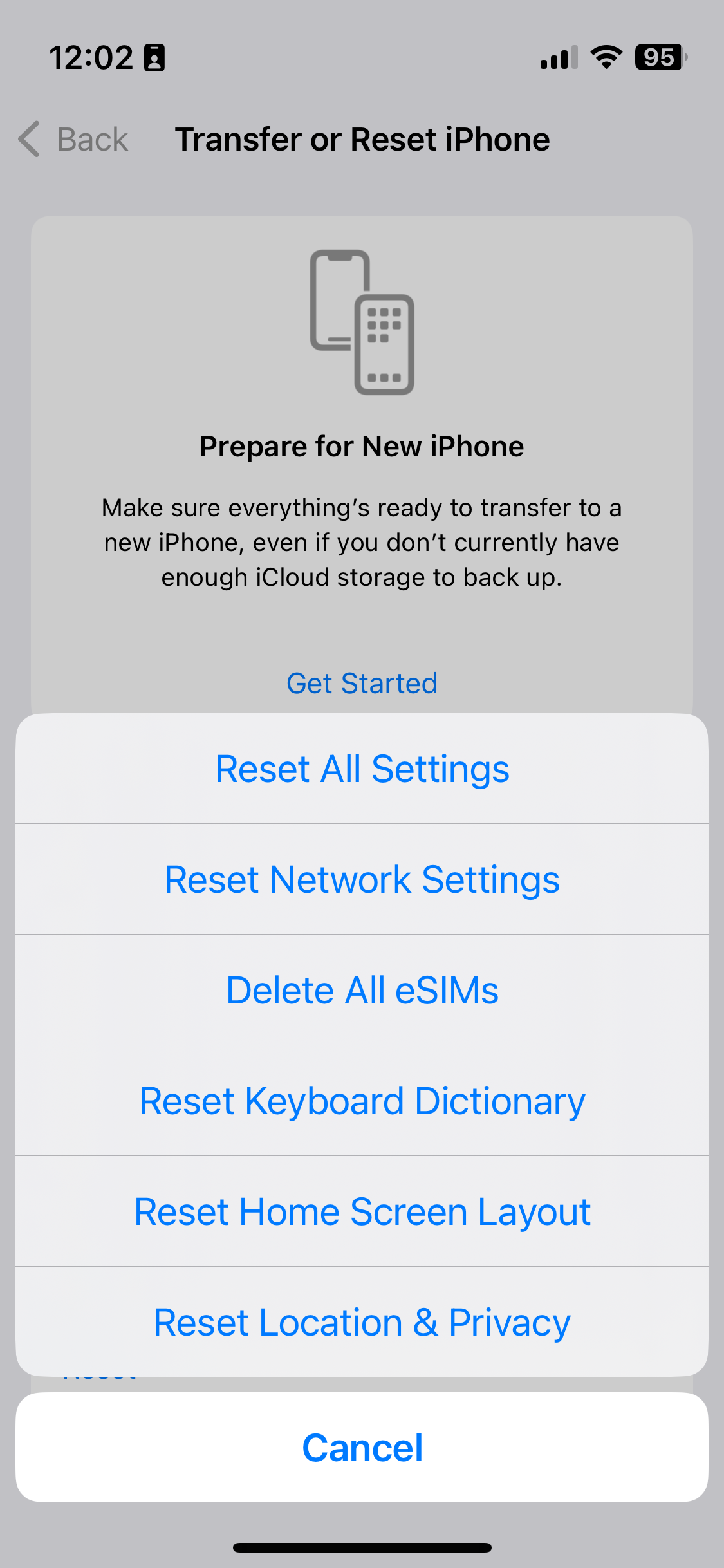
A screenshot showing how to reset settings on iOS 16

Over the Christmas break, my iPhone would randomly decide that I was in my office. I’d have an app open that used my location, but instead of showing me where I actually was, it’d suggest that I was in Bradford. Which isn’t so useful when, in reality, you’re at home, or in York.

It caused particular problems when using Google Maps for directions, as it’d randomly jump to Bradford and then back again. Swarm was basically unusable. And it completely broke the ‘Track Exercise’ function of the Fitbit app. I had to actually uninstall and reinstall the Fitbit app a couple of times because it wouldn’t let me stop the exercise. This was even after restarting the app.

Turning Wifi off helped. Apple’s iPhones, and indeed many other devices, use the SSIDs of available Wifi networks to approximate your location. This is done by querying a web service, which means that you can still get an approximate location even when indoors, and out of view of GPS satellites. But turning off Wifi was hardly a long term solution.

How to actually fix the location problem

A bit of Googling uncovered this article about fixing your location. It offers several solutions, depending on whether the issue affects just one application, or all. In my case, it was all applications, and the solution that worked was the fifth on the list. This involves resetting your phone’s location and privacy settings.

To do this, open Settings, and choose General. Then, scroll right down to the bottom and choose Reset, then select ‘Reset Location & Privacy’ – on iOS 10.2, this is the last option. Your device will ask you for your unlock password – pop this in, confirm, and hopefully your device will get the location correct from now on.

There is a drawback to doing this, however. You’ll have noted that this resets both your location and privacy settings. This means that any apps that you have granted access to your contacts, photos, calendars, camera, microphone, media library and so on will need to request them again. Although, oddly, apps will retain their location permissions, along with any permissions regarding background app refresh, notifications or mobile data access.

Despite these issues, it was a relief to fix the problem.

This blog post was updated in November 2023 with an updated screenshot, but the instructions are broadly the same.

Neil and Christine’s Geocaching Adventure

Geocache

This weekend Christine and I went Geocaching for the first time. It’s something I’d considered doing ever since I got my iPhone, almost a year ago (seriously, it does not feel like a year already…), but I never got around to it. Anyhow, a colleague at work had mentioned some of her friends had got into it, and several of my blogger friends like Andy and Firda do it, so I looked for caches near where we live and found 5 within a one mile radius.

With it being a bank holiday yesterday, it meant we both had the afternoon free, so I bought the iPhone app (which I’ll review tomorrow) and we set off. The first one we found is shown above – it’s a ‘micro’ cache which is the second-smallest size of cache, and is about the size of a matchbox. Inside every geocache is a piece of paper to write your name and the date to log your visit. Finding the cache took a little longer than expected, although the hint for the cache was spot on when we finally worked it out. This was also perhaps our punishment for choosing the nearest cache rather than going a little bit further to one recommended for newbies.

We continued on to find three further caches – the next two being the fiendish ‘nano’ caches which are the smallest, and usually magnetic. In fact, when I first found it I thought it was the magnet to hold the cache onto something, not the cache itself – it wasn’t until I twisted it that it opened to reveal the log inside. The last one for the day, alongside the canal, was inside a 35mm film canister, and required a little scrambling down a bank to get to.

So, four caches down. There are obviously many more to find – after all, if there are four in a small town like ours, then the must be thousands in the UK alone, nevermind overseas. Of course, we’ll now have to go a bit further to look for them but it’s possible to do a spot of geocaching whilst doing other activities. There’s two on campus at work to find during a lunch break and I might have a look for some in Huddersfield as I’m there on Thursday. Still, we may go out specifically to find geocaches – after all, we’ll probably be walking between them so it’s good exercise.

I’m under the impression that smartphones are making geocaching more accessible; in the past, if you wanted to find a geocache you would have needed to buy a GPS receiver, which for those not interested in outdoor pursuits isn’t so useful when not geocaching. Smartphones have brought GPS to the masses, and phones with always-on internet bring dynamic maps and access to the Geocaching community whilst on the go, so there’s no need to plan geocaching trips ahead of time. The Geocaching web site could do with some improvements – it’s a bit cluttered and the design feels rather dated.

Tomorrow, I’ll do an App of the Week review of the Geocaching iPhone app. I may blog again about my Geocaching exploits later on, as and when I find more.