
Fixing high memory usage caused by mds

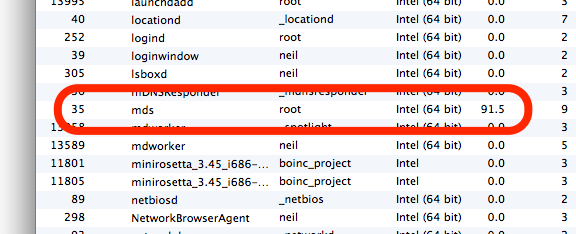
Screenshot of activity monitor on Mac OS X showing mds with high memory usafe

Recently my Mac Mini has been running very slowly, with some programs freezing for as much as several minutes. I pruned the list of items that were running on startup but this didn’t seem to make much difference.

So I opened Activity Monitor (the OS X equivalent of Task Manager) and found a process called ‘mds’ was consuming huge amounts of RAM and virtual memory. MDS is the process which builds an index of your disks for use by Spotlight, the tool that lets you search your drives, and also by Time Machine for backups. Sometimes MDS requires a fair amount of RAM, but it was using almost 2 gigabytes of virtual memory and almost a gigabyte of RAM in my case. I only have 4 gigabytes of RAM in total, and so this was causing major problems as OS X had to regularly swap data between RAM and the paging file.

I’d tried looking into this before and got nowhere. Most of the results in Google were discussions on Apple’s support forums, which were devoid of any real solutions. But eventually I found this post on iCan’t Internet which actually had a solution.

Firstly you should run Disk Utility. Repair your hard disk, and also repair the disk permissions. This may fix your problem, but it didn’t in my case so I moved on to the next step.

Open up Terminal, and type in the following command: sudo mdutil -avE . This runs a tool called ‘mdutil’, and tells it to completely rebuild Spotlight’s index. It turns out that the index on my hard disk had got corrupted somehow, and this was causing problems with the ‘mds’ process. It took a while for the command to run, but afterwards a huge amount of RAM and virtual memory became free. Unsurprisingly, my Mac ran much more happily after this.

Hopefully if you’ve have the same problem this will help. It has certainly breathed new life into my increasingly sluggish computer.

And now it’s the Mac Mini’s turn

As many of you will know, as well as my MacBook, which I use as my main computer, I have a Mac Mini as well – this was my first Mac which I bought in 2005. It has spent the past year or so searching for a purpose – I was, and still am, hoping to turn it into a media centre but I’ve neither had the time or money to go ahead with it, and to be honest, I don’t really need to either.

Anyway, after yesterday’s shenanigans with my MacBook, it’s the turn of the Mac Mini to refuse to work. It’s actually not a problem that developed today – I noticed it wasn’t working last week, but as I run it headless I didn’t have a computer monitor to plug it into. All I knew was that it wasn’t registering itself on the network.
Today I had chance to use it with an external monitor. I heard the startup sound, saw the Apple logo on the screen, and then, nothing. No status indicator, just the Apple logo.

So, I zapped the PRAM – Command+Option+P+R. This time, the status indicator appeared for about 10 seconds before the Grey Screen of Death appeared, showing a kernel panic. This happened with subsequent boots.

So, I tried booting from the OS X CDs. Same problem. In fact, after a while, all I could do was access the Open Firmware command prompt.

This therefore means that there’s something wrong with the RAM or another component. Over the Christmas period, I took my Mac Mini with me to my parents in York, rather than leaving it in Bradford as I figured it would be safer. I’m guessing that it may have got jolted in transit and one or more of the components is out of place. It could also be bad RAM, but the RAM was only replaced in November 2006 and it was good-quality Crucial RAM. Plus, it’s a faff trying to get the damn thing apart and will probably require the purchase of another putty knife seeing as my existing one has gone missing.

In the meantime, I have a nice iOrnament.

More on the upgrade

As promised, here is more about the upgrade I did to my parents’ computer last weekend.

The computer will be 4 years old in October and I wanted to sort out its current shortcomings while also making it capable of running for at least another 2-3 years. The agreed budget was £100, about 6 times less than the original cost of the computer.

In the end, we went for the following internal components:

  • 2 GB of Corsair Value Select PC3200 RAM
  • 256MB XFX nVidia GeForce 6200A AGP 4x/8x graphics card
  • A no-brand USB and FireWire PCI card

The memory was the most important part of the upgrade. Originally, the machine only had 512 MB of RAM, and as such was struggling. As a matter of principle I only buy Corsair or Crucial RAM as I know it’s good quality, and on this instance I went for Corsair as it was slightly cheaper and could be shipped as part of the same order from Scan. It was still the most costly aspect of the upgrade at £39.32 (ex VAT), taking the majority of the £100 budget.

Next was the graphics card. Right now the machine has onboard VIA graphics, which can do some basic 3D but not much more (it will just about handle the original World of Warcraft with all of the effects turned off, but it’s not pretty), and it leeches system RAM rather than having its own. Furthermore, the manufacturer has not produced any new drivers for Windows Vista. So, as part of my plan to keep the machine running for a few years, allowing for a potential Vista upgrade is important. I doubt nVidia are due to disappear any time soon, so hopefully this new card will be a safe bet. It also adds DVI and S-Video output, allowing connection to a TV or a more modern TFT screen.

Finally, I added a USB and FireWire PCI card. The machine had 2 USB ports at the front and 2 at the back, but both of those at the back were full and my parents were already having to use a hub. The machine is due to be moved to a room where there is no wired socket for Ethernet, so we’ve opted to go for a USB wireless dongle (the Netgear WG111 previously mentioned), so that would be another USB port used up. As an extra PCI card was only around £5, it made sense to add 4 more ports. It also adds 2 FireWire 400 (IEEE 1394a) ports, which the computer previously lacked; whether my parents will ever use them is perhaps questionable but at least they are there, and it may add resale value to the machine.

These 3 items, plus the Netgear dongle, packing and VAT, came to £100.19, so only a bit over budget 🙂 . The difference is very noticeable – startup times are improved and general performance is much better. The machine is now almost ready for Windows Vista – the only device lacking a Vista-compatible driver is the internal modem, which isn’t in use anyway and could be removed if necessary (it’s made by SmartLink who sold their assets to Connexant in 2006, and then disappeared off the face of the earth. Their latest drivers don’t even work correctly with Windows XP SP2).

Stop… upgrade time!

My parents’ computer is in need of a mid-life upgrade. It was bought in October 2004 and, at the time, gave acceptable performance. But now it’s flagging a bit, in comparison to the latest and greatest. To save you reading the old entry, here’s the specs:

  • AMD Athlon XP 3000+
  • 512 MB RAM
  • 80 GB HD
  • DVD rewriter
  • 64MB onboard graphics
  • Plus all of the usual stuff

Three-and-a-half years on, and it looks like the main weak points are the memory and graphics. The processor is reasonably good, and I’m not inclined to replace it as the prospect quite frankly scares me, and they still have ample space on the hard drive.

512 MB RAM is low by today’s standards, and so I’m proposing an upgrade to 2 GB – the maximum the machine will hold. Upgrading the RAM on Hari’s machine, which is of a similar specification and age, made a big difference and so this would be my first choice.

The graphics are the other aspect I want to upgrade. Right now it’s a VIA onboard job, which as well as being underpowered also lacks Windows Vista drivers, so if my parents do ever upgrade (unlikely, but I wouldn’t rule it out) they would potentially run into problems. The machine does have an unused AGP port, and so a cheap graphics card would be an instant upgrade. It would also return those 64 MB of RAM that it used to the computer, although 64 MB is a drop in the ocean when you have 2 GB.

We still have Hari’s old graphics card lying around (in a static-proof sleeve), which is based on the nVidia GeForce 5200 FX chipset. This was okay for normal use on her computer but seriously impacted her WoW gaming. Now, my parents are hardly likely to be fragging noobs or levelling shadow priests any time soon, but a better card can be bought for very little money. In fact, £25 would buy you something based around the full nVidia GeForce 6200 chipset (as opposed to the budget FX range). So it’s a question of saving £25 and recycling the old card, or getting something better for a little more money.

The computer also needs equipping for Wifi, probably by virtue of a USB dongle, but at less than £10 a piece that’s not a major issue. The total budget for all of this is £100, with the RAM costing about £50 (looking at Crucial and Corsair prices). There’s ample room for a reasonable graphics card, but I’m wondering whether to bother or not.

What do you think?

Memory upgrade question

Here’s a question for all you memory techie nerd people out there:

Given the choice, would you go for Crucial memory, or Corsair Value Select memory?

The reason why I am asking is that I’m finally getting around to upgrading Hari’s computer, now that memory prices have fallen far enough for it be a little over £100 for a full 2 GB of RAM. Crucial have the memory she needs at £108, but they’re currently out of stock and there’s no indication as to when they’ll get stock back in. Scan, on the other hand, has Corsair Value Select memory available now for £107 including delivery.

Obviously the two cost the same so price isn’t an issue, but should I wait and buy Crucial memory, or get Corsair memory now? The fact that it is ‘value select’ seems to imply that it might not be as good as Crucial’s memory but I have no idea whether this is actually the case; all I know is that Crucial and Corsair are good brands.

Obviously it would be nice if she could afford high quality gaming memory but this is about the best we can do for now. Any thoughts are welcome.

Memory upgrade

Today I finally got around to upgrading the memory in my Mac Mini. Since buying it last year it’s had 512 MB of RAM, which is fine for general computer-ry stuff (reading email, browsing the web, maybe running iTunes in the background) but lately it’s been used more and more for playing World of Warcraft, which is a very memory-intensive program. With it running, doing anything else on the system is, at best, difficult – switching between World of Warcraft and, say, Firefox takes a long time.

I ended up buying the memory from Crucial – I’ve bought from before and had no problems, and this time was no exception. I ordered the memory yesterday morning, and despite going for the free delivery and not the more expensive guaranteed next day delivery it still came today, which is excellent. Crucial also happened to be cheaper than buying Corsair memory from either Scan or Dabs, and I’d rather not have generic memory if I can avoid it.

The reason why I have been putting the upgrade off isn’t so much the cost aspect (which ended up at £85 for 1 GB of PC2700 DDR RAM), but the actual upgrade itself, and in particular taking the unit apart. It’s a very small unit and the case isn’t screwed on – you actually have to pry it open with a knife – I used a standard putty knife from Wickes. Because my unit also has Airport and Bluetooth, you have to then detach one of the antennae before then lifting the RAM out and inserting the new module. Thankfully, there are videos which explain this process – I really would not have bothered if I hadn’t seen it being done first. One thing I did do, however, was boot the computer before putting the lid back on and making it sure it worked – after going through all the effort of taking the machine apart I didn’t want to have to do it all over again just because the module wasn’t seated correctly, for example.

Thankfully, the upgrade worked, and now the Mac has double the memory to play with. It’s not a seismic difference in speed but it does feel snappier; still, my MacBook, with its Intel Core Duo processor, beats it when playing WoW. But not by quite so much.