
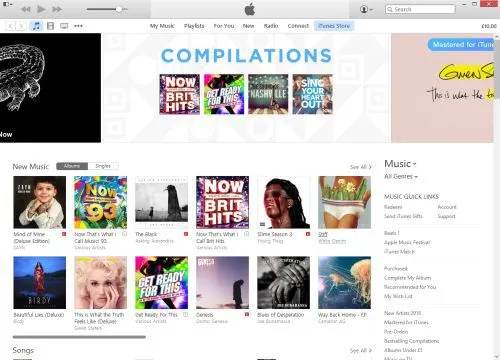
iTunes. It’s the software that many of us use begrudgingly for listening to music, purchasing content, syncing with our devices and watching videos. Mac users get it as part of OS X, whether they want it or not, but Windows users need to download it, to be able to synchronise their music libraries with their various iDevices.
Apple is known for its great hardware design (with just a few exceptions), and people like me are very loyal to our iPhones due to its (in my opinion) superior user interface. So why did iTunes, one of Apple’s most-used desktop computer programs, become so hated by its users? Why would writer and Guardian journalist Charlie Brooker describe it as ‘…a hideous binary turd that transforms the sparkling world of music and entertainment into a stark, unintuitive spreadsheet’?
To find out how iTunes came to be the bloated mess that it now is, we need to look back into its history.
A brief history of iTunes
iTunes has not always been called iTunes. Way back in the late 1990s, it was called ‘SoundJam’, and was written by an independent third-party developer for the original Mac OS System 9. Apple later bought out the developers, releasing iTunes 1.0 in 2001, which built on SoundJam’s features and added the ability to burn CDs with tracks from the user’s library. Fundamentally, the basic music management features of iTunes are largely unchanged in 15 years.
iTunes 2.0 was the first release for Mac OS X, and the first to support Apple’s brand new music player, the iPod. This took iTunes from being an application that simply managed music on your computer and your CDs, to your iPod as well.
Version 4.0 and 4.1 were big steps forward for iTunes. Version 4.0 brought the iTunes Music Store (later just the iTunes Store when it expanded to other content), and 4.1 brought iTunes to Windows for the first time. Adding the iTunes Store added another layer of complexity to an application that already did quite a lot of different things.
As Apple improved its iPod range, iTunes had to keep up. So the 2004 launch of the iPod Photo, with a colour screen for showing photos, saw photo syncing added to iTunes 4.7, and the launch of the fifth generation iPod Classic in 2005 meant that iTunes would gain support for video playback. By now, it was possible to use what was originally a program for managing music, to manage your movie and TV show libraries as well. Podcast support arrived in version 4.9.
2007 brought the first iPhone. Up until 2011’s release of iOS 5, iOS devices relied on iTunes for various tasks like software updates and backups, and so all of this had to be handled in the app as well. Ultimately, this led to a major redesign of the iTunes interface in 2012 (version 11), but it retained its underlying code and all of its numerous existing features. And iTunes 12 saw Apple Music, its new streaming service, bolted on to iTunes.
So what is iTunes now?
We know what iTunes was, when it first came out 15 years ago: a music library management program that let you play music, and import and export tracks to CDs. Its feature set has since ballooned into:
- an all-encompassing media and app store
- music and video player
- podcast manager
- internet radio player
- streaming music service
- CD ripper and burner
- mobile device sync and backup tool
- online music storage manager
All of these are rolled into one, monolithic app, which is supposed to run on both OS X and Windows. Whilst Apple controls OS X and iTunes’ integration with it, the Windows version has developed a reputation for being slow and a pain to update. iTunes for Windows actually includes a number of helper utilities (Apple Mobile Device Support, Bonjour, Apple Software Update and others) and I’ve lost count of the times when I’ve tried to update iTunes on Windows to find that the installation failed. Sometimes, you just have to uninstall and reinstall everything, which is time-consuming and far from ideal for a piece of software that is updated on a near bi-monthly basis. I wouldn’t be surprised if many Windows users still have old versions, due to updating issues.
What can Apple do to make iTunes better?
In my view, Apple needs to take a look at what it has done on iOS. There’s no monolithic, all-encompassing ‘iTunes’ app — instead, its individual functions have been broken down into multiple apps. Here’s how iOS does it:
- Music — this handles the music you own (in your iTunes library) and Apple Music.
- Videos — playback of videos in your iTunes library is handled by a separate app.
- Podcasts — again, podcasts have their own app. This was baked in to the Music app in earlier versions of iOS, but was later spun-out and it now comes as standard.
- iTunes Store — the store is a separate app; once you buy something, playback is handled by the Music or Videos apps.
- App Store — apps for iOS devices are bought separately from audio and video content.
- Settings — handling your settings is done in the main iOS Settings app.
So I suggest that Apple splits iTunes on the desktop into the following:
- iTunes Music — a music player that takes iTunes back to its roots. It’ll handle all aspects of playing music — whether this is from your own library, a CD, Apple Music or internet radio. CD burning can go in here too.
- iTunes Video — this could replace Apple’s QuickTime player, which hasn’t seen much development in recent years. It can handle the playback of video content from your library — whether that’s films, TV shows, or home movies imported from iMovie.
- iTunes Podcasts — a separate podcast manager, like on iOS.
- iTunes Store — like on iOS, the store app is kept separate. When an item has downloaded, a single click would allow users to open the content in either the music or video player, where applicable, or in a third-party player if Apple wants to play nice.
- Apple Sync Settings — on a Mac, this could be an additional preference pane in System Preferences. On Windows, I would have previously suggested a new Control Panel applet, but I gather such things have been phased out in Windows 10 and so this would have to be a separate app. This would handle the synchronisation of data between your computer and Apple device (a modern-day reincarnation of iSync), so you can choose what is copied across and handle backups and software updates.
A simple onboarding splash screen could help users find out where things have moved to when they upgrade.
What else needs to change?
Splitting iTunes up into several component apps will hopefully make it faster (less code to load into memory) and easier to use (less features to cram into a single interface). I also hope that doing this would improve the Windows version, which has never been as slick as its Mac counterpart.
But one other thing that Apple needs to change is the incessant prompts for your AppleID password. Some of these make sense — unless you turn it off, you’ll be prompted every time you buy something, and that’s fine. But sometimes I get asked for my password for no discernible reason. This came to a head last week when my AppleID was locked due to ‘suspicious activity’ on my account — which was me renaming my iPhone to ‘Phoney McPhoneface’ — yeah, I know. This led to at least four prompts to enter my (18 character) password on my phone, and iTunes asked for it twice. In all of these situations, I entered the password correctly, so why all the prompts?
I’m sure there are many more ways that Apple can improve iTunes. The change I’ve suggested here is a major one, and would probably be the biggest shake-up since its launch in the 1990s. But I honestly think that it would make a major difference to iTunes’ many millions of users around the world.

