AboutMy.email

Screenshot of the aboutmy.email screen

So, now that I’m sending out email newsletters, I need to be sure that people will actually receive the emails. Because email spam is still a problem after all these years, the big webmail providers have strict requirements to ensure that email reaches their user inboxes, and AboutMy.email is a really simple testing tool.

When you open the web page, you’ll be given an automatically generated unique email address. All you need to do is send an email to this address, preferably by adding it to your email list. Once the email comes through, AboutMy.email will analyse it, and let you know what you need to improve.

I had already set up DMARC, DKIM and SPF on my domain, and so, as you can see from the screenshot, it scored quite well. Other things that I’ve gained points for are my site having an IPv6 address, and using TLS for email connections.

To improve the score further, I’ve subsequently added a BIMI record, and need to look into adding unsubscribe headers from my emails. But it’s a very good start, and should reduce the chances of my emails ending up in user’s spam folders. I like how simple AboutMy.email is – you don’t need to register an account, and there’s no spam follow-ups afterwards (which would be ironic I suppose).
Silencing unknown callers

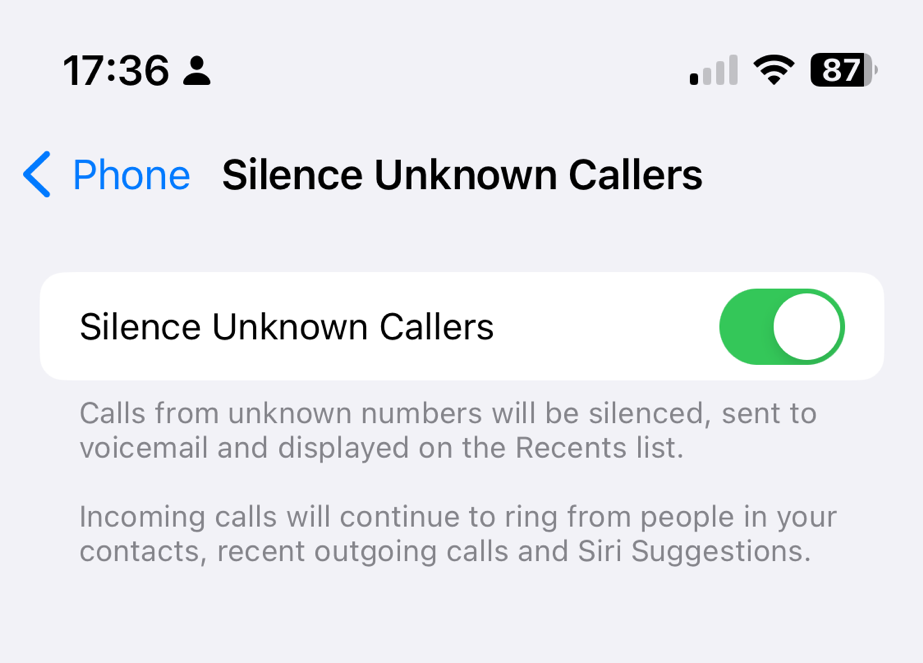
Screenshot of the iOS option to silence unknown callers
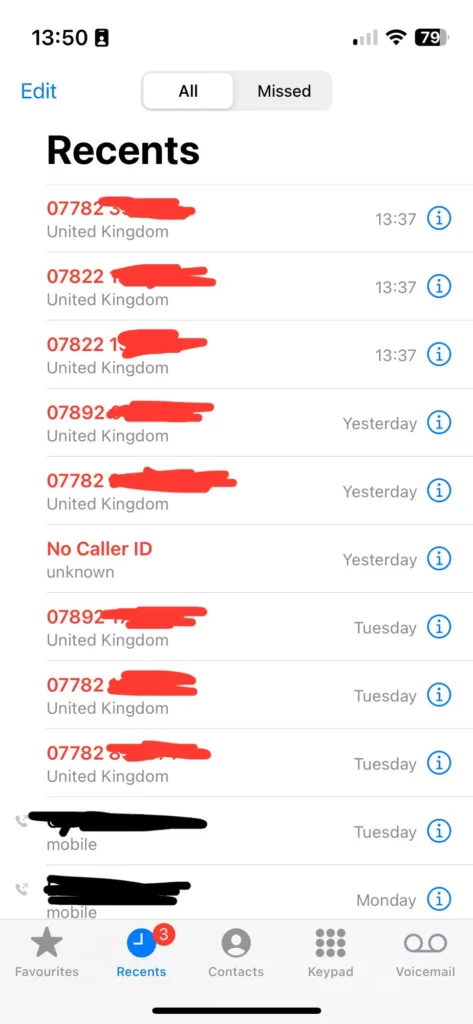
My recent calls list, showing lots of missed calls from numbers not in my contacts

Over recent weeks, I’ve been plagued by calls from numbers not in my contacts. Sometimes, as per the screenshot, I’ll get three calls from three different UK mobile numbers within seconds of each other. So, I’ve enabled Silence unknown callers on my iPhone.

I made a mistake by answering the first call, and it turned out to be some kind of cryptocurrency scam. However, it wasn’t just a random dial; they had my name and email address as well as my phone number. This suggests that they’ve hoovered up my personal data from a previous breach – possibly the Patreon breach of 2015, but there have been many others.

Since then, I’ve been getting three or four calls at a time, usually twice per day. It’s a different number every time, so whilst I may have not been fully convinced it was a scam when I answered the first time, I am convinced now. I’ve tried to hide the numbers in the screenshot because the numbers have almost certainly been faked and probably belong to innocent people. It also suggests to me a deliberate effort to get around call blocking apps like Truecaller, for which I have a premium subscription.

What this means is, if people call me, my phone will only ring if the number is in my contacts, if I’ve called it recently, or it’s a ‘Siri suggestion’. The latter could include numbers in recent text messages and emails, for example.

If you want to enable this yourself, open Settings on your iPhone, go to Phone and then scroll down to ‘Silence Unknown Callers’.

I’ll keep this on until the random calls stop. At the time of writing, they’ve slowed down but haven’t stopped completely. Maybe they’ll get the hint in time.

Comment Spam strikes back

An illustration of a robot turning web pages into canned meat product. Generated using Bing AI Image Generator

So now that I’m blogging again, it’s the return of comment spam on my blog posts.

Comment spam has always been a problem with blogs – ever since blogs first allowed comments, spam has followed. Despite the advert of the rel=”nofollow” link attribute, automated bots still crawl web sites and submit comments with links in the hope that this will boost the rankings in search engines.

In the early days of blogging, blogs often appeared high in Google’s search engine results – by their very nature, they featured lots of links, were updated frequently, and the blogging tools of the time often produced simple HTML which was easily parsed by crawlers. So it was only natural that those wanting to manipulate search engine rankings would try to take advantage of this.

I’ve always used Akismet for spam protection, even before I switched to WordPress, and it does a pretty good job. Even then, I currently have all comments set to be manually approved by me, and last week a few got through Akismet that I had to manually junk.

Humans, or AI?

These five interested me because they were more than just the usual generic platitudes about this being a ‘great post’ and ‘taught me so much about this topic’. They were all questions about the topic of the blog post in question, with unique names. However, as they all came through together, and had the same link in them, it was clear that they were spam – advertising a university in Indonesia, as it happens.

Had it not been for the prominent spam link and the fact they all came in together, I may have not picked up on them being spam. Either they were actually written by a human, or someone is harnessing an AI to write comment spam posts now. If it’s the latter, then I wonder how much that’s costing. As many will know already, AI requires a huge amount of processing power and whilst some services are offering free and low cost tools, I can’t see this lasting much longer as the costs add up. But it could also just be someone being paid using services like Amazon Mechanical Turk, even though such tasks are almost certainly against their terms of service.

I think I’m a little frustrated that comment spam is still a problem even after a few years’ break from blogging. But then email spam is a problem that we still haven’t got a fix for, despite tools like SPF, DKIM and DMARC. I’m guessing people still do it because, in some small way, it does work?

Why Thunderbird is better than OE

You may have heard that despite reports earlier in the week, Microsoft will still develop Outlook Express after all. But unless Microsoft pull off something truly remarkable, I’m not going to switch back from my beloved Mozilla Thunderbird. And what’s more, I’ve given you a list of reasons why I’m not switching, in no particular order 🙂 .

  1. Themes – bored of the normal look? Change it. 10 themes are already available and it’s only at version 0.1
  2. Extensions – add on extra features without using shell hooks (like OEQuoteFix uses).
  3. Junk Mail filtering – considering OE is the world’s most popular mail client, I’m surprised this isn’t already in. But it isn’t. Thunderbird uses Bayesian filtering which is one of the best forms.
  4. Better message filtering – much more powerful than the rather basic filtering in OE, and easier to use too! Great for adding a filter to mark out mail that SpamAssasin thinks is spam, since you can specify custom header matching.
  5. Not full of security bugs – I can open an email infected with Klez and know that I won’t be automatically infected. And not a security patch in sight.
  6. HTML Sanitization – you can either view HTML messages in their full glory, or with things like images and CSS removed so that your address cannot be tracked as easily. You can even view them all as plain text.
  7. Sanitization for Junk Mail – if you like pretty messages but still want privacy, you can enable sanitization only for emails marked as junk.
  8. Cross platform – you probably could run OE in Wine on Linux, but this baby runs natively on Windows, Linux and Mac OS X. And it’s already being ported to all manner of other OSes.
  9. Text Zooming – it’s been nearly a year since I used OE properly so I can’t remember if it does this, but if IE is anything to go by, even if it did it wouldn’t do it properly. You can make text larger or smaller in all emails, whether they use CSS or not. Great if your aunty sends everything in 64pt fonts.
  10. Automatic folder compression – those DBX files can get awfully big in OE, even if you delete all your mail. Thunderbird can compress them automatically, rather than waiting for you to do it yourself.
  11. Javascript Console – I’ll but good money that OE will never have this feature.
  12. Three-pane vertical layout – Outlook has this, but OE does not. But Thunderbird does 🙂
  13. Customisable start page – Yes, you can change it in OE but only by going into the registry or using X-Setup (a blatant plug because I wrote that plug-in myself 🙂 ). Thunderbird has it on the opening tab of the Options dialogue.
  14. On-screen alerts – You can have it pop up a message near the system tray when mail arrives. Handy that.
  15. Message labelling – Have important emails marked as red, or personal ones marked in green, although naturally you can change the colours easily. And you can set mail filters to do this automatically.
  16. Graphical emoticons – MSN Messenger has this, why doesn’t OE?
  17. Spellchecker – yes, OE has it but in some cases it’s buggy. And you can also change the language without buying a new OS.
  18. Doesn’t get hijacked – one of my ISPs decided to add an ‘Infobar’ to the bottom of OE once, taking of valuable screen real estate. And then there was the Hotmail advertising bar, and the ‘Outlook Express provided by…’. Yes, again X-Setup can fix those but how many users in the world have X-Setup? Probably about 0.1% or something.

I’ve probably missed many others, but that’s 18 features that I personally find useful that OE doesn’t have. Are you convinced yet? 😉

Added: meanwhile, there’s a guide for switching from OE to Thunderbird, complete with screenshots and very simple instructions. Check it out! 🙂