Nanoleaf Matter Essentials LED Bulb review

A photo of the Nanoleaf Matter Essentials B22 LED Bulb in a light fitting

I’ve bought myself a Nanoleaf Matter/Thread Essentials LED bulb (sponsored link) to use with another PIR motion sensor (see my review of that from a couple of weeks ago). Unlike last time, this is a Matter over Thread bulb, rather than a Zigbee bulb.

Whilst many of the smart home products I have bought recently have been Zigbee devices, I’m reasonably convinced that Matter and Thread are the future of home automation. To date, I’ve only picked up Matter smart plugs – some Meross Wi-Fi plugs and some Onvis Thread plugs – so this is the first Matter bulb that I’ve bought.

Connecting over Matter

This Nanoleaf Essentials bulb connects over Thread, rather than Wi-Fi. This is probably why there is a ‘Frequently returned item’ warning on the Amazon listing, as it won’t work well without a Thread Border Router. Thankfully, I have three – two Google Wi-Fi devices, and my Home Assistant instance with a USB dongle. Like Zigbee, Thread is a mesh network, and so these three border routers, and my two Onvis plugs have formed a relatively good Thread mesh. That’s good, because this bulb is in a room on its own some distance from any of the border routers, but it’s able to join the mesh with the Onvis plugs.

As it’s a Matter device, I was able to add it to Home Assistant, Google Home and Apple Home with no issues. Nanoleaf include the necessary QR code on the instruction manual as well as the bulb itself, which is helpful. The bulb also supports Bluetooth, partly for commissioning onto the Thread network, but it can also be controlled by Bluetooth using the Nanoleaf app if you don’t have a Thread Border Router. However, due to Bluetooth’s short range, I doubt this will be much use to many people.

Appearance and usage

The design of the bulb is a little odd. Unlike most LED bulbs, it’s not a smooth spherical surface, but a series of blocky geometric shapes. I’d prefer a smooth look, personally.

The bulb was quite responsive when using it with Google Home. It’s a colour changing and dimming model, and when it turns on and off, it fades up or down, which is a nice touch. I found controlling it with Home Assistant a little more hit and miss – sometimes, turning it on took a few seconds, but other times it was instant. I’ll need to look into why that is.

Cost

The thing that mainly drew me to this bulb is its price – literally just five of your Great British Pounds. That’s not quite as cheap as the £4.33 Zigbee bulb that I previously bought from AliExpress, but as it’s from Amazon, I didn’t have to wait a week for shipping. And as it’s a Matter bulb, it’s better supported by Google and Apple. I just wish it was a little less ugly, but at £5, you can’t really argue.

A tale of two dongles

A photo of two dongles, both Sonoff ZBDongle E devices, labelled 'Zigbee' and 'Thread'.

I now have two dongles – both Sonoff ZBDongle E devices – connected to the Raspberry Pi which runs my Home Assistant instance. One is for Zigbee, and the other one is for Thread.

Last January, I wrote about how I was using both Zigbee and Thread on the same dongle. This uses ‘multi-protocol’ mode, and requires a Home Assistant addon which can differentiate between Zigbee and Thread data packets. However, this is no longer recommended:

During the further development and testing of the multiprotocol firmware, we have concluded that while Silicon Labs’ multiprotocol works, it comes with technical limitations. These limitations mean users will not have the best experience compared to using dedicated Zigbee and Thread radios. That is why we do not recommend using this firmware, and it will remain an experimental feature of Home Assistant Yellow and Home Assistant SkyConnect. If you currently have the multiprotocol firmware installed but don’t actively use it to connect to Thread devices, we recommend that you disable multiprotocol.

For the time being, I have been operating a single ZBDongle E just with Zigbee firmware. However, now that I have some Thread devices, I decided to buy a second dongle and flash that with Thread firmware, using this web flasher.

Now, my Thread smart plugs can be reached by Home Assistant without its own Thread dongle – I have a Google Nest Wi-Fi system which also acts as Thread Border Routers. Therefore, having a Thread dongle isn’t necessary – Home Assistant can see and interact with the devices using Google Nest Wi-Fi. But having a dedicated Thread dongle for Home Assistant does offer some advantages:

  • Thread is a mesh network, so adding another Thread device extends the mesh and should improve resilience.
  • It gives Home Assistant direct access to the Thread network.
  • It enables another Thread Border Router, offering an additional exit node.
  • The Home Assistant Thread Border Router addon includes a web interface, allowing you to view your network’s topology and get a visual representation of how the devices connect to each other.

You may also notice that I’ve labelled the two dongles so that I know which one is which, using my trusty Bluetooth label printer.

If you’re looking to buy your own Sonoff ZBDongle E, you can, of course, buy one from Amazon (sponsored link), but (whispers: they’re cheaper on AliExpress).

Just a note: I was unable to flash any updated firmware on the newer dongle that I bought this month, using the Web flasher, so that’s now the Zigbee dongle. Apparently it may be an issue with the Windows drivers, as I was able to use Home Assistant’s Silabs Firmware Flasher addon to update it instead. If you specify this custom URL in the addon settings, it’ll use the latest (as of November 2024) Zigbee firmware. It’s also worth noting that, if you use Zigbee2MQTT, once you’re running the latest Zigbee firmware, you’ll need to tell Zigbee2MQTT to use the new ’ember’ driver rather than ‘ezsp’.

The older dongle seemed to happy to accept different firmware using the web flasher, having done so in the past. So, that’s the one with the Thread firmware.

Comparing different smart home protocols

An AI-generated image of various smart devices connecting to a home

When I started acquiring smart devices for my home, my focus was on those that worked over Wifi (or Ethernet) – I wasn’t really aware of the likes of Zigbee, Z-Wave and other protocols that were out there. In particular, I avoided those that required the purchase of a hub or bridge, due to the higher upfront cost.

Now that I’m further along my smart home journey, I’m more open to considering a range of different protocols. They all have their advantages and disadvantages to consider.

Wifi (and Ethernet)

I’m grouping these together as devices that are visible to a standard home network and have their own IPv4 address. The majority of smart home devices use Wifi, as there’s usually no need to buy an additional hub or bridge. Therefore, set-up is usually easy (sometimes aided by Bluetooth), and their range is fine as long as they can pick up your home’s Wifi signal. It’s also very easy to connect these devices to cloud services.

In terms of disadvantages: Wifi primarily uses the 2.4 GHz frequency band, which is used by lots of things and so there’s a potential for interference. The ease of connecting these devices to the cloud can also be seen as a flaw; they’re more susceptible to being compromised by bad actors, and don’t offer as much privacy. Wifi is also quite power-hungry – devices that don’t plug into the mains will need their batteries changing more frequently.

Bluetooth

As mentioned, Bluetooth is often used with Wifi to initially provision devices, but some Bluetooth-only devices can be used in a smart home. For example, there’s my Bluetooth thermometers, which connect to Home Assistant. Compared to Wifi, power requirements are much lower and so Bluetooth is good for battery-powered devices. They’re also more private, as they can’t easily be connected to from the wider internet.

However, Bluetooth has quite a limited range – it’s designed to be a ‘personal’ area network and won’t reach across large houses. You can use a Bluetooth Proxy in Home Assistant to extend the range, and whilst these devices are cheap, you’ll need to be comfortable flashing custom firmware and will usually need to plug them in as they bridge to Wifi. Like Wifi, it uses the 2.4 GHz band and so interference is possible – especially with the lower signal strength. Bluetooth connections also tend to be between two paired devices.

Zigbee

Zigbee is a mesh protocol, and it’s used by a number of smart home brands such as Philips Hue and Ikea Tradfri, as well as UK smart meters. This means that all devices on the same network talk to each other, and so a network with lots of devices could theoretically be quite strong. Like Bluetooth, there’s additional privacy as these devices aren’t connected directly to the internet like with Wifi. It’s also more energy efficient than Wifi, so battery-powered Zigbee devices will last longer between charges.

The key disadvantage of Zigbee is that you need a bridge to link it to your home network. Manufacturers like the aforementioned Philips and Ikea will sell you a hub that does this, although you can also buy USB dongles. Therefore, there’s a higher initial cost as you have to buy a hub as well as your devices. And it’s another 2.4 GHz protocol, so could have the same interference issues as Bluetooth and Wifi.

Whilst Home Assistant has good Zigbee support, both natively and through the Zigbee2MQTT system, if you don’t have a separate hub then getting these devices into Google Home can be a very involved process. Alexa is a little easier thanks to the Emulated Hue integration.

Thread

Thread is based on the same 802.16 standard as Zigbee, but differs in a couple of ways. Firstly, devices on a Thread network have an IPv6 address. Secondly, Thread is a simpler protocol that focuses just on being a mesh network with Matter taking over the device APIs. The benefit of integrating with Matter is that, unlike Zigbee, you may not need a separate bridge for Thread devices. A number of smart speakers from Google, Amazon Alexa and Apple can also act as Thread Border Routers, so it’s possible that you’ll already have the infrastructure in place in your home for Thread devices. Like Zigbee, Thread is a mesh network, and by using Thread Border Routers, the devices have a degree of separation from the wider internet that should improve privacy and security.

The downside is that Thread is still pretty new, and so there aren’t many Thread devices out there yet. You may also find that each device that incorporates a Thread Border Router creates a separate Thread mesh network. Home Assistant can be configured to join a preferred network, but it can be a bit of a faff. Ideally, they should all make one big, strong mesh network across your home, but we’re not there yet. And, once again, we’re dealing with a 2.4 GHz protocol here.

Z-Wave

Z-Wave sets itself apart from the aforementioned protocols by being on the lower 800-900 MHz frequency range. These lower frequencies have a longer range, and so are more suited to larger homes, but also avoid the interference of the 2.4 GHz band. Like Zigbee, it’s a mesh network, and should have similar privacy and security benefits by not being connected directly to the internet.

This also means that Z-Wave has the same disadvantage as Zigbee in that you’ll need a bridge to expose these devices to your home network. Furthermore, Z-Wave devices tend to be more expensive, so the upfront cost is usually higher than other protocols mentioned here.

RF and Infrared

I’m including these for the sake of completeness, but they’re not ‘smart home protocols’ in the same way as the above. It’s possible to connect the likes of Home Assistant to bridge devices that can communicate over Wifi and 433 MHz RF or Infrared. These will typically be doorbells or remote controls for devices that don’t connect using any of the above. But setting them up can be trial and error, and involves detecting and interpreting codes to trigger automations.

If you’re building a smart home system, then a bridge may be useful to bring existing devices in that don’t support standard smart home protocols. But if you’re looking to buy new devices, stick with the ones above.

How to join a preferred Thread network in Home Assistant

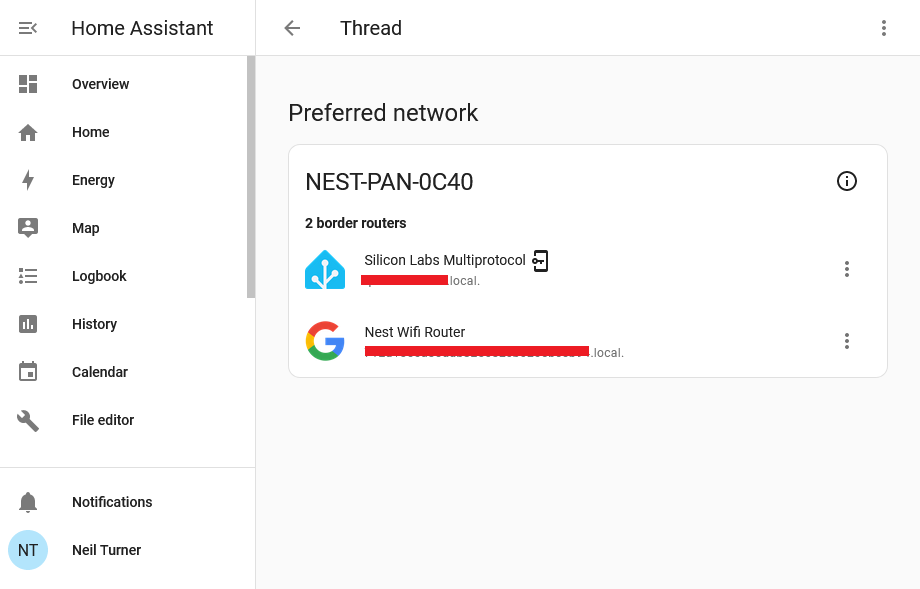
A screenshot of Home Assistant's Thread Integration showing two Open Thread Border Routers on the same network

If you use Home Assistant, and have an existing device that includes a Thread Border Router, then it should automatically add the Thread integration so that it can communicate with Matter devices. Some of Google’s Nest Hub and Nest Wifi devices include Thread, as do some of Apple’s newer Homepod devices and some of Amazon’s Echo devices. Because they broadcast their existence on your home Wifi network using mDNS, Home Assistant can detect their presence.

What Home Assistant can’t automatically do, however, is join these existing Thread networks. As this article from The Verge states, there isn’t a mechanism for sharing Thread network credentials between devices. That means that you can end up with a home that has several devices, all with the own Thread networks that don’t talk to each other, and your Home Assistant device not able to talk to any of them.

Hiding on your phone

The good news is that Home Assistant can access Thread network credentials from your phone, and this should allow you to join one of your existing Thread networks. In the above screenshot, I have my third party Thread dongle attached to the existing Nest thread network used by my Google Nest Wifi system.

The reason why I’m writing this blog post is that it’s not obvious how to enable Home Assistant to join a Thread network that it doesn’t have credentials for. Think of the Thread network credentials as being a bit like your Wifi password (or ‘pre-shared key’ to give it its official name). However, whilst you’ll usually either use whatever password is printed on your router, or a short password you set yourself, your Thread devices will come up with their own long alphanumeric key. And then, they’ll keep it a secret.

Thankfully, your phone should have this key – in Google Play Services on an Android device, and iCloud Keychain on an iOS device. And, thankfully, the Home Assistant Companion app for these platforms can access these credentials and provide them to Home Assistant, allowing you to connect to your existing Thread networks.

Matching the manufacturer to the network

But there’s a catch:

  • If you have a Google Wifi or Nest Hub device, then you’ll need an Android device to access the credentials.
  • If you have an Apple HomePod, then you’ll need an iOS device to access the credentials.

This is why I found it difficult to join the Thread network that my Google Wifi devices had created. I’m an iPhone user, and so it wasn’t able to access the credentials. They’re not available to the Google Home app on iOS, for example.

Thankfully, my wife has been a stubborn Android user for as long as I have been a stubborn iOS user. So, I just needed to ‘borrow’ her Android tablet, install the Google Home and Home Assistant Companion apps, and log in to both. Then, on the Home Assistant app, navigate to the Thread settings where an ‘Import Credentials‘ button appears. Once I tapped this, Home Assistant was able to join the Thread network created by my Google Wifi devices. Had I owned a HomePod, the process would have been similar.

One Thread network to mesh them all

Thread is a mesh network protocol, and having all devices on the same network is beneficial. Each additional device helps maintain the reach of the network. So it’s a shame that new devices just seem to set up their own networks, and don’t bother to try to join a Thread network that may already exist. Some of this is down to the Connectivity Standards Alliance, who haven’t specified a way of exchanging Thread network credentials. But it’s also worth noting that Matter and Thread are still very new standards. By comparison, Zigbee was designed in the 1990s and standardised over 20 years ago.

A few weeks ago, the Home Assistant developers hosted a livestream about ‘The State of Matter’, and there’s a useful summary here (which is good as the live stream was the best part of three hours). There’s still work to be done with supporting Thread networks in Home Assistant.