Comparing different smart home protocols

An AI-generated image of various smart devices connecting to a home

When I started acquiring smart devices for my home, my focus was on those that worked over Wifi (or Ethernet) – I wasn’t really aware of the likes of Zigbee, Z-Wave and other protocols that were out there. In particular, I avoided those that required the purchase of a hub or bridge, due to the higher upfront cost.

Now that I’m further along my smart home journey, I’m more open to considering a range of different protocols. They all have their advantages and disadvantages to consider.

Wifi (and Ethernet)

I’m grouping these together as devices that are visible to a standard home network and have their own IPv4 address. The majority of smart home devices use Wifi, as there’s usually no need to buy an additional hub or bridge. Therefore, set-up is usually easy (sometimes aided by Bluetooth), and their range is fine as long as they can pick up your home’s Wifi signal. It’s also very easy to connect these devices to cloud services.

In terms of disadvantages: Wifi primarily uses the 2.4 GHz frequency band, which is used by lots of things and so there’s a potential for interference. The ease of connecting these devices to the cloud can also be seen as a flaw; they’re more susceptible to being compromised by bad actors, and don’t offer as much privacy. Wifi is also quite power-hungry – devices that don’t plug into the mains will need their batteries changing more frequently.

Bluetooth

As mentioned, Bluetooth is often used with Wifi to initially provision devices, but some Bluetooth-only devices can be used in a smart home. For example, there’s my Bluetooth thermometers, which connect to Home Assistant. Compared to Wifi, power requirements are much lower and so Bluetooth is good for battery-powered devices. They’re also more private, as they can’t easily be connected to from the wider internet.

However, Bluetooth has quite a limited range – it’s designed to be a ‘personal’ area network and won’t reach across large houses. You can use a Bluetooth Proxy in Home Assistant to extend the range, and whilst these devices are cheap, you’ll need to be comfortable flashing custom firmware and will usually need to plug them in as they bridge to Wifi. Like Wifi, it uses the 2.4 GHz band and so interference is possible – especially with the lower signal strength. Bluetooth connections also tend to be between two paired devices.

Zigbee

Zigbee is a mesh protocol, and it’s used by a number of smart home brands such as Philips Hue and Ikea Tradfri, as well as UK smart meters. This means that all devices on the same network talk to each other, and so a network with lots of devices could theoretically be quite strong. Like Bluetooth, there’s additional privacy as these devices aren’t connected directly to the internet like with Wifi. It’s also more energy efficient than Wifi, so battery-powered Zigbee devices will last longer between charges.

The key disadvantage of Zigbee is that you need a bridge to link it to your home network. Manufacturers like the aforementioned Philips and Ikea will sell you a hub that does this, although you can also buy USB dongles. Therefore, there’s a higher initial cost as you have to buy a hub as well as your devices. And it’s another 2.4 GHz protocol, so could have the same interference issues as Bluetooth and Wifi.

Whilst Home Assistant has good Zigbee support, both natively and through the Zigbee2MQTT system, if you don’t have a separate hub then getting these devices into Google Home can be a very involved process. Alexa is a little easier thanks to the Emulated Hue integration.

Thread

Thread is based on the same 802.16 standard as Zigbee, but differs in a couple of ways. Firstly, devices on a Thread network have an IPv6 address. Secondly, Thread is a simpler protocol that focuses just on being a mesh network with Matter taking over the device APIs. The benefit of integrating with Matter is that, unlike Zigbee, you may not need a separate bridge for Thread devices. A number of smart speakers from Google, Amazon Alexa and Apple can also act as Thread Border Routers, so it’s possible that you’ll already have the infrastructure in place in your home for Thread devices. Like Zigbee, Thread is a mesh network, and by using Thread Border Routers, the devices have a degree of separation from the wider internet that should improve privacy and security.

The downside is that Thread is still pretty new, and so there aren’t many Thread devices out there yet. You may also find that each device that incorporates a Thread Border Router creates a separate Thread mesh network. Home Assistant can be configured to join a preferred network, but it can be a bit of a faff. Ideally, they should all make one big, strong mesh network across your home, but we’re not there yet. And, once again, we’re dealing with a 2.4 GHz protocol here.

Z-Wave

Z-Wave sets itself apart from the aforementioned protocols by being on the lower 800-900 MHz frequency range. These lower frequencies have a longer range, and so are more suited to larger homes, but also avoid the interference of the 2.4 GHz band. Like Zigbee, it’s a mesh network, and should have similar privacy and security benefits by not being connected directly to the internet.

This also means that Z-Wave has the same disadvantage as Zigbee in that you’ll need a bridge to expose these devices to your home network. Furthermore, Z-Wave devices tend to be more expensive, so the upfront cost is usually higher than other protocols mentioned here.

RF and Infrared

I’m including these for the sake of completeness, but they’re not ‘smart home protocols’ in the same way as the above. It’s possible to connect the likes of Home Assistant to bridge devices that can communicate over Wifi and 433 MHz RF or Infrared. These will typically be doorbells or remote controls for devices that don’t connect using any of the above. But setting them up can be trial and error, and involves detecting and interpreting codes to trigger automations.

If you’re building a smart home system, then a bridge may be useful to bring existing devices in that don’t support standard smart home protocols. But if you’re looking to buy new devices, stick with the ones above.
Sonoff Zigbee and Thread/Matter dongle

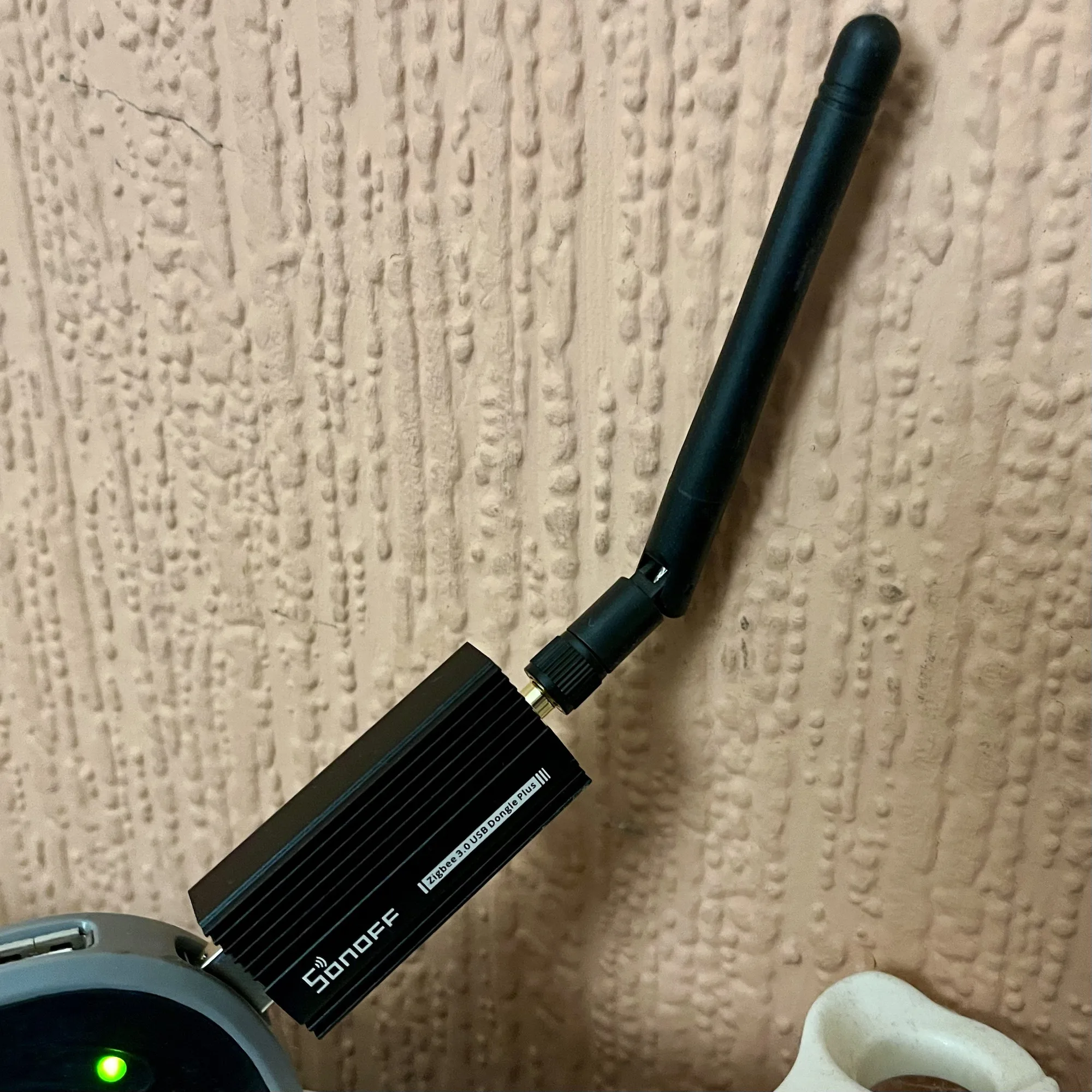
A photo of the Sonoff ZBDongle E which offers Zigbee and Thread support

If you’re a Home Assistant user, and want to connect your Zigbee and Matter devices, then one option to consider is this Sonoff ZBDongle E. I bought one a couple of weeks ago, and it seems to work fine with my Home Assistant setup.

One thing you will notice if you view its Amazon product page (sponsored link) is that there’s no mention anywhere of Thread or Matter. Out of the box, this Sonoff dongle will only work with Zigbee devices. However, if you follow this handy guide from Smart Home Scene, you can flash the dongle with custom firmware, which adds support for Thread as well. As I mentioned in my recent is there a Zigbee network in your house blog post, both Zigbee and Thread are protocols in the 802.15 family.

The firmware flasher is actually browser-based, and so there’s no need to download additional software. However, it’ll only work in Edge or Chrome, as seemingly Firefox doesn’t have away of allowing web pages to access serial ports.

Note that the guide linked above is for Home Assistant Supervised and OS. If you’re running Home Assistant as a Docker Container, then you’ll need to install this Docker Image as well. I haven’t tried it myself, as I run Home Assistant Supervised, but this seems to be the way to get it to work.

Once it’s all set up, you’ll be able to add both Zigbee and Matter devices to your Home Assistant installation.

The Sonoff dongle cost £22 when I bought it earlier this month, although at the time of writing the price has been hoicked up to £30. That makes it only £1 cheaper than the Home Assistant Skyconnect, which is the official dongle. Therefore, my recommendation of the Sonoff dongle being a cheaper option no longer applies and it’s up to you which one to buy.

Is there a Zigbee network in your house?

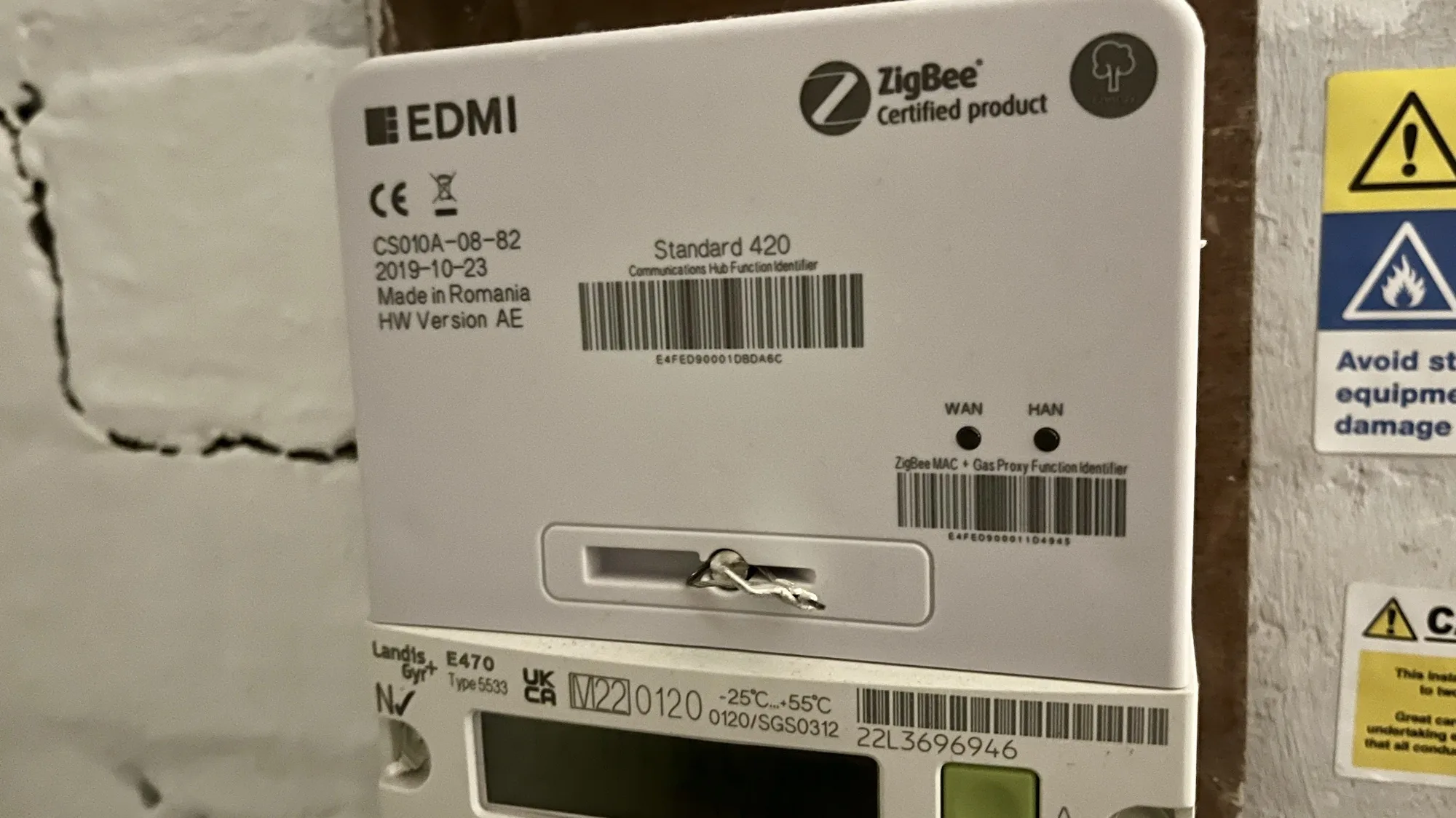
A photo of our Smart Meter which states it is Zigbee certified

If you’re in the UK, and have a smart meter, then your home probably has a Zigbee network that you may not know about.

What is Zigbee?

Zigbee is a wireless mesh networking protocol, that is commonly used for smart devices. If you have smart lightbulbs, such as the Ikea Trådfri or Philips HUE range (sponsored link), then Zigbee is what these devices use to communicate with their hub.

Zigbee isn’t the same as Wifi. Wifi devices belong to the 802.11 family of IEEE standards, whereas Zigbee is in the 802.15 family . There’s a difference at the hardware level, so a device that supports Wifi can’t use Zigbee unless it has a specialised chipset. However, there is commonality between the two; like Wifi, Zigbee uses IP addresses, and operates on the 2.4 GHz band.

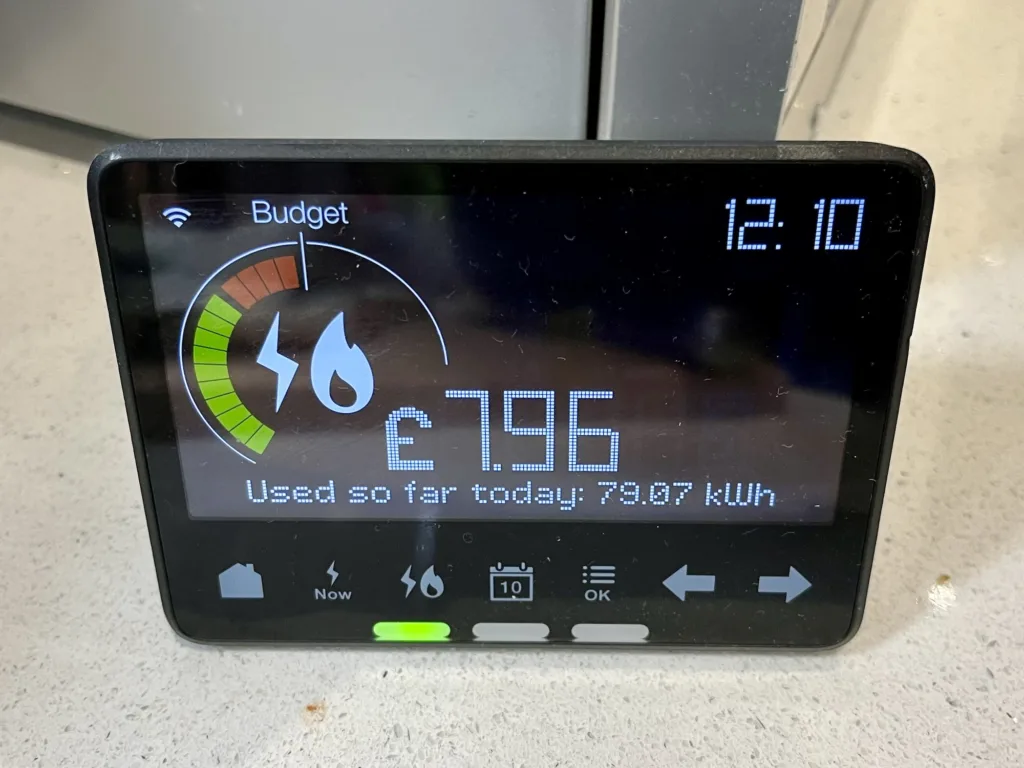
Our In Home Display, which shows our usage from our smart meters and connects using Zigbee

If you have smart meters for your electricity and gas, then these will use Zigbee to communicate with your IHD (In Home Display). This is the small device that shows your current and daily usage.

Can you access this Zigbee network?

No. Even if you have a device with Home Assistant and a Zigbee dongle, it won’t be able to see the Zigbee network that your meters and IHD use. I suspect this is because your electricity meter has its own SIM card, to access the internet to send your readings. If you could access this Zigbee network, then it may use your electricity meter’s internet connection and not your own.

Update (January 2025): Depending on where you live, your smart meter may not actually have a SIM card. If you live in Wales, or central and southern England, then it will have a SIM card and will send your data using 2G or 3G internet services on O2’s network. However, if you live in Scotland or the north of England, as in north of the M62 corridor, then your smart meter will send data on the 400MHz band. This offers lower bandwidth, but higher range, and more likely to penetrate the insides of houses in remote areas. We have the latter type of smart meter, as we live just north of the house in the middle of the M62.

There are, however, some devices that will bridge between this Zigbee network and your own Wifi network at home. Some newer IHD devices offer this, and if you’re an Octopus Energy customer, you can join the waiting list for the Octopus Home Mini. I joined the waiting list a few months ago, but I haven’t heard anything yet. Meanwhile, you can also buy a Glow CAD (Consumer Access Device) for £65, which can connect to Home Assistant. Alas, it’s out of stock at the time of writing.

Another option for Octopus Energy customers is this Home Assistant addon, which brings in your usage data. However, it updates half hourly unless you already have an Octopus Home Mini.

Other ‘secret’ networks in your home

In our home, we also have a couple of Thread networks. Thread is related to Zigbee in that it’s also in the 802.15 family, and is arguably a successor. Nest developed it to enable their smart thermostats to talk wirelessly to the heat link that connects to your boiler, so this makes one network. Newer Nest thermostats can act as a Thread Border Router and so other devices using Matter can connect to it, but we have an older model.

We also have a pair of Google Nest Wifi devices (a hub and a point) which use Thread to communicate with each other. Google has updated these to offer a Thread Border Router, and so I’ve been able to access this with Home Assistant, ready for when we have some Matter compatible devices. So at least I can access one of the three non-wifi networks in my home.

Further reading

Whilst researching this, I came across this Hacking Your Smart Meter (Part 1) article, although there doesn’t appear to be a part 2. Instead, the author, Terence Eden, uses an API from his energy company as above.

The Smart Meter Home Area Network is also a really useful article, on what is quite a well balanced web site about the various pros and cons of having a smart meter. Because we export excess energy from our solar panels, we need to have a smart meter to be paid back for what we export.

Creative Commons License
Except where otherwise noted, the content on this site is licensed under a Creative Commons Attribution-ShareAlike 4.0 International License.