I’ve reviewed several Twitter clients over the past couple of years, and just over two years ago I had a look at Tweetie, which was a freemium Twitter app for Mac OS X and at the time my preferred choice of Twitter client. The developer of Tweetie later got hired by Twitter themselves and with the launch of the Mac App Store last year came an official Twitter for Mac client based on Tweetie.
Until recently this was my favoured Twitter client on my Mac, but having used Tweetbot on my iPhone for some time I felt that I wanted a more powerful desktop Twitter client too. Osfoora had just been launched, so I gave it a spin, and I have to say I’m impressed.
The interface is apparently very similar to Twitterific, a veteran Twitter client that I’ve never really used before, but it’s also very similar to the official Twitter for Mac app so users should feel quite at home with it. I’ll therefore focus on what sets it apart from the official app.
Firstly, it supports the rather useful Tweet Marker service, which lets you bookmark your position when reading through your timeline. If you read every tweet in your timeline and use multiple devices (like a PC and a smartphone), Tweet Marker allows you to read some tweets on your phone (while travelling home on a train for example), and then pick up where you left off on your PC at home. Tweetbot also supports this on the iPhone. It’s a free service but donations are requested.
Moving on, as you’ll see in the screenshot, thumbnails of images in tweets are shown inline, so that you can easily see a preview before clicking them to view them full size. This is good as sometimes you’ll click on an image that looks interesting to find that it’s actually rather boring, or worse, an announcement that you’ve lost the game (sorry). Popular image services like TwitPic, yFrog, Instagram and Twitter’s own image hosting service are supported.
When composing a new tweet, you can include the title of the current song that you’re playing in iTunes by simply clicking a button, and like with the official client typing ‘@’ allows auto-completing of Twitter handles if you want to mention someone.
In terms of more advanced features, support for Read It Later and Instapaper is included, so you can save interesting links to these services for later reading. This isn’t as useful as it is on a mobile app, but I’ve still found myself saving links for later reading. You can also ‘mute’ specific usernames, in case someone you follow starts tweeting more than usual about something that you don’t care about and want a bit of a break. Conversely, you can also have tweets from other usernames highlighted, if you feel they’re more important than other tweets on your timeline. Unlike Tweetbot, Osfoora doesn’t yet support the muting of hashtags (which is useful when TV shows like X-Factor are on) or muting of clients (to hide tweets about what TV shows people are watching, what games they are playing or where they’ve checked into on Foursquare, for example). This would be useful to me.
Like most third-party clients, you get a choice of URL shorteners, rather than using Twitter’s own, although CloudApp is currently the only other one supported – no support for bit.ly, for example. Similarly you don’t have to use Twitter’s own image hosting service if you don’t want to.
Osfoora doesn’t yet support live streaming – tweets are refreshed on a schedule. However, this can be set to every minute if you wish, and support for live streaming should come in a future update. A nice touch is that a small message briefly appears at the bottom of the timeline stating how many tweets were received at the last refresh – although Osfoora also supports Growl notifications, I find this less jarring.
Finally, there’s support for multiple Twitter accounts, although each account gets its own timeline window. You can hide them though, or just use one window and use a keyboard shortcut to cycle through them.
As I only get to do this once every four years, here’s the obligatory leap day post (see also posts from 2008 and 2004). I’ve not been able to any leaping today, or anything much at all actually as I’ve been ill with gastroenteritis since yesterday. I’m starting to feel better but almost all of yesterday was spent in bed.
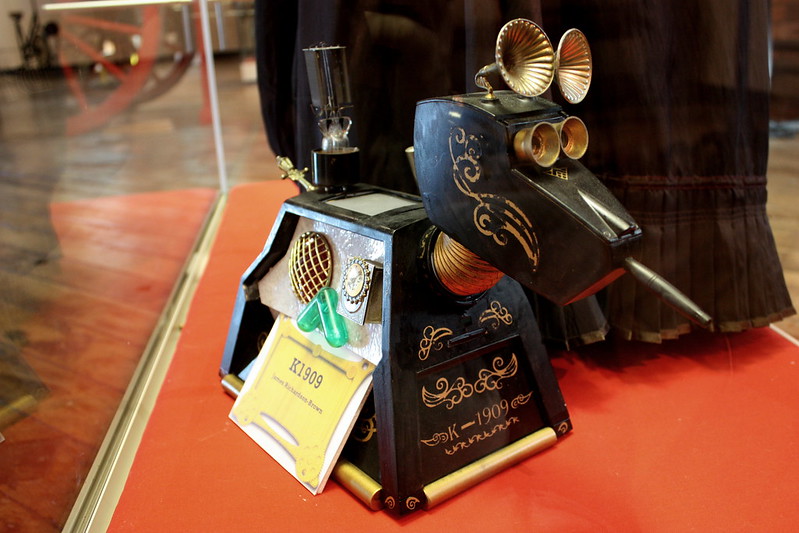
The photo for this post is of a Steampunk recreation of K-9 from Doctor Who, called K-1909, currently on show as part of a Steampunk exhibition at the Bradford Industrial Museum. You should go – it’s free to get in, and runs until early May.
When wanting to choose a photo for this post, I found that none of me 2500+ Flickr photos were tagged with ‘coffee’, hence the use of someone else’s photo under license. The reason for this is that I don’t drink coffee.
Or rather, I never used to drink coffee. But now I do. Occasionally.
Until now I’ve been that awkward person who, when asked whether I wanted tea or coffee, wanted something else like water or juice or hot chocolate or anything that wasn’t a hot caffeinated beverage. But as coffee shops have become more and more prevalent I’ve been curious to see if I really do still hate coffee.
In Starbucks, I’d been having their Frappucinos for some time – the non-coffee ones – and on a day when I was feeling particularly tired after an early start I opted for a caramel coffee one, hoping it would perk me up and wouldn’t have the bitterness that I hate about normal coffee (I also don’t like dark chocolate, or bitter ales, incidentally). Thankfully, it didn’t, and so step one of accepting coffee into my life was achieved.
The problem with blended drinks like Frappucinos are that they’re cold drinks. Great in summer, when it’s warm – or some semblance thereof, this is northern England we’re talking about here – but in the cold mid-winter the last thing you want is a thick, ice cold drink when you actually want to warm up. So, again, I decided to experiment – a caramel latte. And, it wasn’t bad.
So far I’ve had a few lattes, although not all of them a success (I won’t name the outlet that gave me a latte that frankly tasted foul, but bleurgh, I had the aftertaste in my mouth for hours afterwards). Next I may push the boat out a little further and try a cappuccino.
For those of you who are hardened coffee drinkers, it may seem bizarre that I’m only now discovering coffee in my late twenties. But sometimes, rather than assuming that just because you didn’t like something 10 years ago, you won’t like it now, it’s worth trying it again.
So yesterday was a bit cold, with a very strong wind blowing down the Calder Valley. Christine and I went up to Hebden Bridge for a bit of shopping, and to see Hugo at the Hebden Bridge Picture House.
The Picture House is one of two small independent cinemas in the area – the other being the Rex Cinema at Elland, which is geographically closer but a bit of an arse to get to by public transport. It’s a nice cinema, showing one film a day on weekday evenings and matinées at weekends, and usually the films are those that have been in mainstream cinemas some time previously, with very generous legroom. It’s also competitively priced with cheap refreshments, and serves an area otherwise not well served by cinemas – the nearest multiplexes at present are Bradford, Huddersfield or Burnley, which are some trek away.
Unfortunately the cinema isn’t in great nick – there’s quite a bit of work to be done to the building. As it’s owned by the local council, a recent council tax rise has been levied to pay for improvements. Its future is also potentially threatened by the opening of a multiplex cinema in Halifax in a few months time, which is a shame as it has a lot of character.
Hugo, incidentally, is a very good film if you haven’t already seen it.
Thankfully today’s been a little warmer and less windy.
If I could go back in time and tell 17 year old me that in 10 years time I’d still be blogging, 17 year old me would probably be rather surprised. But here I am – 27 year old me is celebrating this blog’s 10th blogiversary. A whole decade of blogging. Wow.
When I did my ‘hello world’ post back on the 14th January 2002 I would never have imagined that I’d still be going now. Despite all the changes in my life over the past 10 years – moving to new places, going to university, getting jobs, finding the love of my life – this blog remained here. Sure, it’s changed a lot, but pretty much every blog entry I’ve made is still intact here.
So, happy birthday blog. Maybe you’ll even be here in 20 years time.
As with the pasttwo years, I’m going to take a few moments of your time to review the goings on of the past twelve months.
January and February
January started with a trip to Blackpool – despite going to Blackpool regularly in 2010, this would be our only trip now that Christine and I both live in Yorkshire – to see friends and visit Blackpool Zoo again. We also had a flat-warming party with friends, despite it being almost two months after we’d moved in. Blogging wise, January was a quiet month – I only posted twice: a quick guide to restarting frozen iOS apps and my ninth blogiversary.
March brought the first of our two short breaks – four nights in Edinburgh. This included visits to Edinburgh Castle, Edinburgh Zoo (you may have noticed that we both like visiting zoos), Surgeon’s Hall Museum, Museum on the Mound, Museum of Scotland and some casual sightseeing and shopping. Back at home, we saw the musical Spamalot in Bradford, and I replaced the hard drive in Christine’s laptop after some worrying startup problems.
On the blog, I made the first major change to the content management system for this site in over 8 years, abandoning Movable Type for Melody, which was a community fork of MT. This turned out to be the first of two major changes. Content-wise I wrote about enabling hardware acceleration in Firefox, which remains one of the most popular posts on the blog, and the start of the 30 Day Song Challenge, which saw me post about a new song (almost) every day right into April.
April
April was quite a big month – we moved flats again, after encountering problems in the previous one. Thankfully we’ve had no such issues in this one and are still happy there 9 months on, which is good as moving twice in 5 months is not fun. Trust me. Especially when you have problems getting the phone line moved across, although to BT’s credit it’s working fine now and we have very good speeds, despite being in a small semi-rural town.
Naturally, as we had a new flat, we needed another flat warming party, which came in early May, shortly followed by a trip to Manchester to see Uncaged Monkeys at the O2 Apollo. May was also my birthday, which was celebrated with a trip to the Victoria Theatre in Halifax to see Ed Byrne (who was painfully funny). And the second of our two short breaks saw us in London for four nights, staying in a Premier Inn in Collier’s Wood to keep costs down. This time, our itinerary included being in the audience for a recording of Jo Brand’s Big Splash at the Hackney Empire (free tickets), Covent Garden, the Grant Museum of Zoology at UCL, watching Wicked at the Apollo Victoria Theatre, shopping on Carnaby Street, Camden Lock Market, the Natural History Museum, V&A Museum and a trip out to Greenwich.
On the blog it was another month. March’s move to Melody had left me underwhelmed so I made a much bigger change and switched to WordPress. 7 months on and Melody has only had one minor update, whereas WordPress has had two point releases with new features, and overall I’m much happier with WordPress.
Despite having walked past a gym on the way to work every day since November, it wasn’t until July that Christine and I finally joined a gym. 5 months on and we’ve been generally going once or twice a week, although I’ve only been once this month (December) due to being either busy or unwell. It has improved my overall body tone, stamina and reduced my asthma symptoms, but hasn’t really shifted much of the excess fat around my waist. This Christmas’ excesses and lack of exercise will have only exacerbated that, so a new year’s resolution will be more time in the gym.
Also in July I started playing World of Warcraft again – well, I’ve been paying my subscription continually for five years but had lost interest – which included moving a couple of my characters to a new server. Whilst this has meant I’ve been able to play with more of my friends, unfortunately it happens to be one of the most popular EU servers with queues of up to 20 minutes to join at peak times. I also upgraded my Mac to Lion, WordPress 3.2 came out and I joined Google+. Offline, I went to the Yorkshire Show for the first time in a few years, and Christine and I went to Hebden Bridge to see Robin Ince do his Bad Book Club show, who we’d also seen in May at Uncaged Monkeys. I’d see him again in December too. Not that I’m obsessed or anything.
August
August, by comparison to the months that preceded it, was uneventful bar me being very busy at work, as usual for that time of year. We spent an afternoon at the Halifax Show, which was somewhat smaller than the Yorkshire Show but still good fun, and I went on a walk over the hills from Hebden Bridge to Marsden. In regular shoes, I might add – which led to some impressive blisters on my feet. This wasn’t deliberate – in the rush to leave I forgot to wear my hiking boots. I also started Geocaching, which I’m still finding fun although I’ve now found all of the caches in easy reach of Halifax, Sowerby Bridge and Bradford so future finds will have to be further afield.
September
As with last year, Christine and I started September by going to Bingley Music Live. This was the only major thing we did that month, as once again I was rather busy at work, although I managed a few further geocache finds. On the blog, I changed the theme to the one you see now. I’ll probably stick with it for now but may adjust the colour scheme sometime. On the job front, my contract at work was made permanent – and thus became the first permanent job I’ve ever had. After several years of uncertainty (see 2009), this is very welcome.
October
And then came October. By far the biggest news of the month, and indeed the year, was that Christine and I got engaged. We’ve been together as a couple for two years, and it was just the right time to do it. The wedding is likely to be in 2013, and although we have talked about it we haven’t yet sorted a venue or a date. Those are jobs for next year.
October also brought a trip to Saltaire and Salt’s Mill, and quite a bit of drinking in Huddersfield, on a pub crawl and subsequently an Oktoberfest beer festival. I also upgraded my iPhone, now over a year old, to iOS 5.
November
In November, I went to a live gig and three comedy shows. The gig was for the band Within Temptation – arguably my favourite band right now, and their show in Manchester was absolutely amazing. It was their first UK tour for several years and this was one of only four nights in the UK, so as you can imagine it sold out weeks in advance – we bought our tickets around 6 months in advance. Thankfully there’s a chance they’ll be back this way next year; if you like their music, please go and see them as they put on an excellent show. As for comedy, I saw comedians Sarah Millican, Chris Ramsey and Milton Jones, all of which were very good. Chris Ramsey has done many gigs at the university over the past three years and is finally getting his deserved share of the limelight – I’d recommend seeing him if you get the chance.
I also attempted Movember, although cheated a little by growing a goatee beard, rather than just a moustache. It lasted until the evening of November 30th, and I’m glad to see the back of it. Christine started blogging again, this time about her recipes.
Christmas, as usual, was spent in York. Christine went back to Sowerby Bridge today, as she’s working; I’m here for another couple of days.
So that’s 2011. It’s been a good year on the whole – we visited some nice places, saw some brilliant shows and took our relationship to the next level. Later on, I’ll write about what 2012 will have in store.
If you’re like me, you’ll have a free Dropbox account for keeping files in sync between multiple computers, as well as having documents available on demand wherever there’s an internet connection, or on your mobile phone. Here’s my referral link. It’s a good, simple service that works well, and it’s free – although you can pay for more storage.
Microsoft has been working on a competitor called Windows Live SkyDrive which also offers integration with its Office Live suite of web apps. There’s now also an iPhone app (and presumably a Windows Phone app as well). Plus, with up to 25 GB of free storage, it starts to compare quite favourably with Dropbox. So, which is best?
Storage space
On the face of it, SkyDrive wins – 25 GB versus 2 GB for a plain vanilla free Dropbox account. However, it’s quite easy to get more space on Dropbox – you should be able to manage at least another 1 GB for free, and with a bit of effort even more – some have even taken to buying AdWords campaigns for around $20 to get up to 16 GB. And whereas Dropbox lets you use all of your space for anything, with SkyDrive, you can only use up to 5 GB to synchronise between computers using its Live Mesh service (more on that later). The other 20 GB has to be used via web uploads, iPhone app, Microsoft Office or Office Live. On this basis, it’s a draw.
Platform support
Dropbox has official clients for Windows, Mac OS X and Linux, plus mobile clients for the iPhone, Android and BlackBerry. Its open API means that unofficial clients are available for further platforms as well. SkyDrive is available on Windows Vista, Windows 7 and Mac OS X Lion – i.e. not available for Windows XP or Linux; alternatively you can access specific documents in Microsoft Office, on the web or on a mobile app. And as yet, SkyDrive doesn’t work on Android or any Linux desktops, nor is there an open API for third-party developers to use.
Simplicity
Dropbox’s main draw is simplicity – there’s one folder that gets synced on all of your computers, and you can also access this folder online or on a mobile app. As mentioned, with SkyDrive you can only sync up to 5 GB; furthermore, those synced folders then cannot be edited by Office Live apps, so it’s a bit more complex. Plus there’s the whole confusion between the SkyDrive and Mesh products.
I could go on, but frankly having reviewed both services Dropbox wins purely by being simple and ubiquitous. SkyDrive does give you more space for free, and also integrates well with Hotmail if you use it, but it also adds a layer of complexity by only letting you use a portion of your allowance for syncing files between desktops. And because the un-synced portion doesn’t mount as a folder on your desktop, you can’t save files to it directly, so really it’s only useful for more long-term storage, or files that aren’t edited frequently. I’ll therefore be sticking with Dropbox.
Posts here have been a little light of late because both Christine and I have been ill with some kind of bug that isn’t quite ‘flu but stronger than a cold. We both spent most of Tuesday asleep, and although I’ve managed to drag myself to work over the past couple of days I’m still not completely better yet.
In other news:
Travelodge saw my post last week and we had a productive chat about my experiences. I have edited the post accordingly, and will therefore withdraw my comments about avoiding them.
I updated this site to WordPress 3.3, which went almost flawlessly apart from it not deleting the .maintenance file from the root folder (the existence of this file basically shuts your site down). It’s easily solved though, and I’m liking the update – the new fly-out menus are very welcome and help to declutter the interface. There’s also drag and drop uploading of images, which sounds cool although I’ve yet to try it myself.
Now I just need to upgrade the other two blogs on here to 3.3. I’ve considered enabling multi-user mode and just having one install but I’m worried that it’ll be a little too restrictive for my needs.
I’ve been experimenting with DNSCrypt, a new tool from OpenDNS which allows you to encrypt your DNS requests in the same way that web pages are encrypted over SSL. It’s a ‘technology preview’ at the moment, with only a Mac client available which is at version 0.7. Unfortunately, when I tried it, it slowed down DNS requests significantly which made pages load more slowly – especially those such as Facebook where images are hosted on cloud servers on different subdomains. The client is also a bit of a pain to uninstall. It’s promising but I’d wait for version 1.0 if I were you.
Christine and I have booked tickets to see the mighty Alestorm next year. After seeing Within Temptation last month (who are amazing live – if you like that kind of music, get tickets if you can), and Alestorm next year, I’ll have seen 3 of my 4 favourite bands live. Just need to see Nightwish now, although they haven’t announced any UK dates for their next tour unfortunately.
On Monday, Gowalla announced that the two co-founders of Gowalla and several of its staff were moving to Facebook shortly and that the service would be closing sometime in January. Having formally launched at SxSW 2009, the site will therefore be gone before its third birthday.
This hasn’t come as much of a surprise for those following Gowalla over recent months. Foursquare has been the big elephant in the room, attracting more attention and having a much larger user base. For a while, Gowalla had a niche – the design of the web site and app was much better, and there were features like Trips (where you could create a list of venues, or ‘spots’ to visit) and virtual items that you could collect. But earlier this year version 4.0 of the app was announced, which removed several features, including items, and tried to focus on travel guides.
This was not well-received. For a while I’d been trying to use both Foursquare and Gowalla, as they both offered something different, but the 4.0 update put me off. Gowalla wanted to focus more on ‘stories’ – not just individual checkins taken in isolation, but say catching a plane, staying in a hotel, visiting attractions and then coming home as one story – or at least this appeared to be the intention. Sadly this wasn’t the reality – ‘stories’ were just individual checkins.
So what now? Gowalla is presently still around and you can still download the app from the iOS App Store, but presumably new user signups will end soon. An export feature has been promised to allow you to retrieve your data but it isn’t live at the time of writing. Even though several of the developers are going to Facebook (the others have been sacked, apparently), it’s a ‘talent acquisition’ which means that Facebook is essentially buying out the staff and not the product, so any data you have on Gowalla will not be transferred to Facebook. This isn’t the first time Facebook has done this – box.io was one of the most recent services to be ‘aqhired’ by Facebook where the developers moved to FB and the service shut down. Still, if you think Facebook is an evil privacy-stealing flying purple people eater, then once you’ve exported your data you can delete your account.
While it’s sad to see Gowalla go, this is potentially good for Facebook, and its new profiles that are aiming to document your life as a story (as far as I can tell). Gowalla’s talent could well be very important in making this a good feature.
As for Foursquare? On the one hand, with Gowalla out of the picture, it has less competition, and could gain favour with ex-Gowalla users if it allows them to import their data and gain badges retrospectively. However, this new deal with Facebook could see Facebook Places resurgent, and while Foursquare has over 10 million users, Facebook has hundreds of millions. Quite what Facebook plans with respect to its location based features remains to be seen but this acquisition shows that it’s more serious about it than some of us thought.